24 ACS 160 User’s Manual
Note! Check that starting the motor does not cause any danger. If there is a risk of damage
to the driven equipment in case of incorrect rotation direction of the motor, it is
recommended to disengage the driven equipment when first start is performed.
Setting parameters:
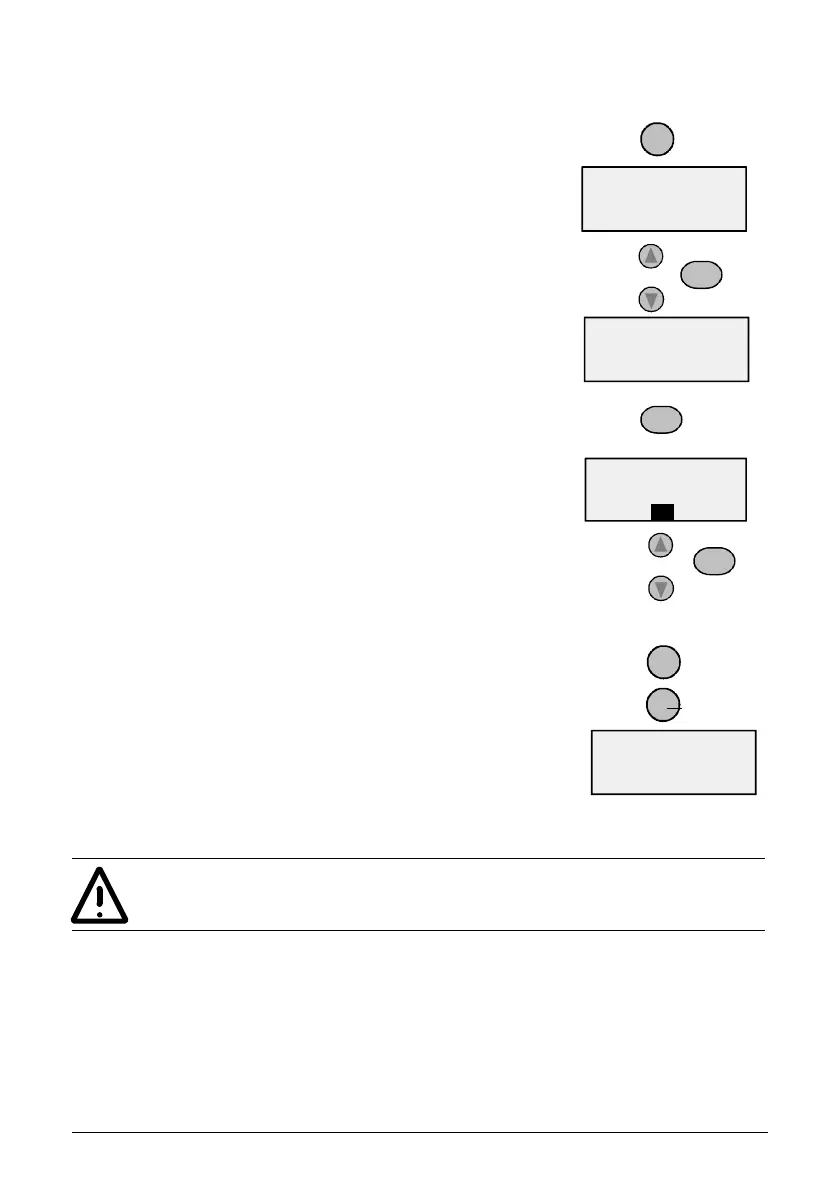
1. Press MENU to enter the Parameter Group Menu. Menu flag
becomes visible.
2 Press UP/DOWN arrows to move between groups, select the start-
up group (99).
3. Press ENTER to view individual parameters.
4. Press UP/DOWN arrows to move between parameters, select the
parameter to be changed (for example 9905).
5. Press and hold ENTER until SET is displayed.
6. Use UP/DOWN arrows to alter the value.
7. Store the modified value by pressing ENTER.
8. Press MENU twice to return to OUTPUT display.
Repeat the above steps for the other parameters.
After entering the required motor data, it would be a good idea to
check the other basic parameter settings. To see basic parameters
refer to section ACS 160 Complete Parameter List (basic
parameters are shaded grey in the table).
ENTER
ENTER
MENU
ENTER
LOC
9905
PAR
FWD
LOC
0.0
FWD
Hz
OUTPUT
LOC
- 99 -
MENU
FWD
LOC
400
SET
V
FWD
MENU
MENU



 To Next Page