30 ACS 160 User’s Manual
Menu Structure
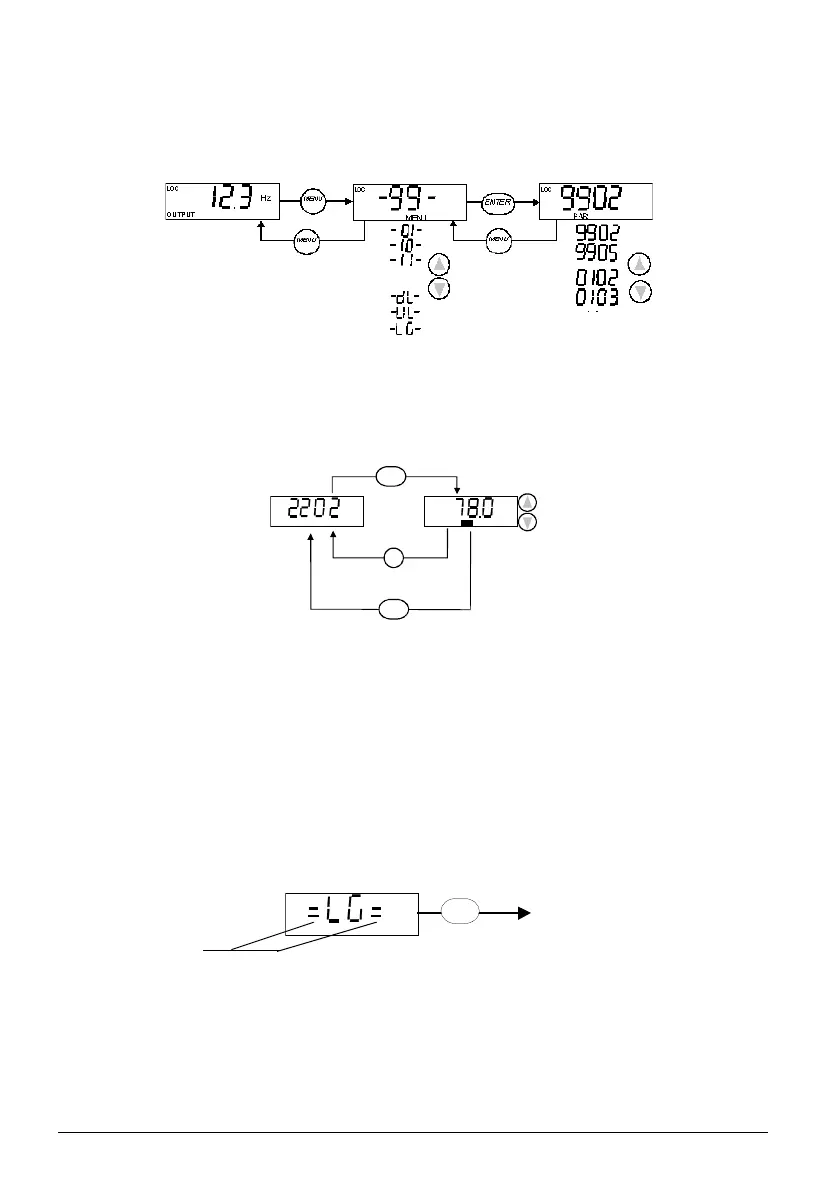
ACS 160 has a large number of parameters. Of these, only the so-called basic parameters are
initially visible. The menu function -LG- is used to make the full parameter set visible.
Setting Parameter Value
Press ENTER to view the parameter value.
To set a new value, press and hold ENTER until SET is displayed.
Note! SET blinks, if the parameter value is altered. SET is not displayed, if the value cannot be
altered.
Note! To view the parameter default value, press the UP/DOWN buttons simultaneously.
Menu Functions
Scroll the Parameter groups for the desired menu function. Press and hold ENTER until the display
blinks to start the function.
Select between basic and full menu
OUTPUT display Parameter groups Parameters
...
PAR
SET
s
MEN U
ENTE R
ENTER
MENU
ENTER
Visible if Full menu
is active
Press and hold



 To Next Page