Commissioning
© 2006 ABB STOTZ-KONTAKT GmbH 222
ABB i-bus
®
EIB / KNX
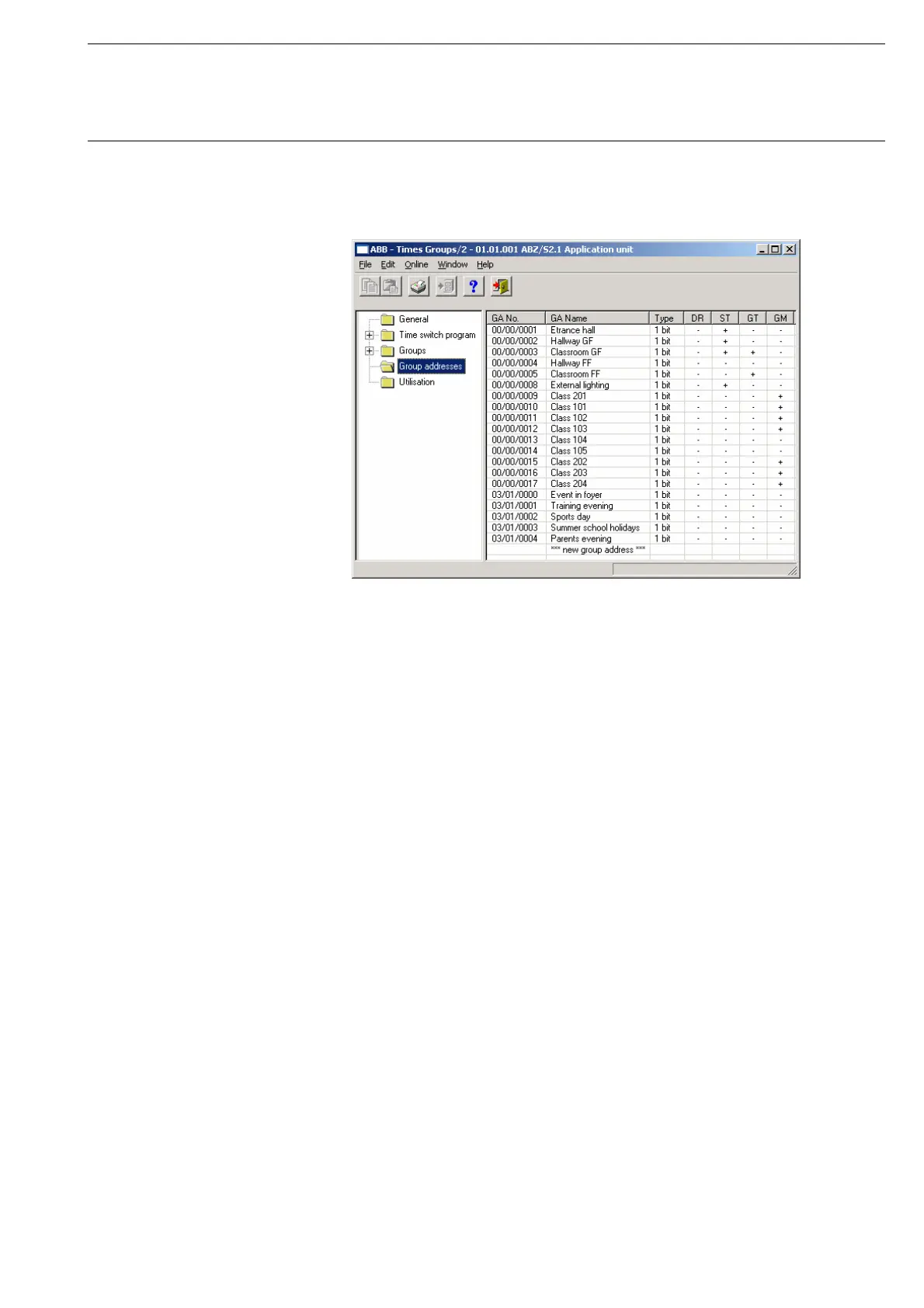
3.4.12.2 Edit group address
Fig. 216: Dialog window: “Edit group addresses”
To edit a group address, select Group addresses in the selection area.
The associated table is activated in the right-hand window.
The table is divided into GA No., GA Name, Type, DR, ST, GT and GM.
The meaning of the individual columns is as follows:
GA No.
The number of the group address is the unique identifier of a group address.
GA Name
The name of the group address is displayed here.
Type
The type indicates which type of values a telegram with this group address
can send.
DR
A + in the Day routine column (DR) indicates whether a telegram with this
group address can activate or deactivate a day routine.
ST
A + in the Switching time column (ST) indicates whether a telegram with this
group address is assigned to a day routine and is thus sent on the bus at a
specific time.










 To Next Page