ENGINEERING ETHE RNE T
1VLG5 00007 E 73
3.5.9 Protection relays
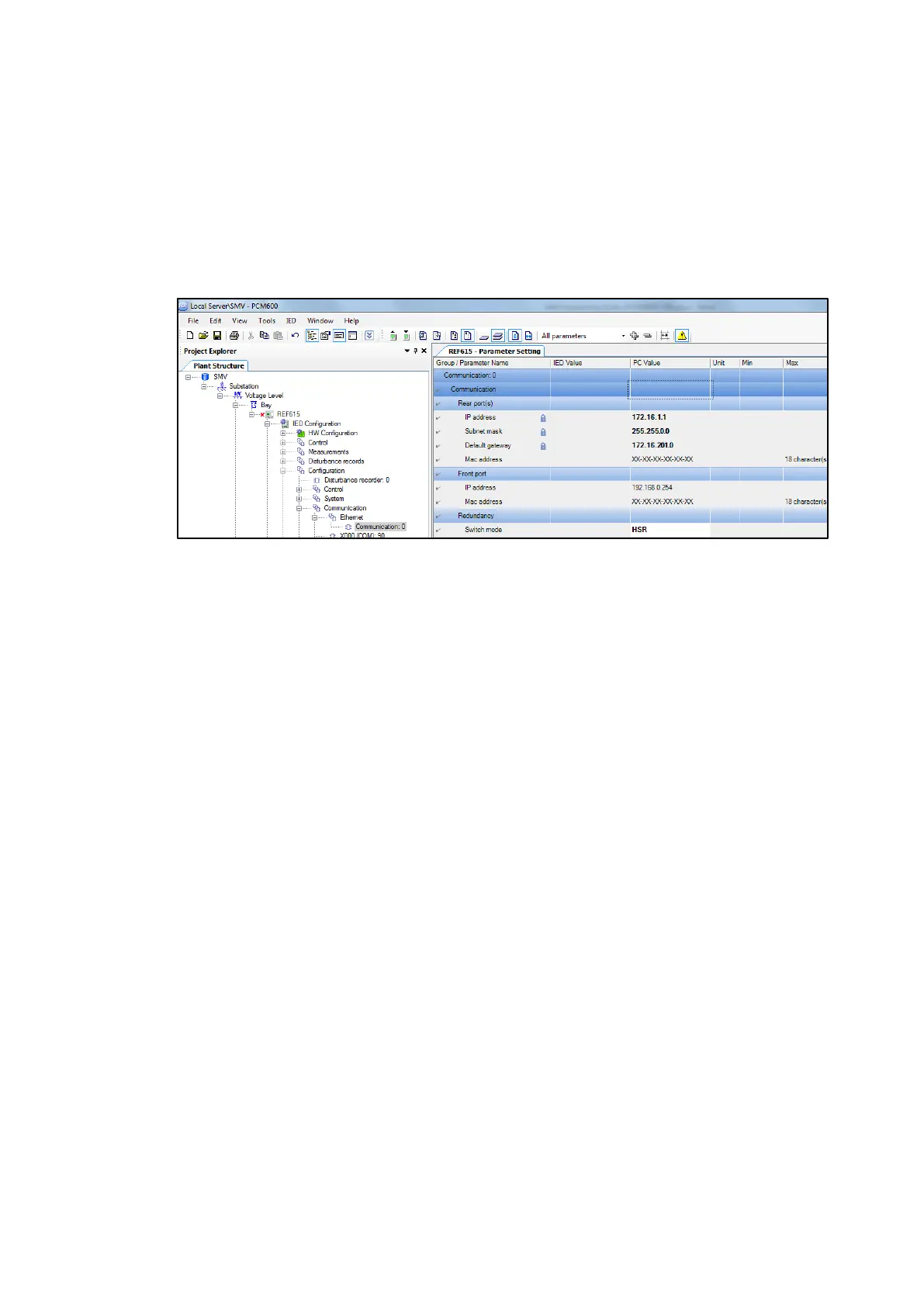
Ethernet rear ports and redundancy settings
IED configuration / Configuration / Communication / Ethernet / Communication: 0
– IP address = IP number
– Subnet mask = Subnet mask
– Switch mode = HSR / PRP / Normal
Figure 95: Communication parameter setting dialog
Ethernet rear ports supervision
RCHLCCH or / and SCHLCCH are used for supervision. RCHLCCH block supervises redundant
channels and SCHLCCH block supervises status of Ethernet ports.
RCHLCCH outputs signals
– CHLIV Status of redundant Ethernet channel LAN A. When redundant mode is set to
HSR or PRP mode, value is True if the protection relay is receiving redundancy
supervision frames. Otherwise value is False.
– REDCHLIV Status of redundant Ethernet channel LAN B. When redundant mode is set to
HSR or PRP mode, value is True if the protection relay is receiving redun-
dancy supervision frames. Otherwise value is False.
– LNKLIV Link status of redundant port LAN A
– REDLNKLIV Link status of redundant port LAN B



 To Next Page