37
Operation
C
C
Insert the E-Plate 96
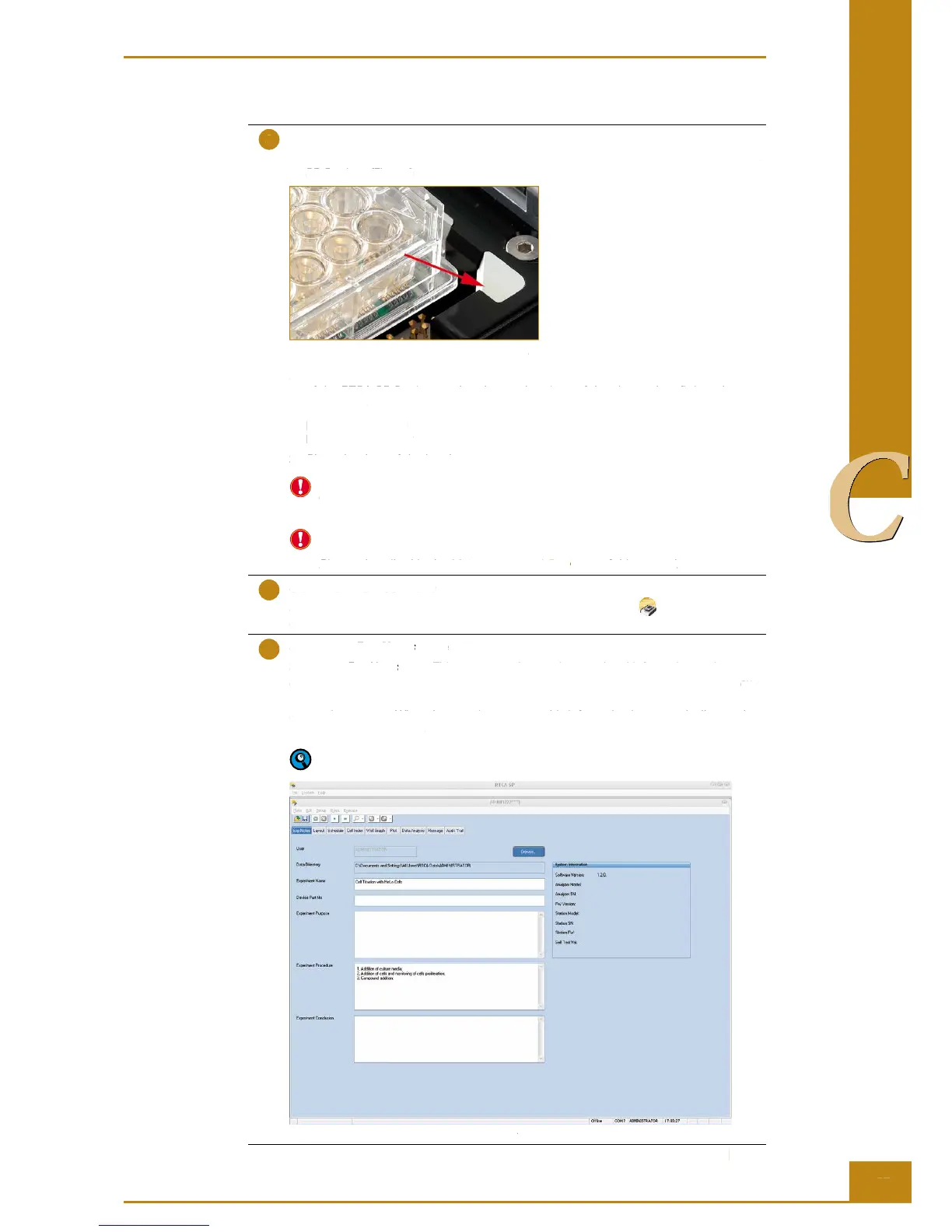
1. Insert the E-Plate 96 front end (with corner cut) into the cradle pocket of the RTCA
SP Station. (Fig. 22)
Figure 22: Correct orientation of the E-Plate 96.
2. Make sure that the plate is fl at in position without any tilting. Lift the lock handle
of the RTCA SP Station, so that the two bearings of the clamp plate fi t into the
grooves of
the lock handle, then push lock handle downward to the horizontal
position. The clamp
plate will lock the E-Plate 96 in the horizontal position. The green
light turns on when
the device is correctly positioned.
3. Close the door of the incubator.
Make sure that all the 120 connector pads of the E-Plate 96 are clean and free of any
dust or dirt particles. If not, wipe the connector pads with lab wipes or a cloth slightly
soaked with 80% alcohol and/or dust off the connector pins with compressed air.
Make sure that all the 120 RTCA Contact Pins are clean and straight without any
bending. If any damage to the Contact Pins is found, please change the Contact
Pins as described in the Maintenance and Care part of this manual.
Start the RTCA Software
Start the RTCA Software by double clicking the RTCA Software icon on the
desktop. If the program is already open, close it, and then reopen it.
Set up the Exp Notes page
Set up the Exp Notes page. This page records experiment-related information such as user,
experiment date, experiment name, experimental purpose, experimental procedure,
ex-
perimental conclusion, and the devices used in the experiment. Enter the information in the
appropriate spaces. When the experiment starts, this information is automatically saved.
You can also click Browse… to select a File Directory in which to save the experiment fi les.
Please refer to the RTCA Software Manual for more information about setting up
the Exp Notes page.
Figure 23: Example of a completed Exp Notes page.
Preparing and Starting a Run on the RTCA SP Instrument
Running a Quick Experiment
1. Insert the E-Plate 96 front end (with corner cut) into the cradle pocket of the RTCA
Figure 22: Correct orientation of the E-Plate 96.
2. Make sure that the plate is fl at in position without any tilting. Lift the lock handle
of the RTCA SP Station, so that the two bearings of the clamp plate fi t into the
the lock handle, then push lock handle downward to the horizontal
plate will lock the E-Plate 96 in the horizontal position. The green
the device is correctly positioned.
3. Close the door of the incubator.
Make sure that all the 120 connector pads of the E-Plate 96 are clean and free of any
dust or dirt particles. If not, wipe the connector pads with lab wipes or a cloth slightly
soaked with 80% alcohol and/or dust off the connector pins with compressed air.
Make sure that all the 120 RTCA Contact Pins are clean and straight without any
bending. If any damage to the Contact Pins is found, please change the Contact
Maintenance and Care part of this manual.Maintenance and Care
Start the RTCA Software by double clicking the RTCA Software
desktop. If the program is already open, close it, and then reopen it.
page. This page records experiment-related information such as user,
Exp Notes page. This page records experiment-related information such as user, Exp Notes
experiment date, experiment name, experimental purpose, experimental procedure,
perimental conclusion, and the devices used in the experiment. Enter the information in the
appropriate spaces. When the experiment starts, this information is automatically saved.
… to select a File Directory in which to save the experiment fi les.
Please refer to the RTCA Software Manual for more information about setting up
Figure 23: Example of a completed
Preparing and Starting a Run on the RTCA SP Instrument
Running a Quick Experiment



 To Next Page