52
RTCA SP Instrument Operator’s Manual
E
E
E Appendix
1. Troubleshooting
1.1 I started an experiment and there was an error message,
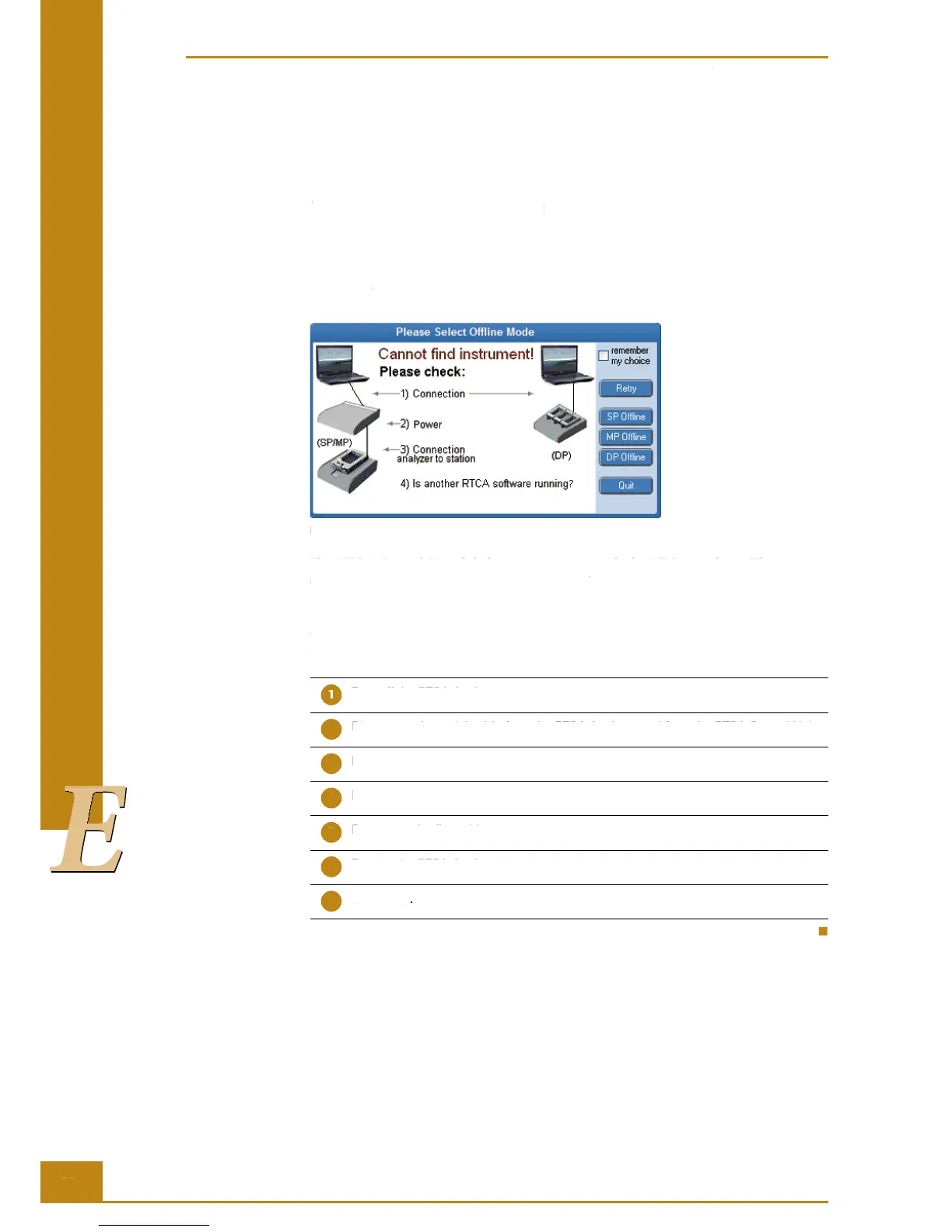
“Cannot fi nd instrument”, what happened?
Figure 37: “Cannot fi nd instrument” error message.
e RTCA Control Unit failed to communicate with the RTCA Analyzer. is message
occurs right a er one clicks the RTCA So ware icon.
Please check RTCA Analyzer power and if the RS232 serial cable, linking the RTCA
Control Unit to the RTCA Analyzer (COM port), and the cable connection between
RTCA Analyzer and RTCA SP Station, are securely connected. Try the following steps:
Turn off the RTCA Analyzer.
Disconnect the serial cable from the RTCA Analyzer and from the RTCA Control Unit.
Reconnect the cable.
Disconnect the fl at cable from the RTCA Analyzer and from the RTCA SP Station.
Reconnect the fl at cable.
Turn on the RTCA Analyzer.
Click Retry.
Troubleshooting
I started an experiment and there was an error message, “Cannot fi nd instrument”, what happened?
RTCA SP Instrument Operator’s Manual
1.1 I started an experiment and there was an error message,
“Cannot fi nd instrument”, what happened?
Figure 37: “Cannot fi nd instrument” error message.
e RTCA Control Unit failed to communicate with the RTCA Analyzer. is message
occurs right a er one clicks the
Please check RTCA Analyzer power and if the RS232 serial cable, linking the RTCA
Control Unit to the RTCA Analyzer (COM port), and the cable connection between
RTCA Analyzer and RTCA SP Station, are securely connected. Try the following steps:
Turn off the RTCA Analyzer.
Disconnect the serial cable from the RTCA Analyzer and from the RTCA Control Unit.
Disconnect the fl at cable from the RTCA Analyzer and from the RTCA SP Station.
Disconnect the fl at cable from the RTCA Analyzer and from the RTCA SP Station.
Reconnect the fl at cable.
Turn on the RTCA Analyzer.
I started an experiment and there was an error message, “Cannot fi nd instrument”, what happened?



 To Next Page