47
Maintenance and Care
D
D
Repeat the above procedure to clean the other row of Contact Pins.
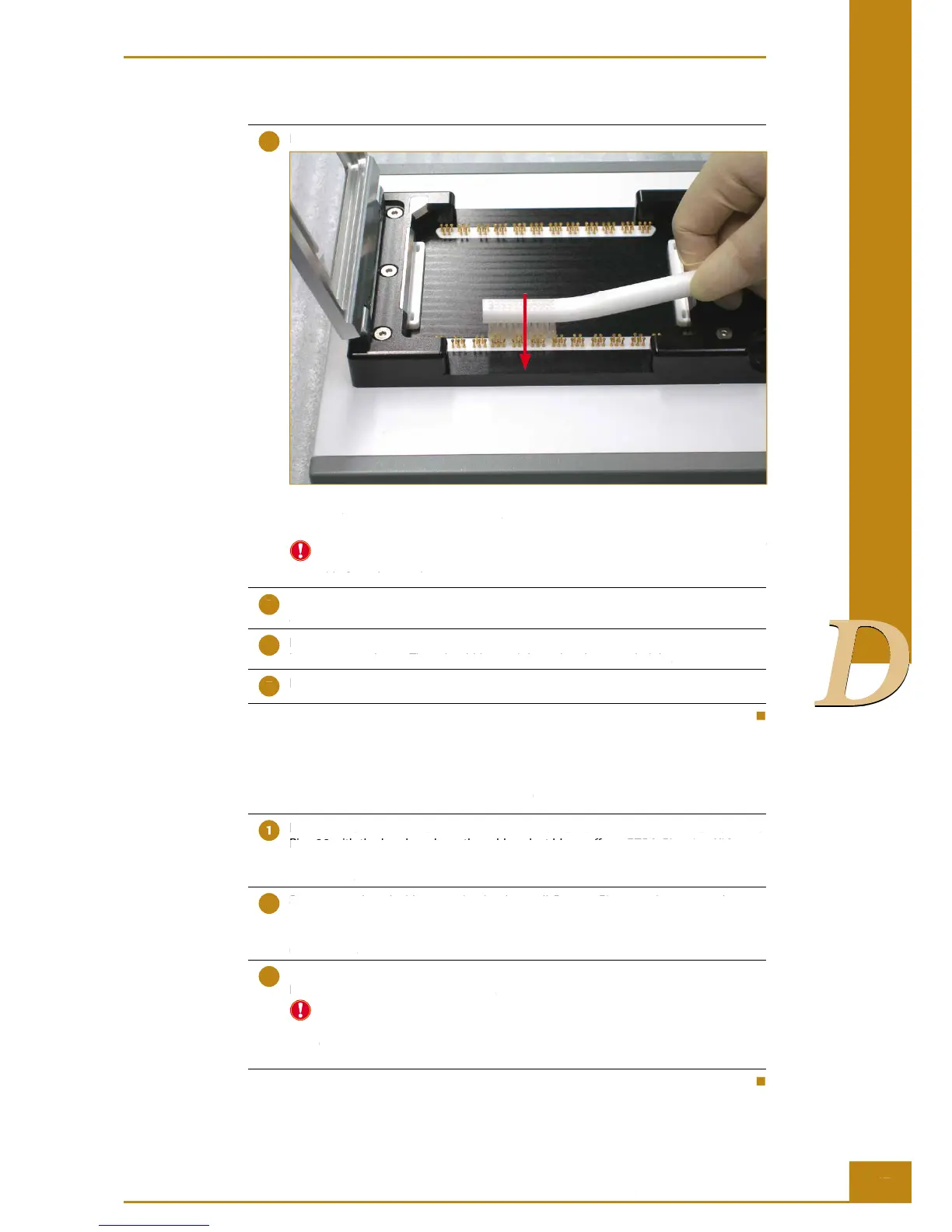
Figure 28: Using the Nylon Brush to clean the RTCA Contact Pins 96 in only one direction at a
time (up to down in the Figure).
Before using the nylon brush to clean the Contact Pins, please make sure the brush
is clean. If you are not sure, please use the blower to blow the brush from each
side for at least 5 times.
Use the air blower to blow the surface around the RTCA Contact Pins 96 to remove
any dust.
Before reinserting the RTCA Protector Shield 96, be sure that all RTCA Contact Pins
have not come loose. They should be straight and at the same height.
Insert the RTCA Protector Shield 96.
Decontamination of RTCA Contact Pins 96
Remove RTCA Protector Shield 96 from the RTCA SP Station. Clean the RTCA Contact
Pins 96 with the brush and use the rubber dust blower (from RTCA Cleaning Kit) to
remove any dust particles from the Contact Pins, following the protocol described in
this section.
Spray 80% ethanol with a spraying bottle on all Contact Pins, two times on each
location. Make sure that all the Contact Pins are covered with ethanol. The total
volume of ethanol for spraying the two columns of Contact Pins should not
exceed 3 ml.
Wait at least 30 minutes at room temperature for the ethanol to evaporate and let the
RTCA Contact Pins 96 dry completely.
Since the brush is used for cleaning the dust particles from the Contact Pins,
the brush should also be decontaminated with ethanol. Fill a container with 80%
ethanol. Then soak the brush in the container for 5 minutes. Take the brush out,
shake the excess ethanol from the bristles and wait for the brush to dry.
Cleaning and Exchanging the RTCA Contact Pins 96
Repeat the above procedure to clean the other row of Contact Pins.
Before using the nylon brush to clean the Contact Pins, please make sure the brush
is clean. If you are not sure, please use the blower to blow the brush from each
side for at least 5 times.
Use the air blower to blow the surface around the RTCA Contact Pins 96 to remove
Before reinserting the RTCA Protector Shield 96, be sure that all RTCA Contact Pins
have not come loose. They should be straight and at the same height.
Insert the RTCA Protector Shield 96.
Remove RTCA Protector Shield 96 from the RTCA SP Station. Clean the RTCA Contact
Pins 96 with the brush and use the rubber dust blower (from RTCA Cleaning Kit) to
remove any dust particles from the Contact Pins, following the protocol described in
Spray 80% ethanol with a spraying bottle on all Contact Pins, two times on each
location. Make sure that all the Contact Pins are covered with ethanol. The total
volume of ethanol for spraying the two columns of Contact Pins should not
Wait at least 30 minutes at room temperature for the ethanol to evaporate and let the
RTCA Contact Pins 96 dry completely.
Since the brush is used for cleaning the dust particles from the Contact Pins,
the brush should also be decontaminated with ethanol. Fill a container with 80%
ethanol. Then soak the brush in the container for 5 minutes. Take the brush out,
shake the excess ethanol from the bristles and wait for the brush to dry.
Cleaning and Exchanging the RTCA Contact Pins 96
Decontamination of RTCA Contact Pins 96
Remove RTCA Protector Shield 96 from the RTCA SP Station. Clean the RTCA Contact
Pins 96 with the brush and use the rubber dust blower (from RTCA Cleaning Kit) to
Figure 28: Using the Nylon Brush to clean the RTCA Contact Pins 96 in only one direction at a
time (up to down in the Figure).



 To Next Page