Viper 4040 User Manual
Revision 3, Oct 2012 5 Main Rotor Track & Balance – 5-29
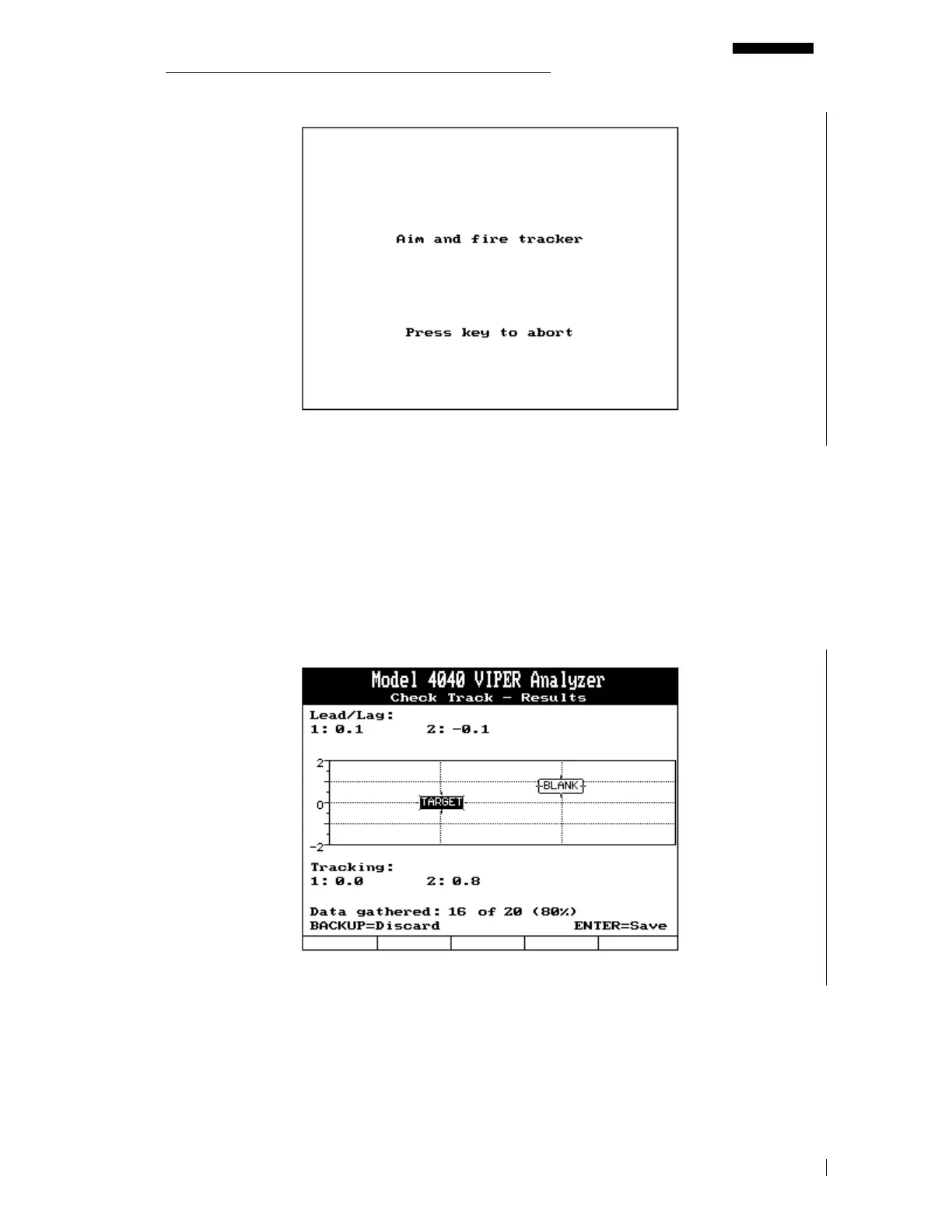
If you select [F5] to measure track, a screen will appear prompting you to “Aim and Fire
Tracker”. At this point, the tracker is energized and ready to use. Verify the presence of a
solid amber light at the bottom of the LED aiming lights. If present, raise the tracker into the
rotor disk and align until the green LED’s illuminate. Press and release the trigger once while
holding the tracker with the green LED’s illuminated. The amber LED should now pulsate.
When the amber LED is completely extinguished the tracker has measured the desired
number of revolutions as entered at the start of the job.
5.3.9.2. – Check Track – Results
A screen will appear presenting the track data just acquired. This data will be shown in both
graphical and numerical format. The sample data above was taken relative to blade one, the
“TARGET” blade. You can see that the TARGET blade is shown lagging 0.04 inches and the
BLANK blade is shown leading 0.04 inches. You will notice that the track of the TARGET
blade zero and the BLANK blade is shown to be 0.75 inches high. The lower portion of the
screen shows the number of valid data packets the tracker sent to the analyzer.


 To Next Page