EasyManua.ls Logo

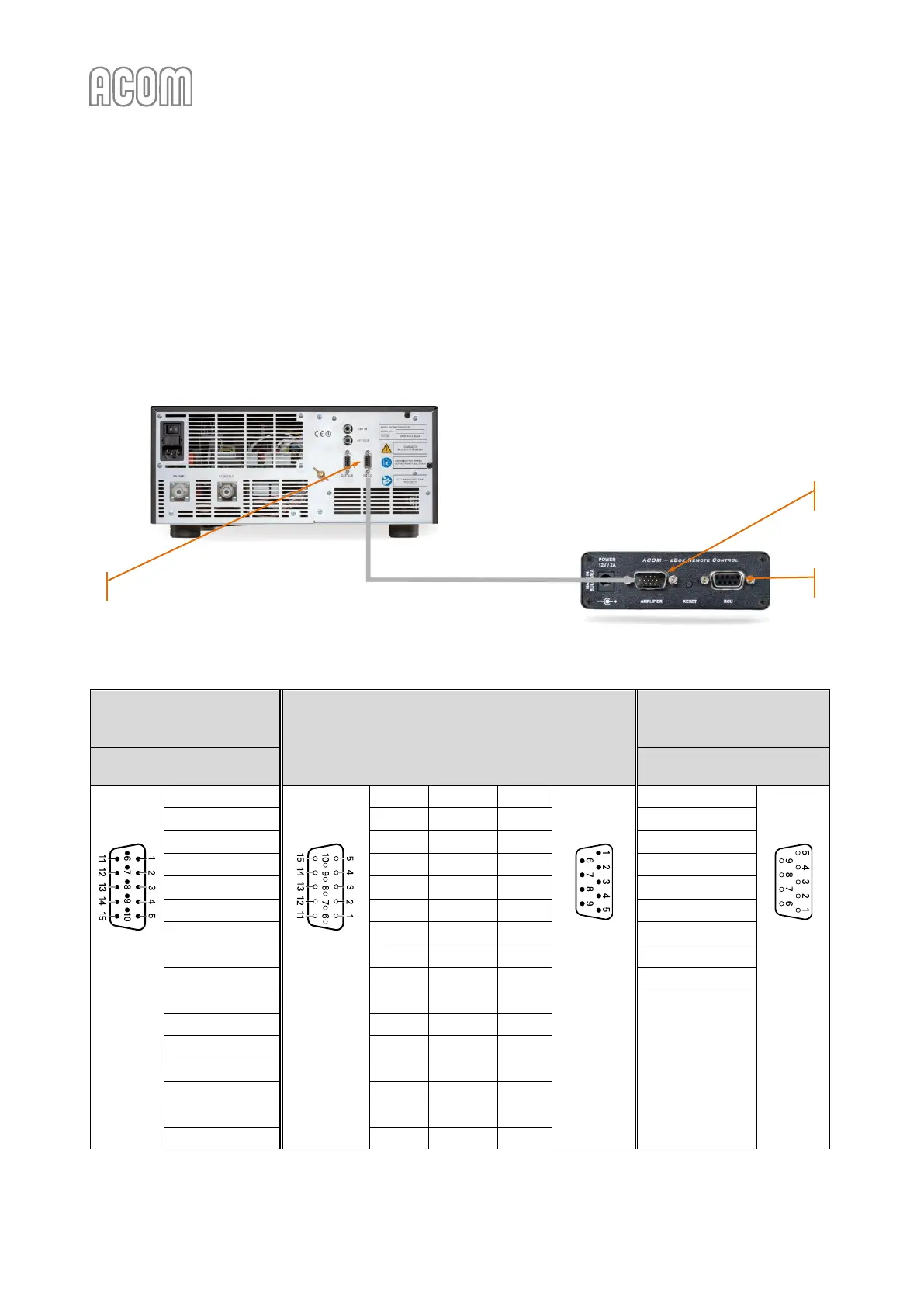
Acom eBox - Figure 2-6 Ebox to ACOM 600 S, 700 S, or 1200 S Connection; Table 2-1 Ebox to ACOM 600 S, 700 S, and 1200 S Connection Cable Wiring

Acom eBox
60 pages
Print Icon
To Next Page IconTo Next Page
To Previous Page IconTo Previous Page
Loading...
User's Manual | ACOM eBox | Ethernet Remote Control Device
Page
16
of
60
| S e c t i o n INSTALLATION
October 2021
If you have an ACOM 600S, 700S, or 1200S amplifier, please, see Figure 2-6 eBox to ACOM 600S, 700S, or
1200S connection and Table 2-1 eBox to ACOM 600S, 700S, and 1200S connection cable wiring for correct
connection cable wiring.
It is necessary to use the original connection cable (delivered with an eBox) and connect the AMPLIFIER
connector (on eBox rear panel, see Pos. (1) below) to the amplifier RS-232 connector (on amplifier rear
panel, see Pos. (2) below).
In this case, the RCU connector (on eBox rear panel, see Pos. (3) below) remains unused.
Figure 2-6 eBox to ACOM 600S, 700S, or 1200S connection
Table 2-1 eBox to ACOM 600S, 700S, and 1200S connection cable wiring

eBox
Rear panel
Connecting cable
ACOM
600S, 700S, and 1200S
Rear panel
AMPLIFIER
connector
RS-232
connector
D-sub
connector,
15-pin,
3-row,
male
1 | GND
D-sub
connector,
15-pin,
3-row,
female
1
Not connected
-
D-sub
connector,
9-pin,
male
1 | Not connected
D-sub
connector,
9-pin,
female
2 | Pin2_A
2
Not connected
-
2 | TxD
3 | Pin3_A
3
Not connected
-
3 | RxD
4 | +10AMP
4
Not connected
-
4 | Not connected
5 | CPU_ON_A#
5
Blue
6
5 | GND
6 | RX_485_TX_P
6
Not connected
-
6 | DSR
7 | CPU_RST_A#
7
Not connected
-
7 | Not connected
8 | RCU_CPU_A
8
Not connected
-
8 | CTS
9 | CPU_RCU_A
9
Not connected
-
9 | Not connected
10 | GND
10
Black
5
Housing
11 | RS_485_TX_N
11
Not connected
-
12 | RS_485_RX_P
12
Not connected
-
13 | RS_485_RX_N
13
Not connected
-
14 | RS_232_TX
14
Red
3
15 | RS_232_RX
15
Yellow
2
Housing
Housing
Ext. shield
Housing
Table 2-1 eBox to ACOM 600S, 700S, and 1200S connection cable wiring

1
2
3

Table of Contents

Related product manuals