Home
Acom
Amplifier
eBox
Page 37 (5.2.2. ACOM 600 S, 700 S, and 1200 S Amplifier Settings)
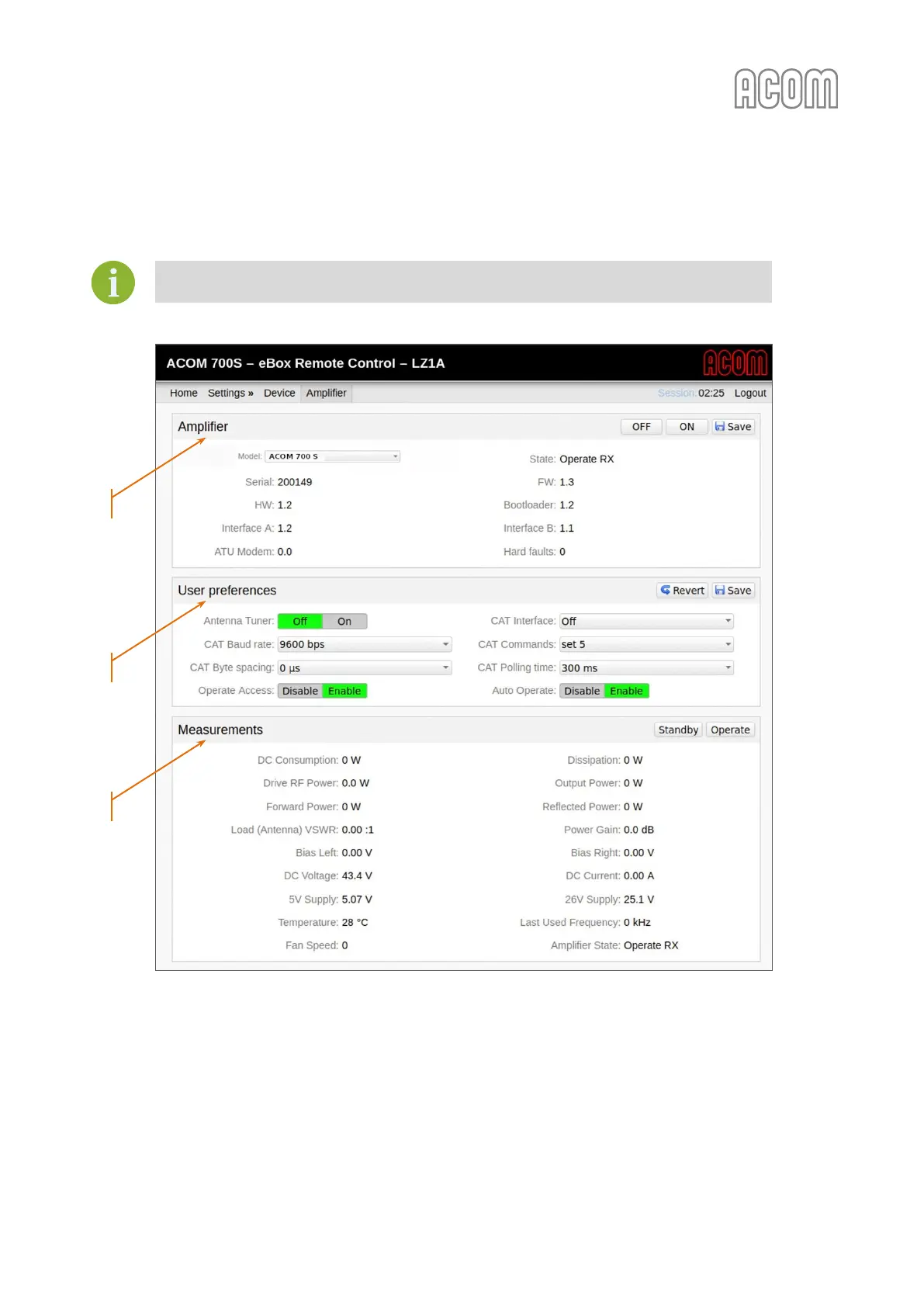
Acom eBox - 5.2.2. ACOM 600 S, 700 S, and 1200 S Amplifier Settings; Figure 5-6 Ebox with ACOM 700 S Connected
60 pages
Manual
Save Page as PDF
To Next Page
To Next Page
To Previous Page
To Previous Page
Loading...
User's Manual | ACOM eBox
|
Ethernet Remote Control Device
October 202
1
S
e
c
t
i
o
n
DEVICE
AND AMPLIFIER SETTINGS
|
Pag
e
37
o
f
60
5.2.2.
ACOM 600S, 700S, a
nd
12
00S Amplifier Setting
s
Amplifiers
ACOM
600S,
700S,
and
1200S
can
be
used
with
ACOM
eBox
with
firmwar
e
version 1.3 or lat
er.
Figure 5-6 eBox with ACO
M
700
S
connected
Figure 5-6 eBox with ACO
M 7
00
S connected
a)
b)
c)
36
38
Table of Contents
Main Page
Default Chapter
3
About Documentation
3
Table of Contents
5
1 General Information
8
Introduction and Description
8
Owner Assistance
9
Equipment Supplied
9
Table 1-1 Package Contents
9
Features
10
Safety Considerations, Explicit Definitions
11
2 Installation
13
Unpacking and Initial Inspection
13
Figure 2-1 Ebox in Original Packaging
13
Figure 2-2 Ebox with Sticked Pads (Bottom View)
13
Power Supply
14
Ebox Location Selection
14
Figure 2-3 Power Supply Adapter
14
Connections
15
Figure 2-4 Front Panel - Connection and Indicators
15
Figure 2-5 Rear Panel - Connections
15
Figure 2-6 Ebox to ACOM 600S, 700S, or 1200S Connection
16
Table 2-1 Ebox to ACOM 600S, 700S, and 1200S Connection Cable Wiring
16
Figure 2-7 Ebox to ACOM 2000A Connections
17
Table 2-2 Ebox to ACOM 2000A Connection Cable Wiring
18
Table 2-3 Ebox RCU Connector Wiring
18
Figure 2-8 Front Panel with Ethernet Cable Connected
19
Table 2-4 Ebox LAN Socket Wiring
19
3 Power on and Indicators
20
Figure 3-1 Front Panel - Connection and Indicators with Power on
20
4 On-Line Connection
22
Connecting Ebox to Your LAN Network
22
Figure 4-1 Ebox Web-Interface Access
22
Figure 4-2 Ebox Viewing in Windows 10 Network
23
Login and Authentication
24
Figure 4-3 Ebox Login Page
24
5 Device and Amplifier Settings
26
Device (Ebox) Settings
26
Figure 5-1 Ebox Settings Device Menu
27
Figure 5-2 Ebox Reboot Page
28
Amplifier Settings
32
Figure 5-3 Ebox Amplifier Model Selection
32
5.2.1. ACOM 2000A Amplifier Settings
33
Figure 5-4 Ebox Warm-Up Time Counter
33
Figure 5-5 Ebox with ACOM 2000A Connected
34
5.2.2. ACOM 600S, 700S, and 1200S Amplifier Settings
37
Figure 5-6 Ebox with ACOM 700S Connected
37
6 Operation
40
Operating with ACOM 2000A Amplifier
40
Figure 6-1 Power on the ACOM 2000A
40
Figure 6-2 Operating of Ebox with ACOM 2000A
41
Figure 6-3 Ebox with ACOM 2000A - Parameter 1 Selection
42
Operating with ACOM 600S, 700S, or 1200S Amplifier
44
Figure 6-4 Power on of the ACOM 700S
44
Figure 6-5 Operating of Ebox with ACOM 700S
44
Figure 6-6 Ebox with ACOM 600S, 700S, or 1200S - Parameter 1 Selection
46
Amplifier Monitoring
47
Operating with ACOM Amplifiers through Simple Network Management Protocol (SNMP)
47
Figure 6-7 Amplifier Monitoring
47
7 Maintenance
48
Periodic Maintenance
48
Cleaning
48
Reset to Factory Default Settings
48
Firmware Updates
49
Figure 7-1 Firmware Update
49
8 Specifications
50
Characteristics
50
Storage and Shipment
51
8.2.1. Storage Environment
51
8.2.2. Shipping Size and Weight
51
8.2.3. Transportation
51
8.2.4. Returning to the Service Provider
51
Figure 8-1 Packaging Cardboard Box
51
Information on Disposing and Recycling of Old Electrical and Electronic Equipment
52
TERMS and ABBREVIATIONS
53
Notes
57
Related product manuals
Acom 1010
40 pages
Acom 1000
48 pages
Acom 700S
92 pages
Acom 500S
66 pages
Acom 600S
35 pages
Acom 2100
6 pages
Acom 1500
52 pages
Acom 1006
20 pages
Acom 1200S
60 pages
Acom 2000A
46 pages
Acom 2000R
33 pages
Acom ACOM1000
23 pages



 To Next Page