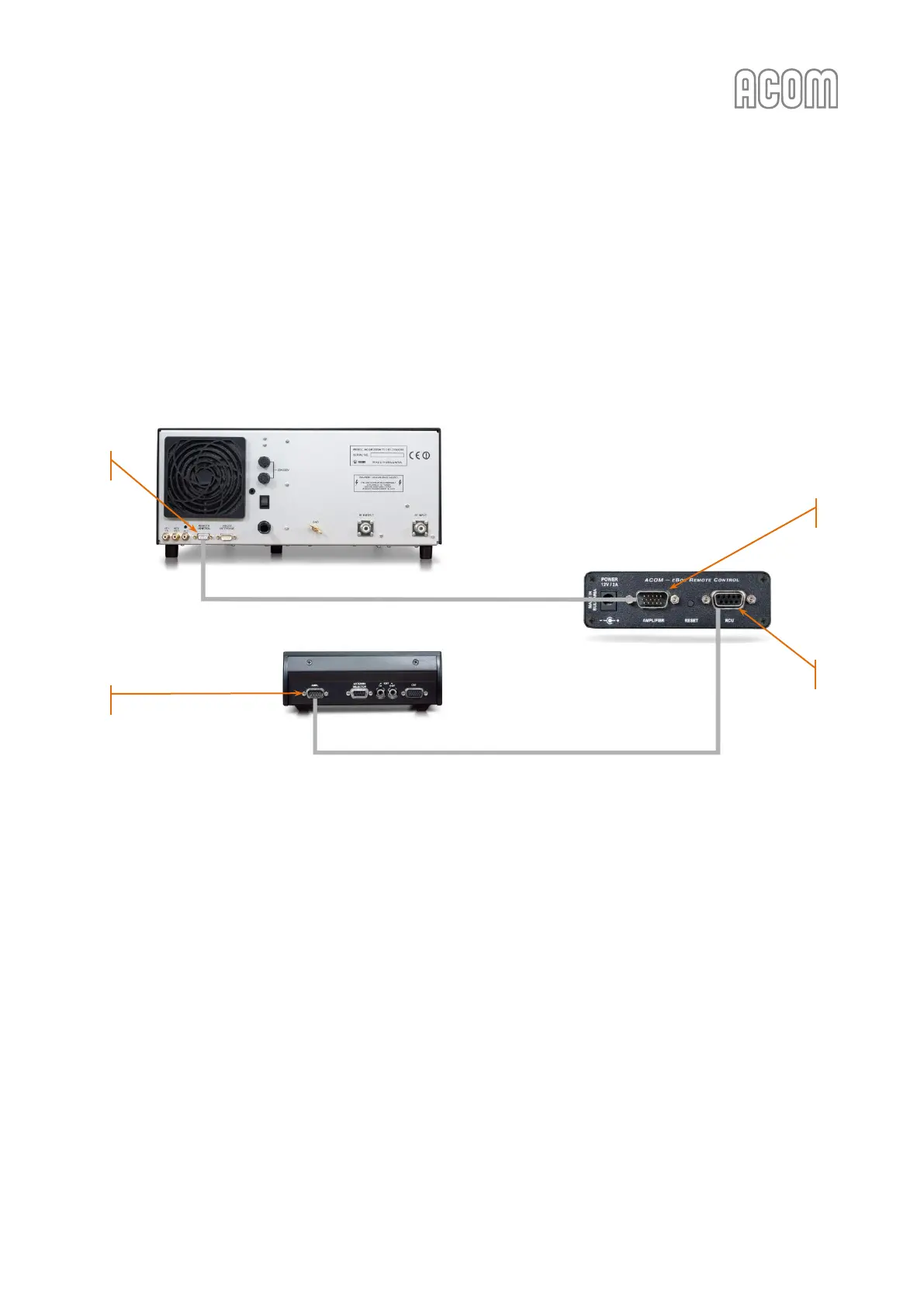
If you have an ACOM 2000A amplifier with RCU, please, see Figure 2-7 eBox to ACOM 2000A connections and
Table 2-2 eBox to ACOM 2000A connection cable wiring.
It is necessary to use the original connection cable (delivered with an eBox) and connect the AMPLIFIER
connector (on eBox rear panel, see Pos. (1) below) to the amplifier REMOTE CONTROL connector (on
amplifier rear panel, see Pos. (2) below).
In this case, the ACOM 2000A RCU (AMPL connector, see Pos. (3) below) should be connected to the eBox
RCU connector (on eBox rear panel, see Pos. (4) below) using the RCU original (existing) cable.
Figure 2-7 eBox to ACOM 2000A connections
Figure 2-7 eBox to ACOM 2000A connections



 To Next Page