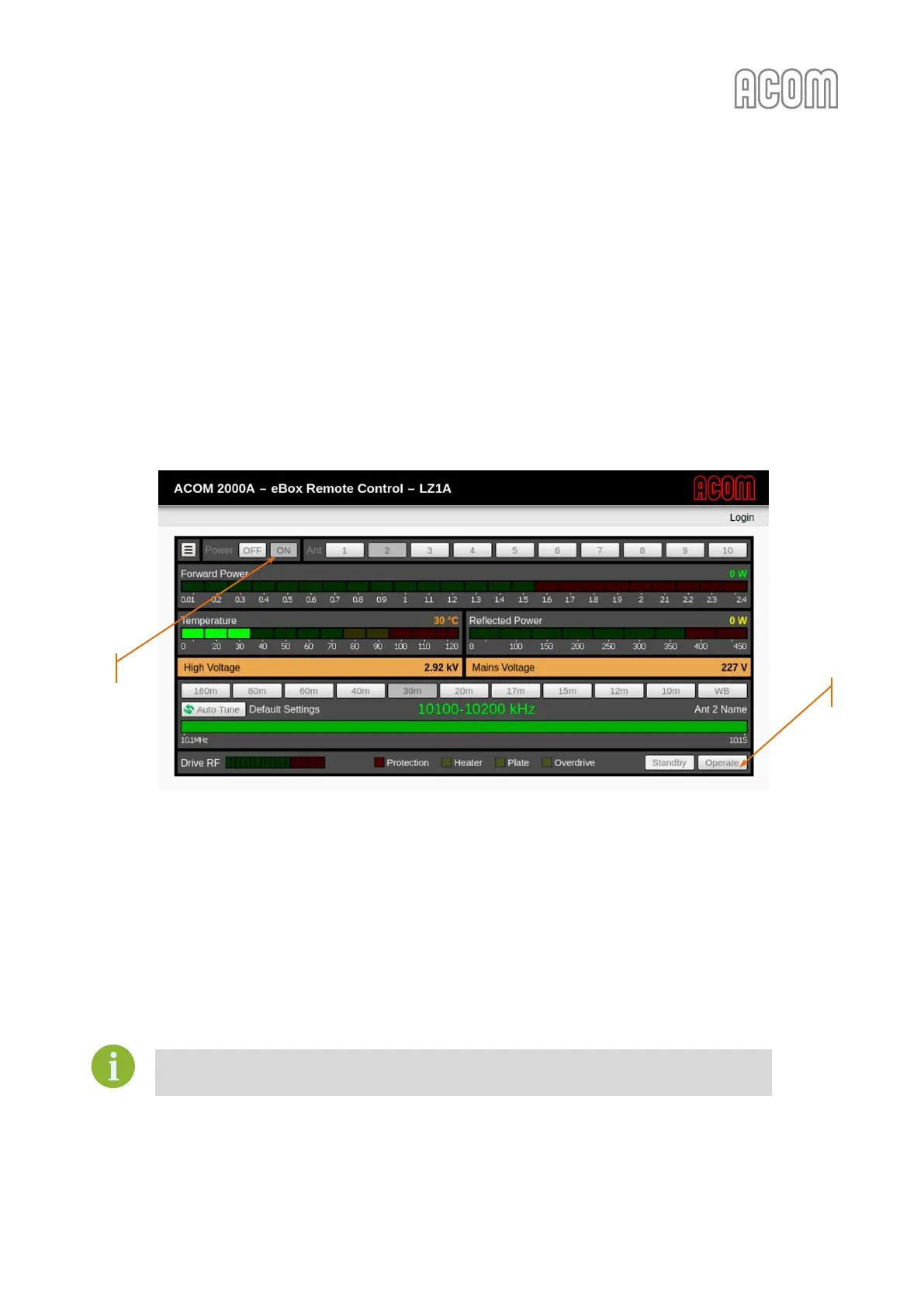
6.3. Amplifier monitoring
With eBox web-interface it is possible to not only control your amplifier (as described in Sections
6.1 Operating with ACOM 2000A amplifier and 6.2 Operating with ACOM 600S, 700S, or 1200S amplifier) but also
to monitor it.
After successful finishing of the installation and setup of your eBox (see Sections 2 INSTALLATION and
4 ON-LINE CONNECTION) the monitoring is always possible without Log-in to eBox.
When monitoring the amplifier, the operational control functions are "grayed/disabled" for the user (for
example, see Figure 6-7 Amplifier monitoring, Pos. (1) and (2)).
Figure 6-7 Amplifier monitoring
Figure 6-7 Amplifier monitoring
6.4. Operating with ACOM amplifiers through Simple Network Management Protocol
(SNMP)
The Simple Network Management Protocol (SNMP) can be used in addition to control the eBox device and
connected amplifier, but this requires advanced IT knowledge.
As this is a sophisticated task, it is not a part of this manual.
SNMP functionality is available in eBox firmware versions 1.2.1887 or later.



 To Next Page