BASE
Setup
See Installing Software Appendix to install AdaptrumTVBD executable on laptop #1
Disable/disconnect laptop wifi (See Disabling WiFi Appendix)
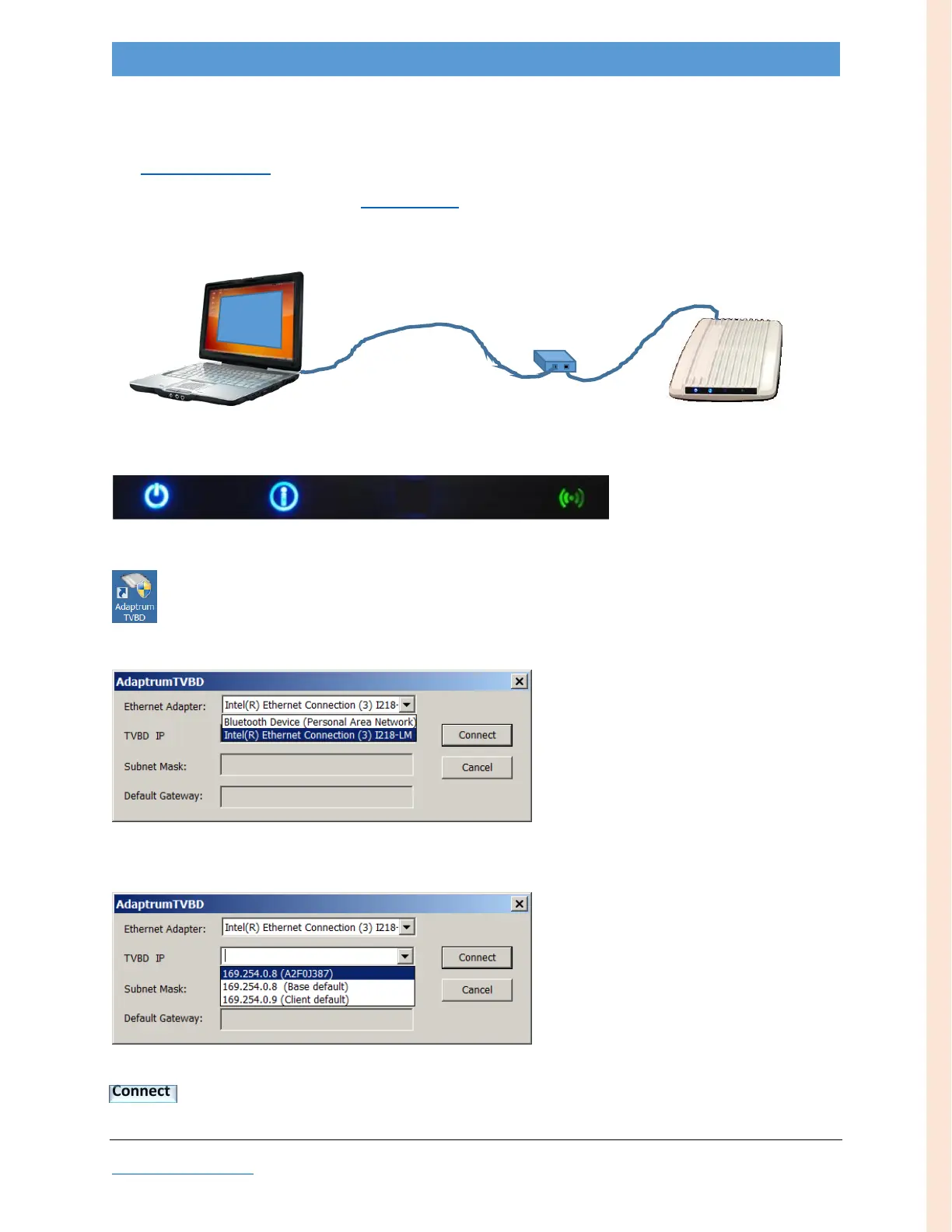
Setup apparatus for initialization: Connect cable from laptop to BASE (thru PoE)
Wait for the “Ready” LED configuration (~30 seconds)…
…plus ~5 seconds
Launch AdaptrumTVBD
Allow program to make changes
In the pop-up, if necessary, select an Ethernet Adapter…
…then pull down TVBD IP choices
BASE unit should appear in the pull-down list; (if it doesn’t, ensure laptop wifi is disabled/disconnected
and LAN IP address is on the same subnet.)
…select (auto-discovered) BASE unit
Note: non-default TVBD appears as IP address + serial number (in parentheses)—first line in example above
Connect



 To Next Page