EasyManua.ls Logo

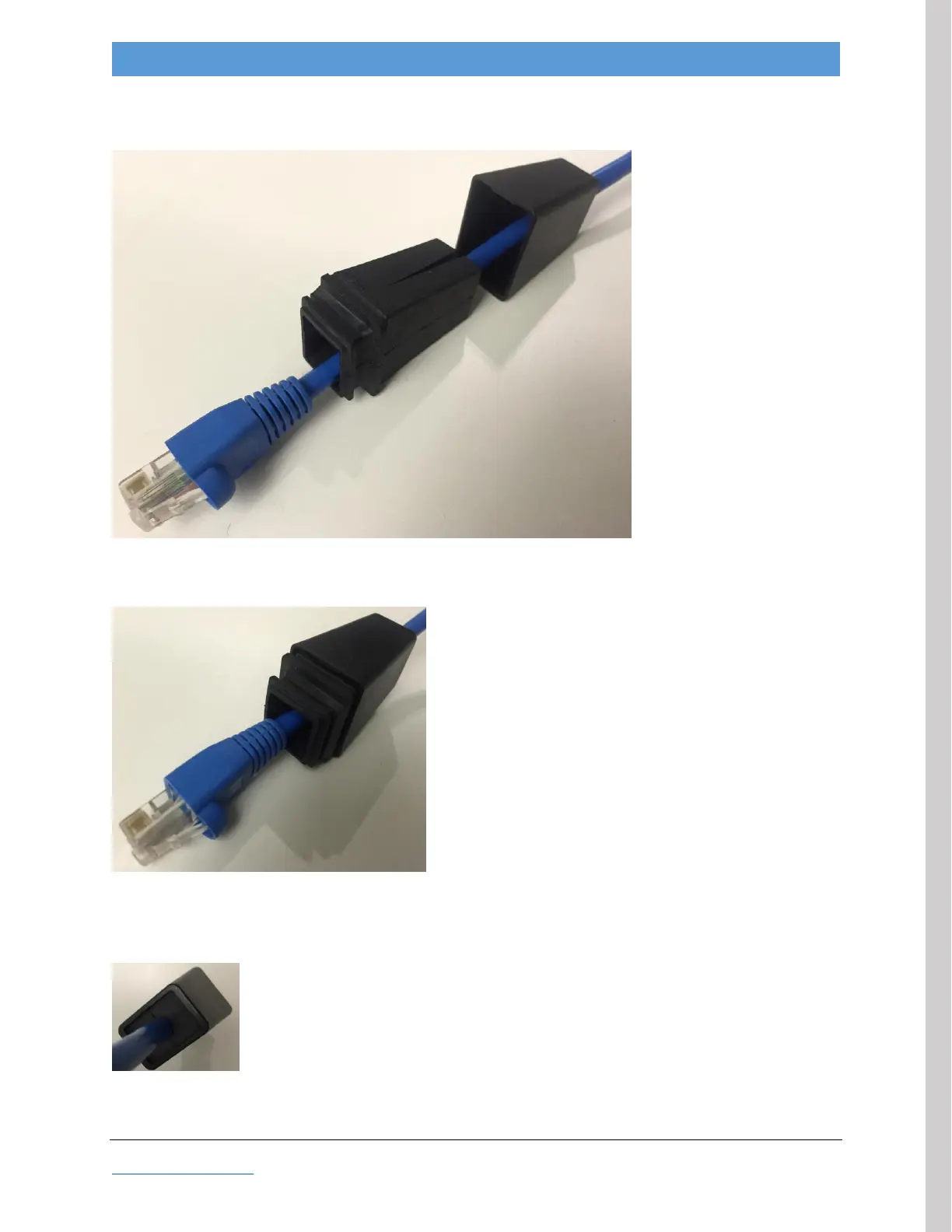
Adaptrum ACRS 2.0 - Figure 5: Ethernet Cable with Weather-Resistant Boot Assembly; Figure 6: Ethernet Cable with Weather-Resistant Boot Assembled; Figure 7: Ethernet Cable Weather Seal

Adaptrum ACRS 2.0
64 pages
Print Icon
To Next Page IconTo Next Page
To Previous Page IconTo Previous Page
Loading...
2016.05.16 Adaptrum© P a g e 23 | 64
support@adaptrum.com All Rights Reserved Worldwide
2016
Adaptrum ACRS2.0 Quick Start Guide (International)
Insert the Ethernet cable first through the weather-resistant boot hard shell and then through the soft
shell, as shown in
Figure 5: Ethernet cable with weather-resistant boot assembly
Next, push the hard shell over the soft shell. This forms the weather seal around the cable.
Figure 6: Ethernet cable with weather-resistant boot assembled
Ensure that there are no gaps between the soft and hard shells on the smaller end and that the cable is
gripped securely by the soft shell.
Figure 7: Ethernet cable weather seal

FIELD INSTALLATION

Table of Contents

Other manuals for Adaptrum ACRS 2.0