EasyManua.ls Logo

Adaptrum ACRS 2.0 - Spectrum Scan Channel Quality

Adaptrum ACRS 2.0
64 pages
Print Icon
To Next Page IconTo Next Page
To Previous Page IconTo Previous Page
Loading...
2016.05.16 Adaptrum© P a g e 56 | 64
support@adaptrum.com All Rights Reserved Worldwide
2016
Adaptrum ACRS2.0 Quick Start Guide (International)
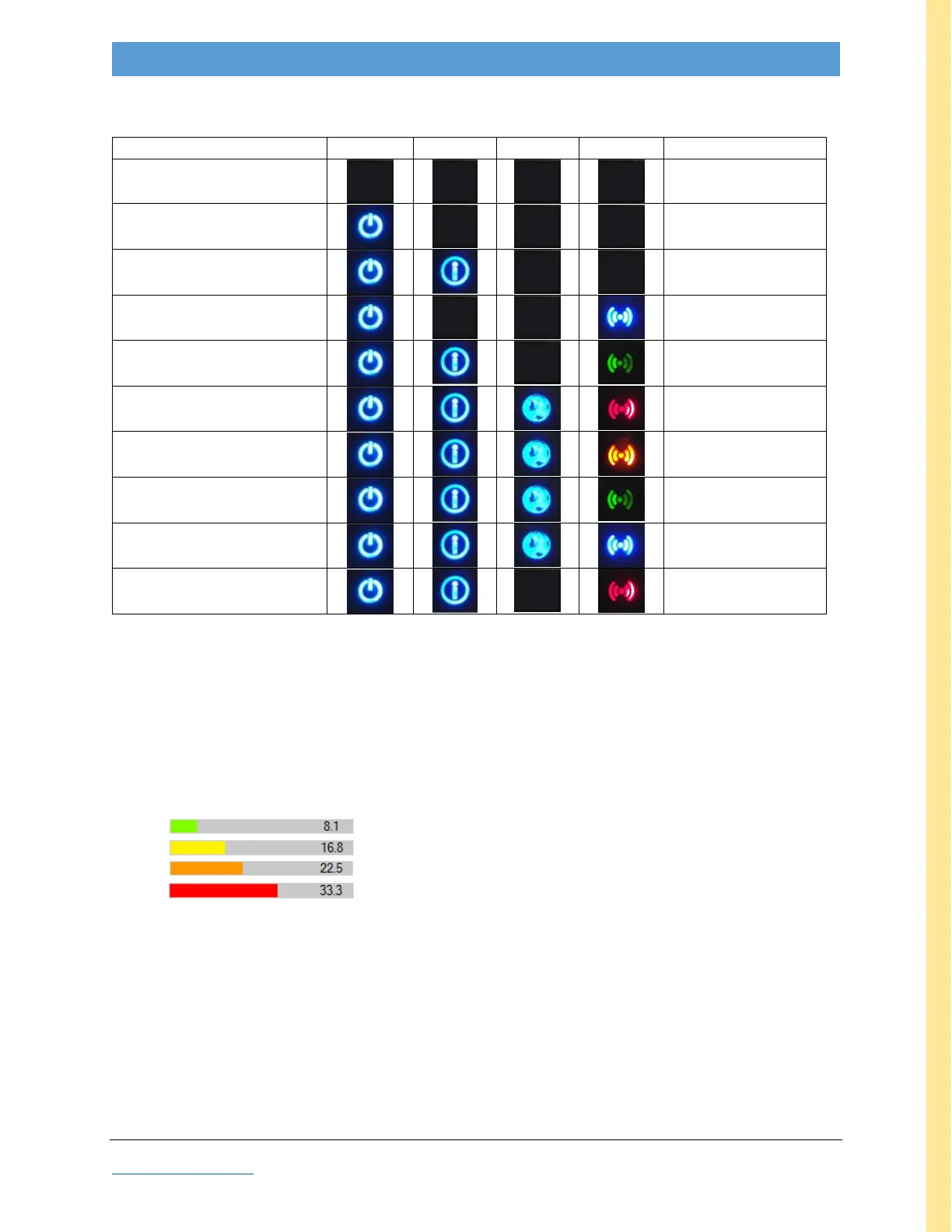
LED Interpretation
Table 14: LED Interpretation table
CONDITION
POWER
INFO
LINK
SIGNAL
Connection Quality
Unit Off
N/A
Initial power up
N/A
booting
N/A
re-booting
N/A
ready
not established
transmitting/linked (1)
Marginal
transmitting/linked (1)
OK
transmitting/linked (1)
Good
transmitting/linked (1)
Excellent
searching (2)
link lost
(1) BASE: transmitting; CLIENT: linked
(2) CLIENT
Spectrum Scan Channel Quality
On the Diagnostics tab, after clicking one of the Measure buttons, Channel Quality is indicated
numerically (lower numbers are better) and by color bars, interpreted as below:
Green Good
Yellow Marginal
Orange Avoid (NOT recommended)
Red Bad (do NOT use)

APPENDIX

Table of Contents

Other manuals for Adaptrum ACRS 2.0