2016.05.16 Adaptrum© P a g e 50 | 64
support@adaptrum.com All Rights Reserved Worldwide
Adaptrum ACRS2.0 Quick Start Guide (International)
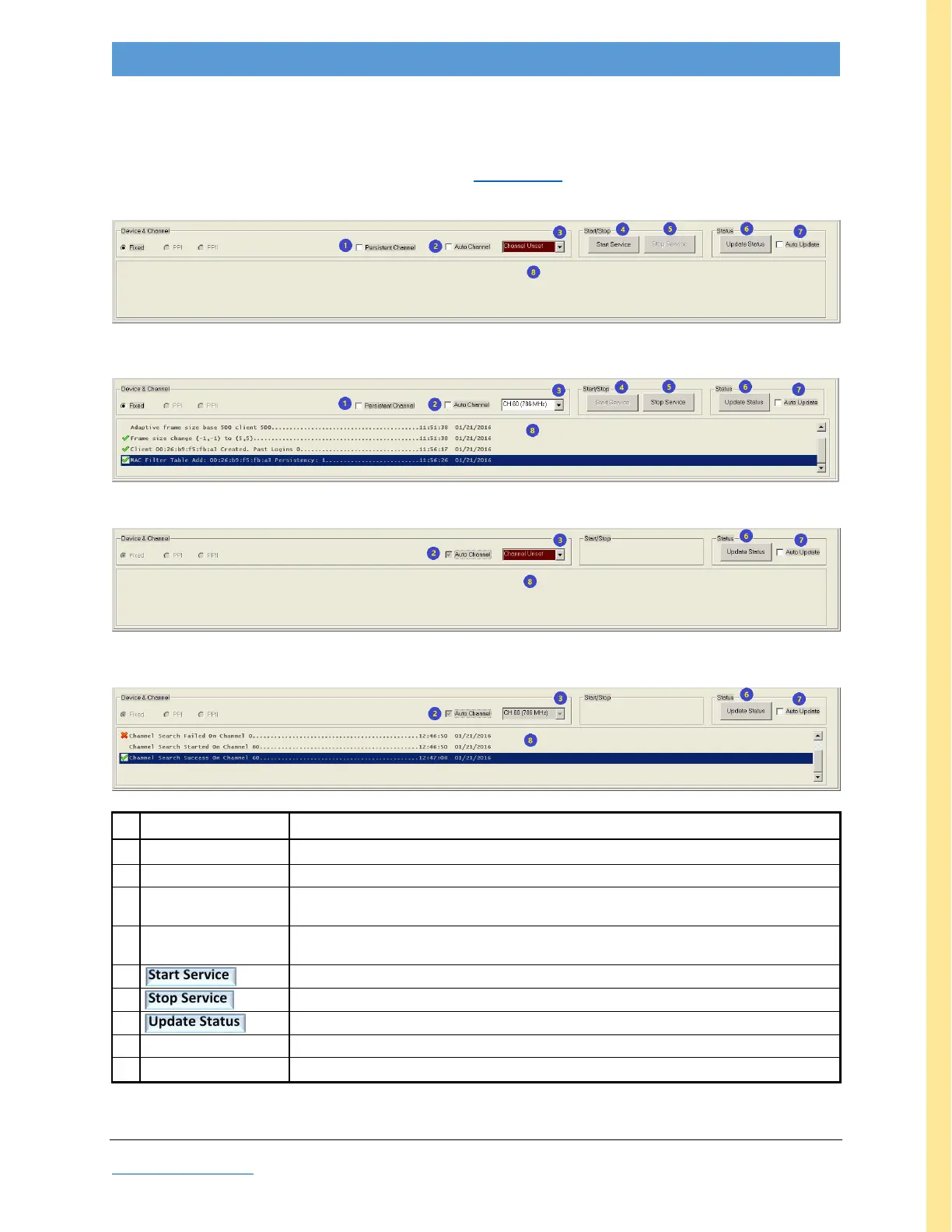
Device & Channel pane
This pane is always displayed at the bottom of the GUI. It is used to select the link channel, activate the
link (Start Service, from BASE only), and to update link status either once (Update Status button) or
continuously (Auto Update checkbox). Do not leave Auto Update on during normal operation.
BASE (initial view)
Figure 31: GUI screenshot: BASE Device & Channel pane
BASE (after CLIENT connection)
CLIENT (initial view)
Figure 32: GUI screenshot: CLIENT Device & Channel pane
CLIENT (after BASE connection)
diagnostic functions reserved for Adaptrum’s use only
if checked, causes unit to connect on selected channel (field #3) after each reboot
if checked, enables unit to scan through channel list (BASE Database tab field #11 or
CLIENT Database tab field #17) in search of finding the best channel
in manual mode, allows user to select a specific channel; in auto-mode, specifies the
channel being used for current link
BASE only: initiates transmission
BASE only: halts transmission
manual, one-time update of channel status reported on Link tab(s)
if checked, initiates continuous update reported on Link tab(s)
displays relevant subset of software messages
Table 13: Device & Channel pane Field Descriptions



 To Next Page