2016.05.16 Adaptrum© P a g e 45 | 64
support@adaptrum.com All Rights Reserved Worldwide
Adaptrum ACRS2.0 Quick Start Guide (International)
Diagnostics Tab
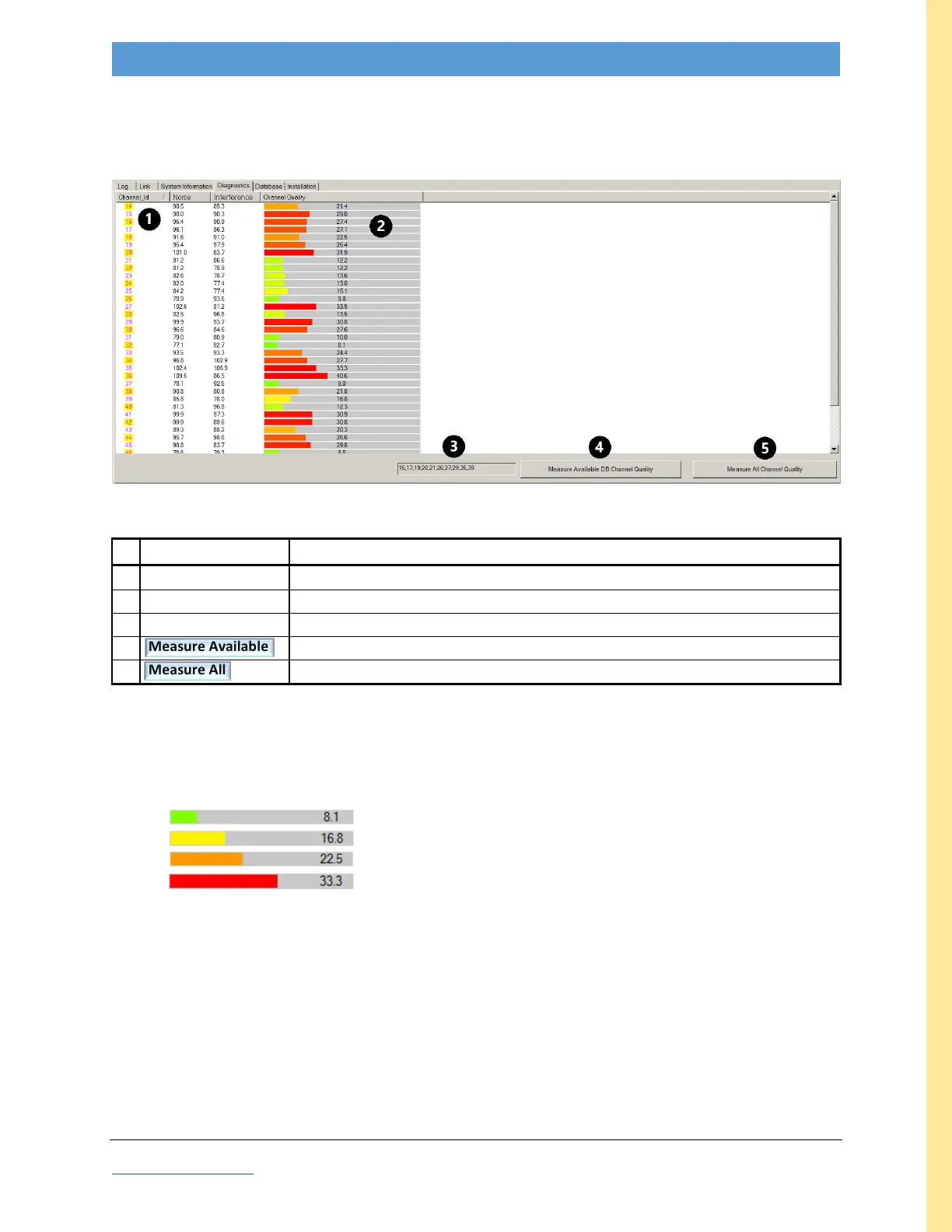
This tab is used to measure channel quality of either all or just the selected channels. The screenshot
below is an example of Measure All.
Figure 26: GUI screenshot: Diagnostics tab
a measure of quality predicated upon Noise and Interference; lower is better
list of available channels constrained by Database tab field #9
initiate quality measurement of selected available channels (field #3)
initiate quality measurement of all channels
Table 8: Diagnostics Field Descriptions
Channel Quality is indicated numerically (lower numbers are better) and by color bars, interpreted as
follows:
Green Good
Yellow Marginal
Orange Avoid (NOT recommended)
Red Bad (do NOT use)
Channel Selection: When selecting a channel, chose the one with the best Channel Quality and, if
possible, with good quality adjacent channels as well.



 To Next Page