2016.05.16 Adaptrum© P a g e 46 | 64
support@adaptrum.com All Rights Reserved Worldwide
Adaptrum ACRS2.0 Quick Start Guide (International)
Database Tab
BASE
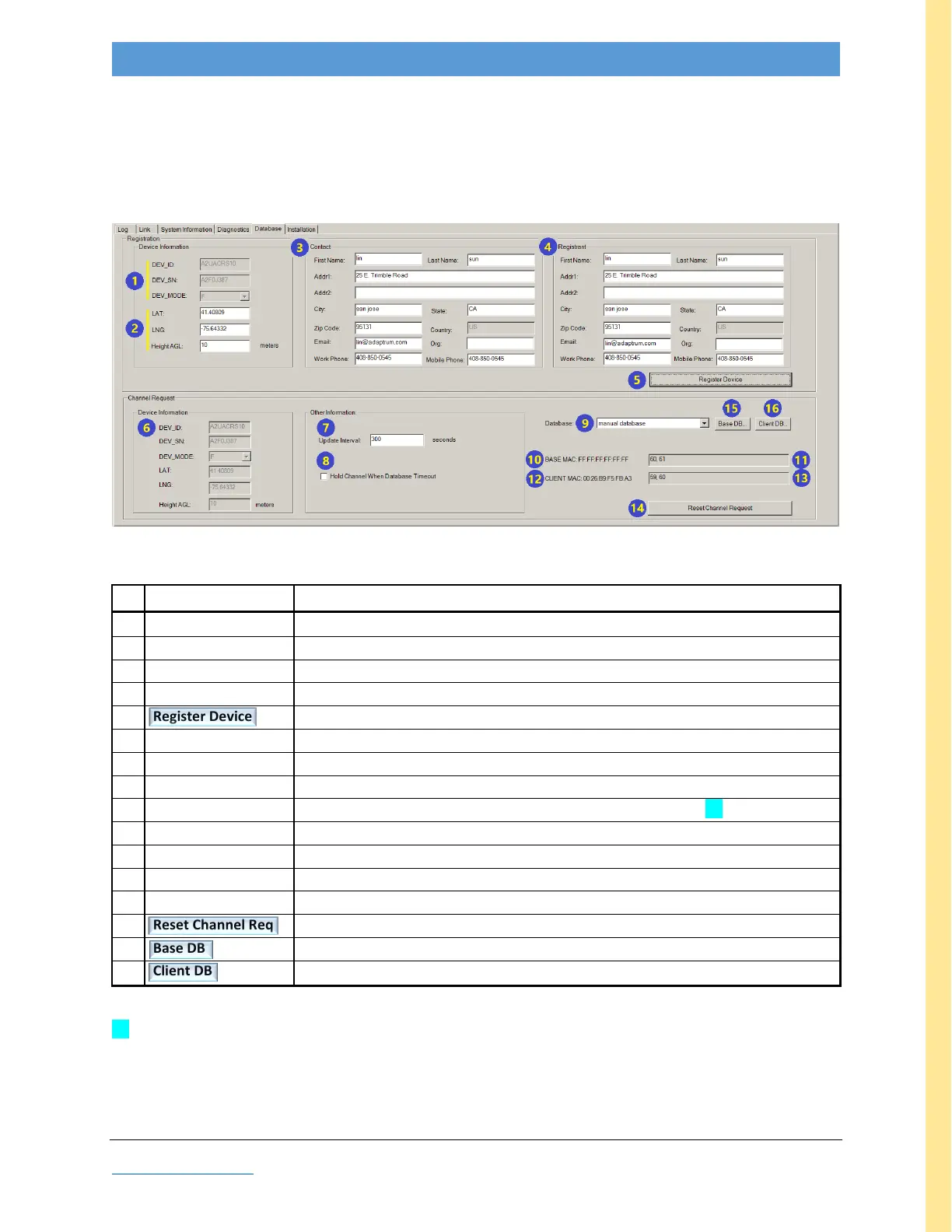
For units configured for “manual database” (as shown in field #9 below), this tab is unused. However, it
is recommended that users fill in fields #2, 3, and 4 for future use. For units configured in other
database modes, required fields depend upon the spectrum oversight agency.
Figure 27: GUI screenshot: BASE Database tab
Note: Fields in gray font are reserved for Adaptrum diagnostic use.
device ID, Serial Number, and Mode hardcoded into hardware
Latitude/Longitude/Height of installed unit to be entered by user
name, address, phone number; may be required by spectrum oversight authority
name, address, phone number; may be required by spectrum oversight authority
sends Contact and Registrant info to cognizant spectrum oversight agency
number of seconds between updates (Device & Channel fields #6 & #7)
requires unit to retain channel even after timeout
specifies database source for constraining available channel list [1]
address (initially blank; updated by button #14)
list of channels selected by button #15 (initially blank, updated by button #14)
address (initially blank; updated by button #14)
list of channels selected by button #16 (initially blank, updated by button #14)
resets current channel selection (enables selection of a new channel set)
[manual database only] opens Station Channel List for BASE channel selection
[manual database only] opens CLIENT Channel List for CLIENT channel selection
Table 9: BASE Database Field Descriptions
[1] Units are typically shipped configured for a specific region as constrained by the database indicated in field #9
above. In example Figure 27, this unit is unconstrained (by “manual database” mode).



 To Next Page