2016.05.16 Adaptrum© P a g e 48 | 64
support@adaptrum.com All Rights Reserved Worldwide
Adaptrum ACRS2.0 Quick Start Guide (International)
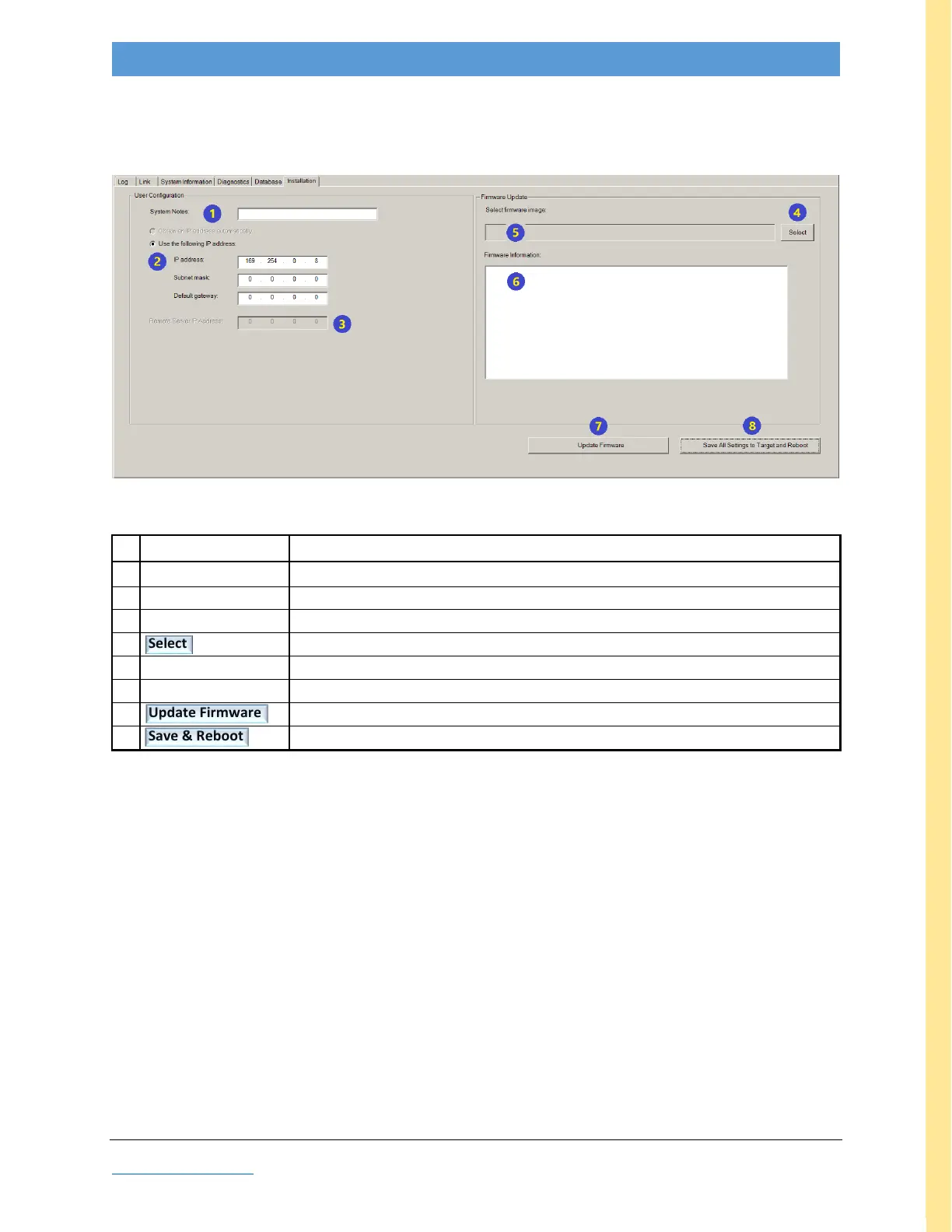
Installation Tab
This tab allows the user to specify unit name and IP address, as well as to perform firmware updates.
BASE
Figure 29: GUI screenshot: BASE Installation tab
Note: Fields in gray font are reserved for Adaptrum diagnostic use.
user-entered unique unit name (highly recommended to fill this out)
browser to navigate to desired firmware (aip) target file
name of selected file (must be a valid aip file)
displays messages after update button 7; wait for ‘ok to reboot’ message
initiates loading of selected file (field #5), messages display in field #6
saves all changes & causes unit to reboot (puts changes into effect)
Table 11: BASE Installation Field Descriptions



 To Next Page