Remote Update
From the BASE, any CLIENT can have either its Firmware or Configuration updated.
Note 1: CLIENTs MUST BE updated before the BASE.
Note 2: BASE must Start Service and link with CLIENT must be established.
Note 3: Auto Update must be off, but Update Status must be performed at least once.
Firmware
Note 4: FIRST, perform Remote Update Configuration, record parameters.
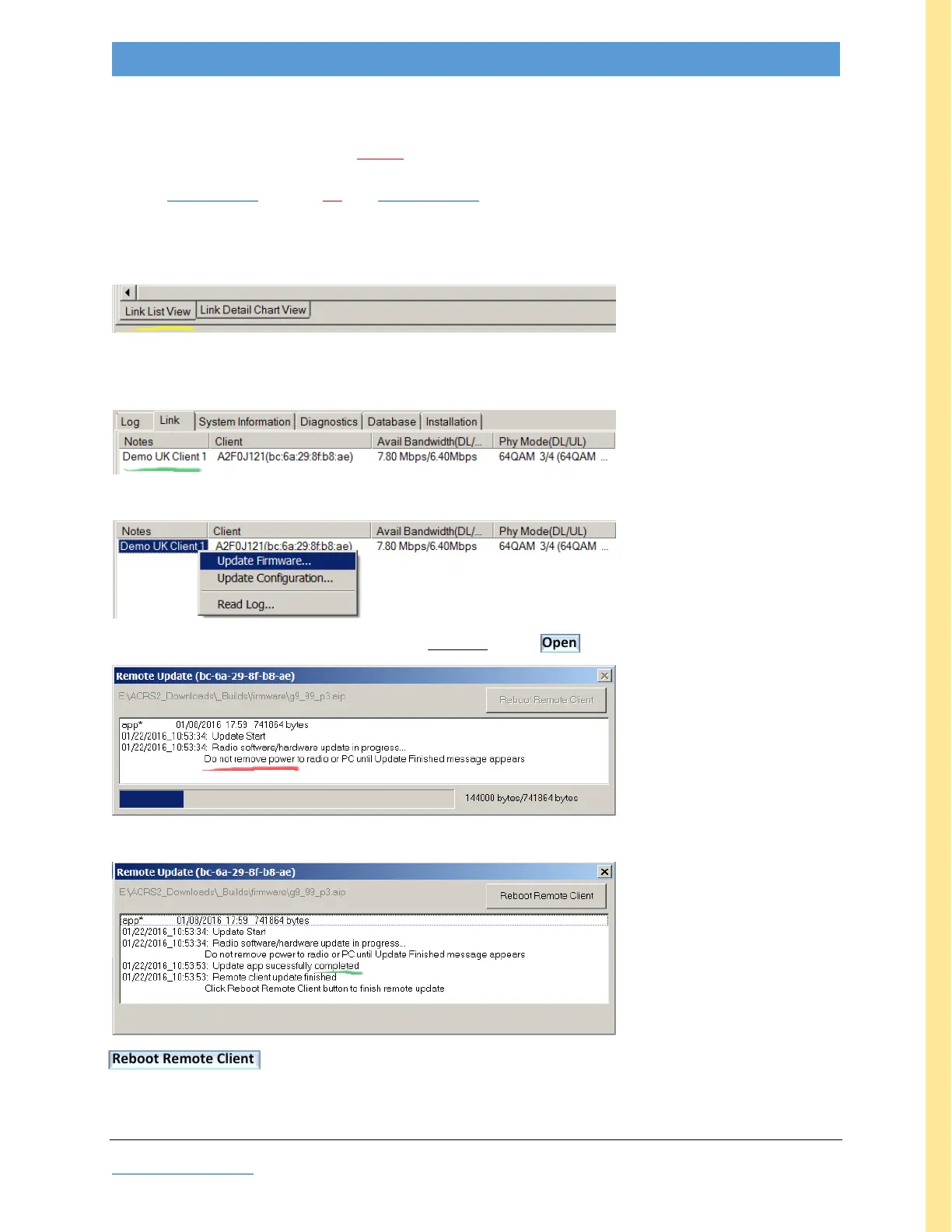
To remote update CLIENT firmware, in the BASE GUI, go to the Link tab, Link List View sub-tab.
(at bottom left)
Right-click on desired target name in Notes column (green highlight); if there’s no name under Notes,
right-click in the empty space.
Right-click opens a pop-up; select the desired operation, e.g. Update Firmware
This opens a file browser. Navigate to the desired Firmware aip file, Open
Wait
Reboot Remote Client
Wait ~40 seconds for CLIENT to reconnect.
If necessary, perform Remote Update Configuration to restore the remote unit’s parameters.



 To Next Page