VP-8-V2 and VP-16-V2 Series Encoder
·
User Manual
24
Save clips to: Set the saving path for the clipped video files in playback mode.
Save downloaded files to: Set the saving path for the downloaded video files or pictures.
You can click the Browse button to change the directory for saving the video files and pictures.
4.2 Device Parameters
4.2.1 Configuring Time Settings
Steps:
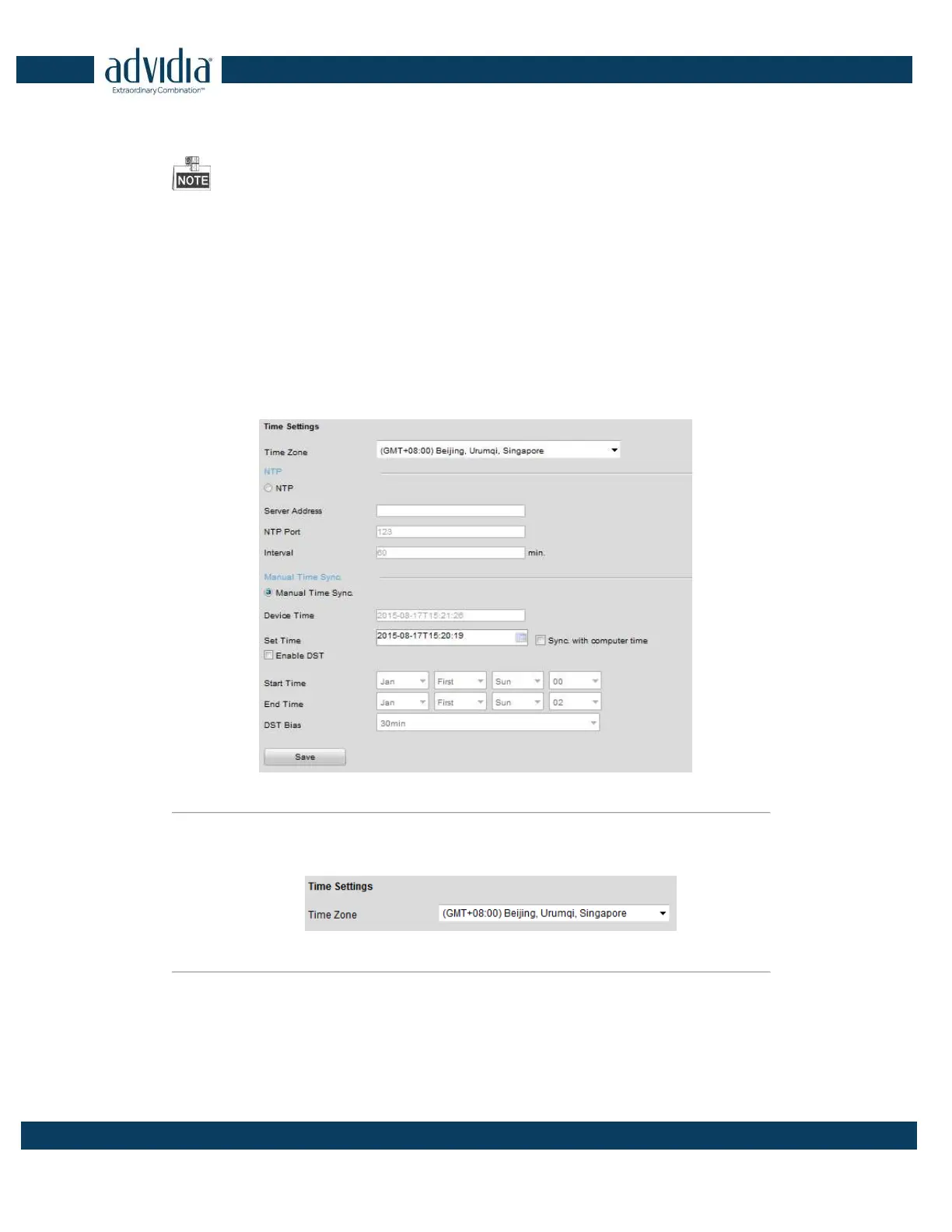
1. Click Remote Configuration > Device Parameters > Time Settings to enter the Time Settings interface:
Figure 4. 2 Time Settings
2. Select the Time Zone.
Select the Time Zone that is closest to the device’s location from the drop-down menu.
Figure 4. 3 Time Zone Settings
3. Configure the time synchronization by NTP server or by manually.
Configuring Time Sync by NTP Server
A Network Time Protocol (NTP) Server can be configured on your device to ensure the accuracy of system
date/time.
If the device is connected to a Dynamic Host Configuration Protocol (DHCP) network that has time server



 To Next Page