VP-8-V2 and VP-16-V2 Series Encoder
·
User Manual
32
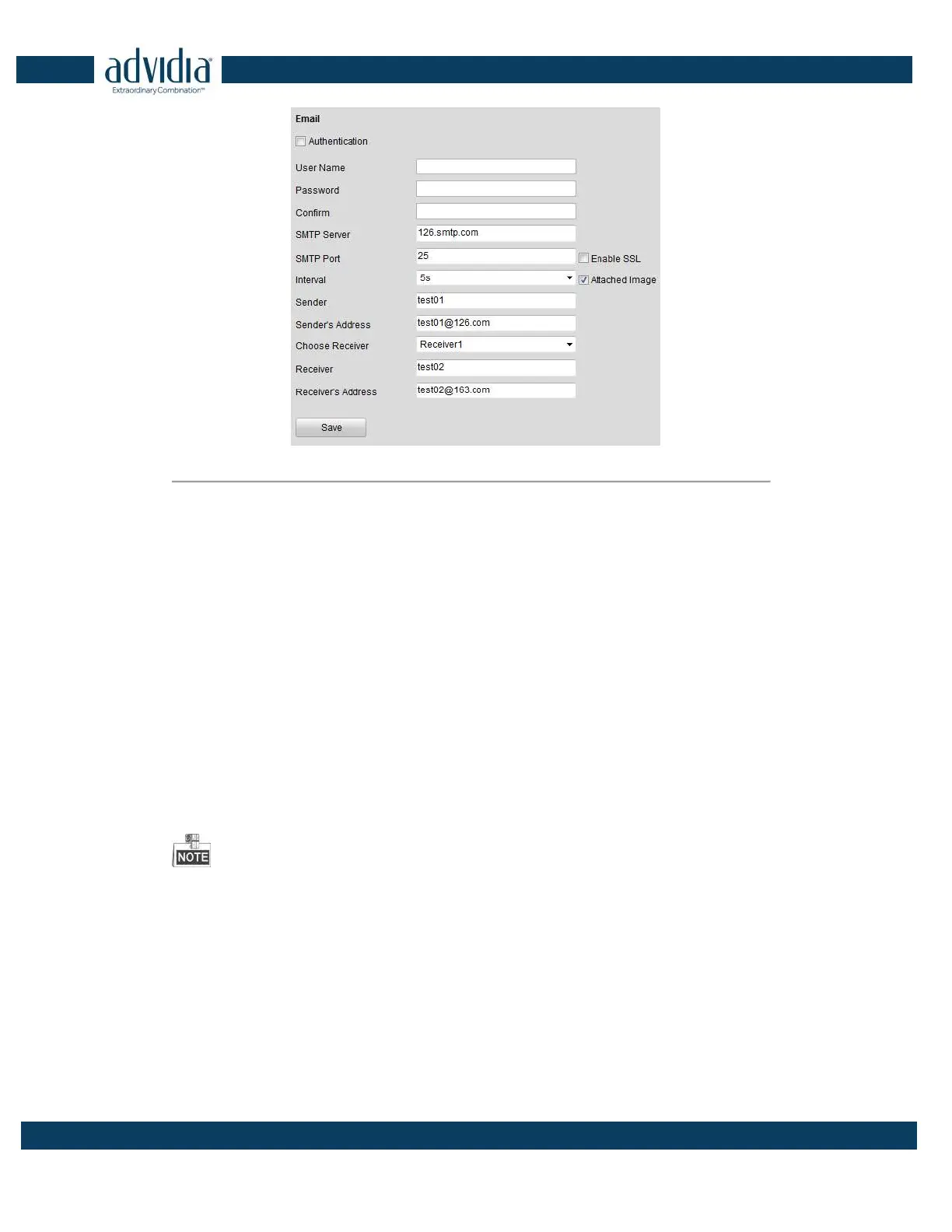
Figure 4. 17 Email Settings (2)
4. Click Save to save the Email settings.
Please refer to the following sections for more information:
Configure alarm linking methods with Send Email on Section Configuring Motion Detection, Section Configuring
External Alarm Input, Section Configuring Video Loss Alarm, Section Configuring Video Tempering
Alarm
and
Section Handling Exception.
4.3.6 Configuring SNMP Settings
Simple Network Management Protocol (SNMP) is an Internet-standard protocol for managing devices on IP
networks
.
You can use SNMP to get camera status, parameters and alarm related information.
Before you start:
Before setting the SNMP, please download the SNMP software and manage to receive the device information via
SNMP port. By setting the Trap Address, the device can send the alarm event and exception messages to the
surveillance center.
The SNMP version you select should be the same as that of the SNMP software.
Steps:
1. Click Remote Configuration > Network Settings >SNMP to enter the SNMP settings interface.
2.
Check the checkbox to enable SNMP v2c, and configure the read SNMP community (default: public), write
SNMP community (default: private), tap address (default: empty) and trap port (default: 162).



 To Next Page