VP-8-V2 and VP-16-V2 Series Encoder
·
User Manual
35
HTTPS URLs begin with "https://" and use port 443 by default.
Steps:
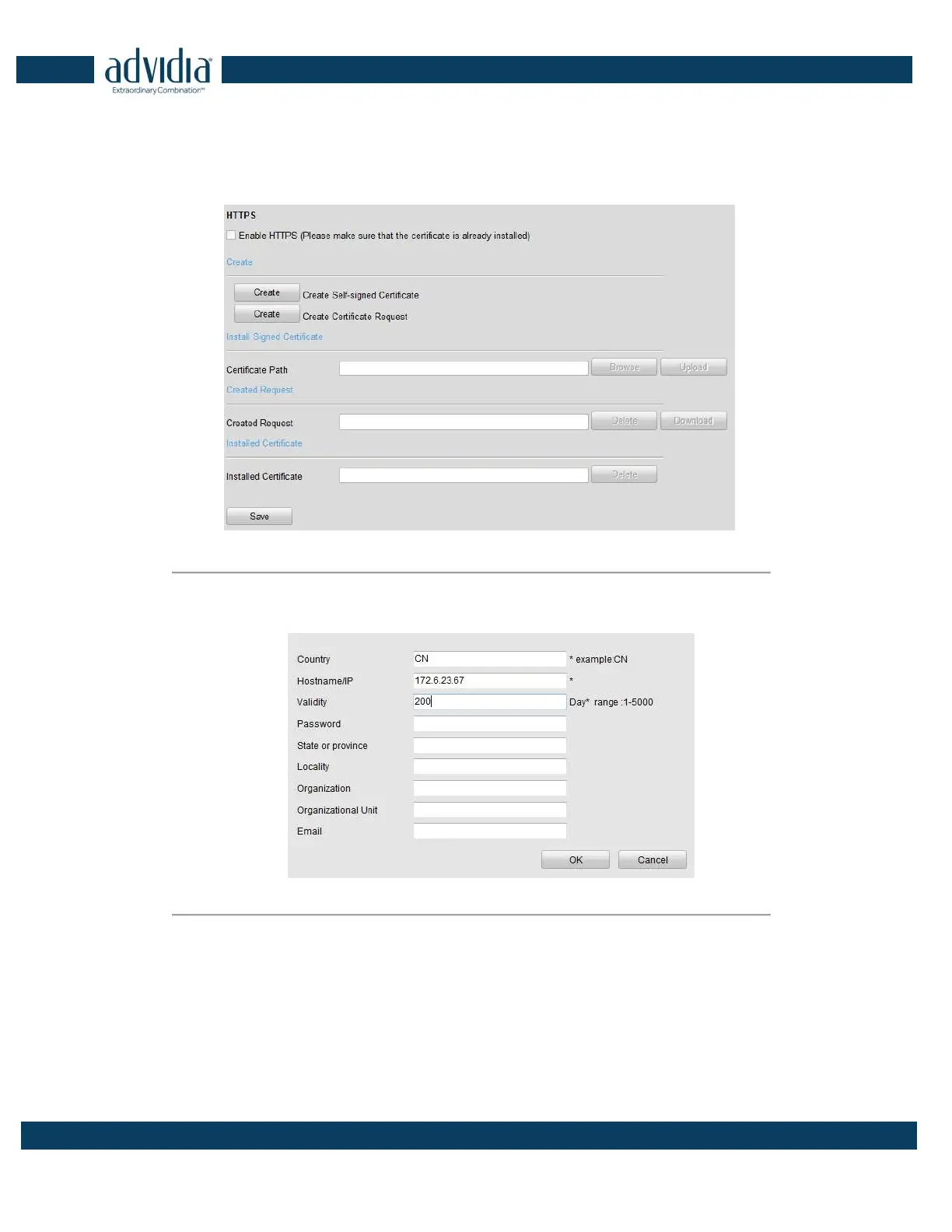
1. Click Remote Configuration > Network Settings > HTTPS to enter the HTTPS settings interface.
2. Create the self-signed certificate or authorized certificate.
Figure 4. 21 HTTPS Settings
Task1: Create the self-signed certificate
(1) Click the Create button to create the following dialog box.
Figure 4. 22 Create Self-signed Certificate
(2) Enter the country, host name/IP, validity and other information.
(3) Click OK to save the settings.
Task2: Create the authorized certificate
(1) Click the Create button to create the certificate request.
(2) Download the certificate request and submit it to the trusted certificate authority for signature.
(3) After receiving the signed valid certificate, import the certificate to the device.
3. When you have successfully created and installed the certificate, check the checkbox to enable the HTTPS



 To Next Page