The Stability Application Applications
Agilent 8163A/B, 8164A/B & 8166A/B Mainframes, Sixth Edition 257
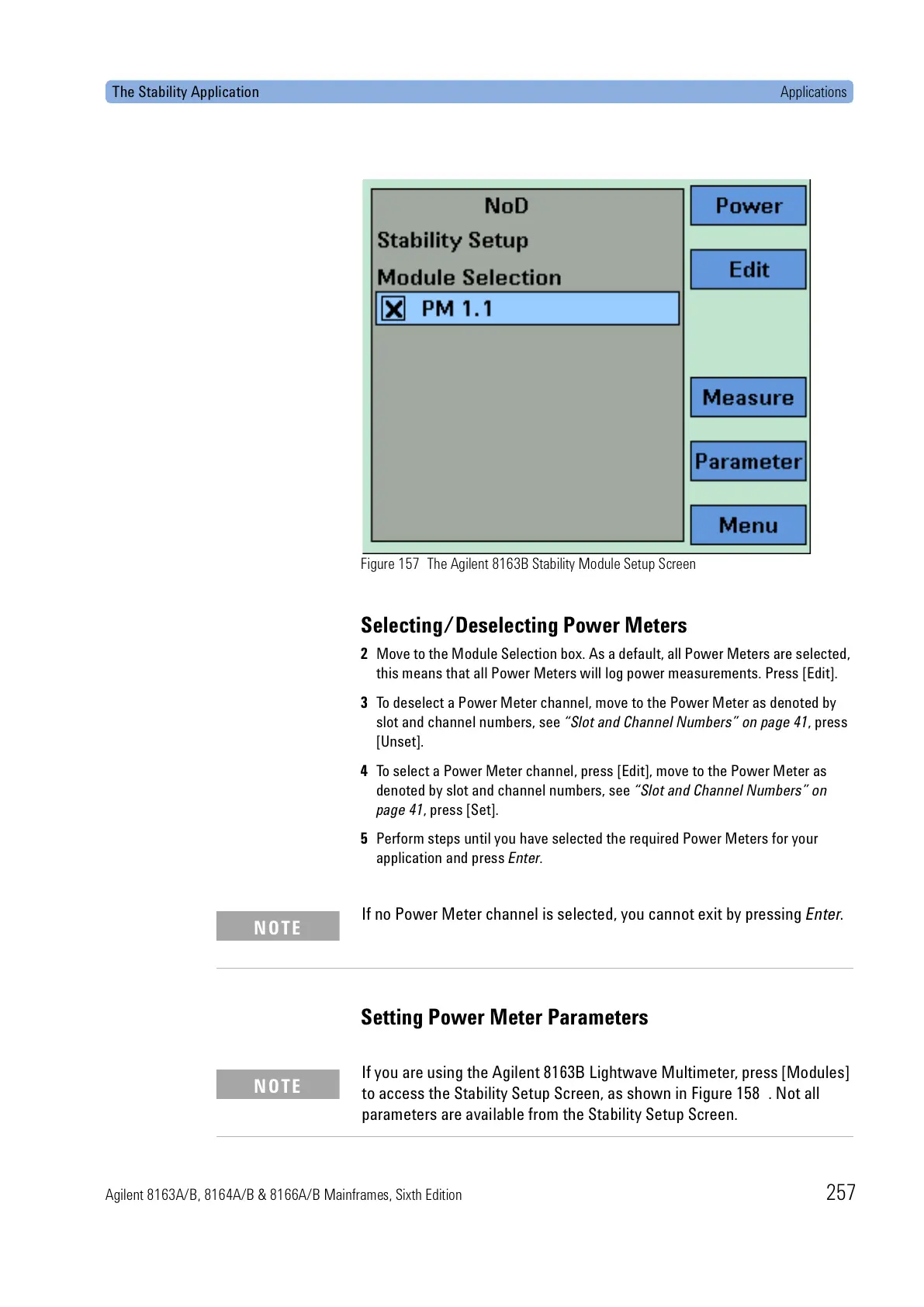
Figure 157 The Agilent 8163B Stability Module Setup Screen
Selecting/Deselecting Power Meters
2 Move to the Module Selection box. As a default, all Power Meters are selected,
this means that all Power Meters will log power measurements. Press [Edit].
3 To deselect a Power Meter channel, move to the Power Meter as denoted by
slot and channel numbers, see “Slot and Channel Numbers” on page 41, press
[Unset].
4 To select a Power Meter channel, press [Edit], move to the Power Meter as
denoted by slot and channel numbers, see “Slot and Channel Numbers” on
page 41, press [Set].
5 Perform steps until you have selected the required Power Meters for your
application and press Enter.
Setting Power Meter Parameters
If no Power Meter channel is selected, you cannot exit by pressing Enter.
NOTE
If you are using the Agilent 8163B Lightwave Multimeter, press [Modules]
to access the Stability Setup Screen, as shown in Figure 158 . Not all
parameters are available from the Stability Setup Screen.
NOTE



 To Next Page
 Loading...