3
72 AhnLab TrusGuard Installation Guide
(O: Required, +: Optional).
HA Mode Operation
Mode
HA Sync
Interface
HA
Interface
OSPF/RIP STP L2 Switch L3 Switch
Active-
Standby
Router O O O +
Bridge O O O +
Active-
Active
Router O O O +
Bridge O O O O
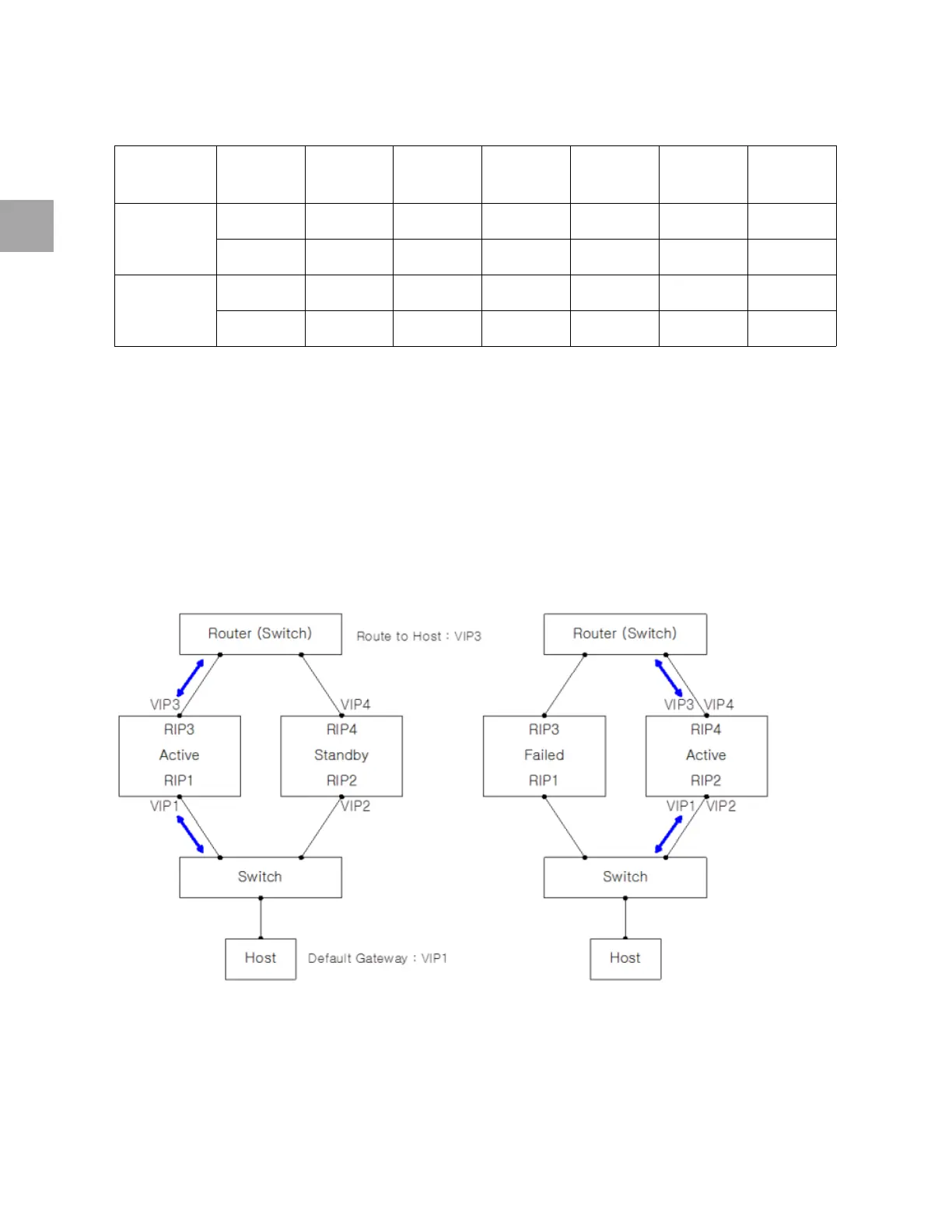
Active-Standby Router Mode
The sub-network uses the master's virtual IP address, VIP2, as the gateway.
All the HA peers use the upper router’s
IP address as the gateway.
The
routing gateway from top to bottom uses the master’s virtual IP address, VIP3.
You can set this mode regardle
ss of the type of upper/lower switch (L2, L3).
All rou
ting goes through the master's virtual IP address: VIP1 and VIP3.
If a problem
occurs in the master, the slave informs the upper/lower device that it has brought over
VIP1 and VIP3 through ARP.



 To Next Page