30
Digital inputs
The production control board has 4 digital inputs to externally control the Airzone systems. These input are configured as
normally open. It is recommended to use a shielded cable to connect it.
- DI4_ACS: This input activates the DHW mode: all the Acuazone/Innobus Pro32 systems working on Air heat will stop
and the message DHW will be displayed by the zone thermostats. This feature is recommended for Aerothermal
installations when the Aerothermal unit starts producing DHW.
- DI5_HEAT: This input activates the semi-forced heating mode in all the system of the installation. These are the modes
available to select: Stop, Heating and Ventilation.
- DI6_COOL: This input activates the semi-forced cooling mode in all the system of the installation. These are the modes
available to select: Stop, Dry, Cooling and Ventilation.
- DI7_STOP: This input activates the Stop mode in all the system of the installation.
- AI1: Analog input reserved for internal use.
DM1 bus connector
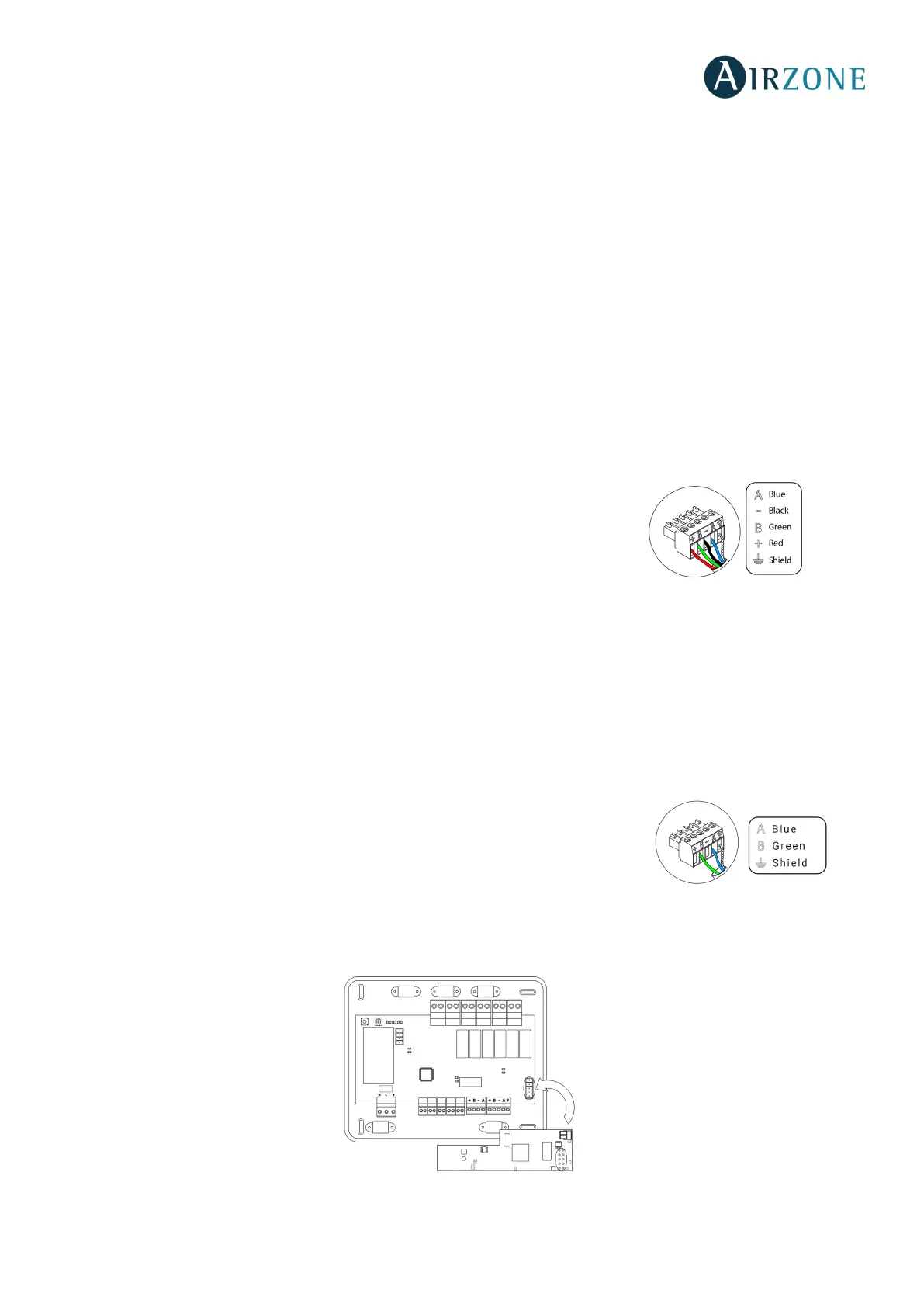
The DM1 domotic bus allows the connection of system main control boards and the
Webserver HUB Airzone Cloud Dual (AZX6WSPHUB).
It has two 5-pin terminals for the DM1 bus connection. This system can only be connected
by bus. Remember that it is necessary to provide power supply through this port by
connecting the 5-pins. Attach the wires with the terminal screws following the color code.
Note: For a proper operation of the main control board, all the main control board must be addressed (up to 32 systems).
DM2 domotic bus connector
The DM2 domotic bus allows the connection of control peripherals in order to manage all the systems connected to the
production control board. These are the elements that can be connected:
- Webserver Airzone Cloud Wi-Fi Dual 2.4-5G (AZX6WSC5GER)
- Webserver Airzone Cloud HUB (AZX6WSPHUB)
It has a 5-pin terminal for the DM2 bus connection. This system can only be connected by
bus. Attach the wires with the terminal screws following the color code.
Note: Do not provide power supply in DM2 or IU ports. For externally powered elements at
110/230 Vac, it is only needed to connect “A” and “B” from the automation bus.
When connecting the Webserver Cloud (AZX6WSC5GER), remove the fixing post from the Webserver and put the connector in
DM2.


 To Next Page