8244 DECT Handset
– E-GAP/GAP mode
- Quick guide
Related Documentation - Other languages for these Safety and Regulatory Instructions and User Documentation are available at the following Web site https://www.al-enterprise.com/products.
8AL90396ENAAed01 - The Alcatel-Lucent name and logo are trademarks of Nokia used under license by ALE. Copyright © ALE International 2021
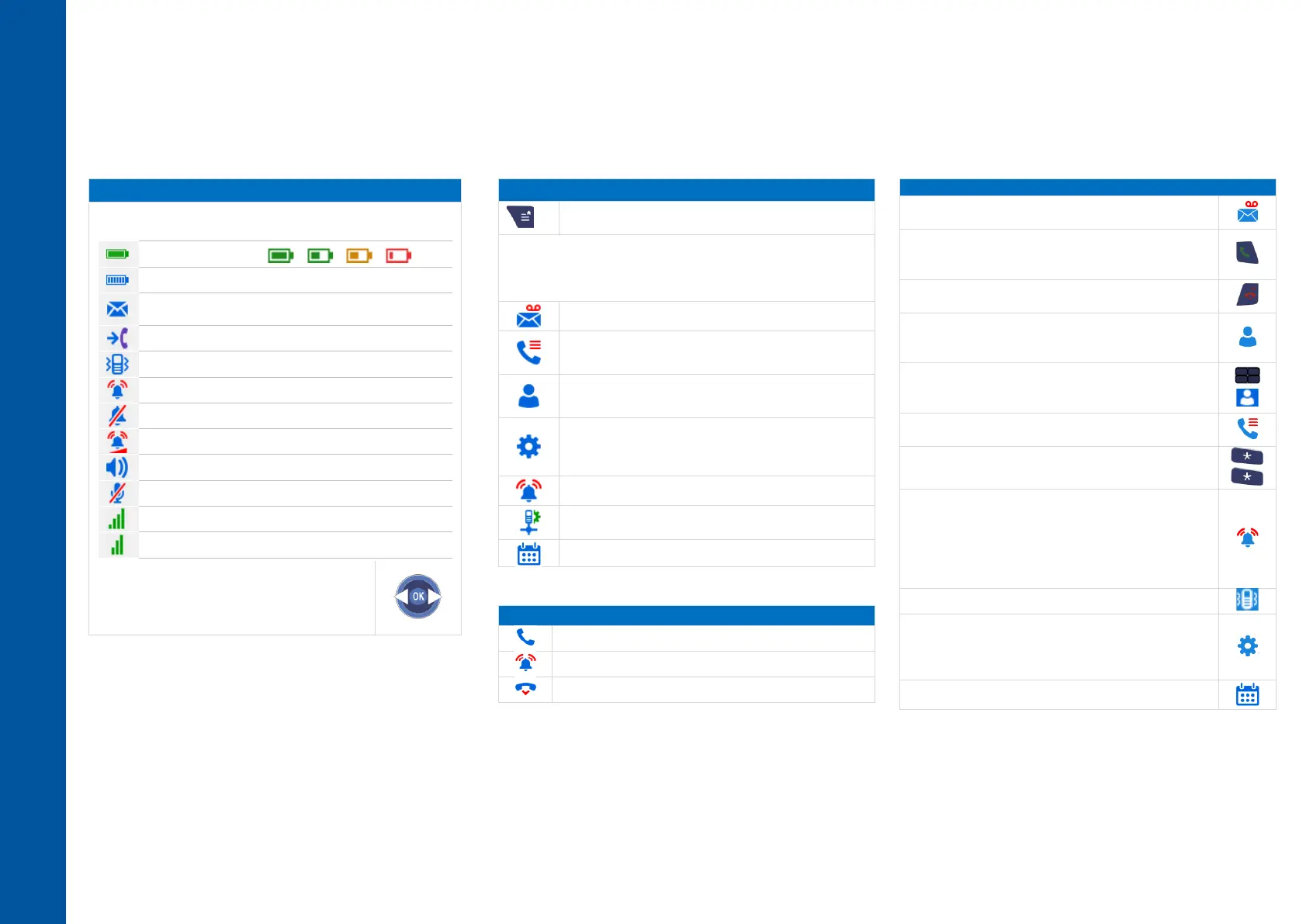
Battery charge level ( > > > ).
In charge (Flashing icon).
New event(s) - callback request, voice mail, text mail,
missed call.
Call diversion activated.
Progressive ringing enabled.
Loudspeaker on (in conversation).
Mute on (in conversation).
Radio reception quality - Normal power mode.
Radio reception quality - 50 mW Power mode.
Access MENU. It provides access to all the functions
available on your system.
Icons depend on the connected system. Some icons may not be
displayed on your phone. All icons are described in their
unselected state. When selected, the icons are displayed in
purple.
Messages
Consult and send voice and text messages.
Call log
Access the log of all incoming, outgoing, and missed
calls.
Contacts
Manage your personal directory and access the
company directory.
Settings
Access the general settings such as auto keys lock,
screensaver, dock settings, language, time and date,
handset name, etc.
Audio settings
Access the ringing, key sound and warnings settings.
Install (password protected).
Installation.
Access the messaging portal.
Consult and send voice and text messages.
Answered incoming calls.
Redialing (long press).
Send the call.
Disabling the ringer.
End the call.
Calling from your personal directory (PersSpDial).
Calling your caller by name (company directory).
Programming your personal directory (PersSpDial).
calling using speed dial key (long press on the speed-
dial key (1 to 9).
Speed dial management (long press on softkey).
Call from call log (All incoming, outgoing, missed or
unanswered calls are displayed in the call log).
Audio settings (Vibrate/Ring, Ascending ringing, Key
sound, Message sound, Coverage warning, Charger
warning, Low bat. warning, Headset mode, AGC, Ring
Shortcut)
Choosing your melody.
Adjusting the ringer volume.
Access the ringer and vibrate adjustment feature.
Selecting language.
Access the handset settings menu (Handset name,
Automatic keylock, Screensaver, Dock settings, Auto
answer
Programming an appointment reminder.












 To Previous Page