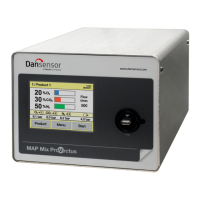
The Dansensor® MAP Mix Provectus is a proportional gas mixer designed for precise gas mixing and pressure monitoring in various industrial applications, including packaging machines and welding. It supports 2-gas or 3-gas combinations using Ar (optional), O2, CO2, N2, and Air. The device is known for its user-friendly interface and high precision, even in challenging conditions that typically affect other gas mixers. When combined with the Dansensor® MAP Check 3 gas analyzer, it can replace older purging systems like the TGC-2, offering similar functionality by allowing the MAP Check 3 to control the mixer.
Function Description
The core principle of the MAP Mix Provectus relies on Mass Flow Controllers (MFCs). Each gas line in the mixer is equipped with an MFC that controls the flow of its respective gas. The desired mixture is programmed via software, and each MFC adjusts its flow proportionally to achieve the required gas blend. For example, to achieve a total flow of 500 l/min with 30% CO2 and 70% N2, the software calculates the necessary flow for each gas (150 l/min CO2 and 350 l/min N2) and sets the MFCs accordingly.
The gas mixer can operate in two primary modes: "Flow" and "Buffer."
- "Flow" mode: In this configuration, the mixer directly feeds gas into a line within the packaging machine. The built-in pressure sensor in this mode is solely for monitoring the output pressure and does not have a control function.
- "Buffer" mode: Typically used with vacuum packers, this version feeds gas into a buffer tank, from which the packaging machine draws its gas supply. The built-in pressure sensor in this mode is crucial for maintaining the set buffer tank pressure. It is recommended that the buffer tank has a separate connection for the pressure sensor. If not, a connection should be established on the inlet string as close to the buffer tank as possible. It is critical to ensure that the gas outlet is never blocked or restricted in front of the buffer tank.
The pressure drop across the gas mixer is significantly lower compared to traditional mechanical mixers. This design ensures maximum utilization of the input gas pressure ranges and allows operation at lower input pressures, depending on the back pressure at the output. Each gas line is also equipped with a pressure sensor (PS). In the event of low gas supply pressure, an "Alarm" signal is triggered to alert the user. If the input pressure exceeds minimal or maximal functional levels, a "Fault" relay is activated, which can be used to stop the packaging machine.
The device can be used as a "Stand-Alone" version with a 5-inch touch panel color display for intuitive operation, or as a "Black-Box" version without a user interface, specifically designed for cost-effective automated machine control, relying solely on external control and maintenance.
Important Technical Specifications
- Mixer Size: 192 x 230 x 375 mm (H x W x D)
- Mixer Weight: 12.0 - 14.0 kg
- Boxed Weight: 13.5 - 15.5 kg (depending on model)
- Mains Power: 100-264 VAC, 47-63 Hz
- DC Models: 24V DC available, range 19-36V DC input
- Power Consumption: 70W (2-gas) to 100W (3-gas), dependent on flow and configuration.
- Gas Inlet/Outlet: 3/8" BSW
- Pressure Sensor: 6/4 mm hose connector, for buffer tank pressure measurement
- Ambient Temperature (Operational): 0 to +45°C, < 95% RH, non-condensing
- Ambient Temperature (Storage): -10 to +60°C, < 95% RH, non-condensing
- Ambient Pressure (Operational): 900 hPa to 1050 hPa
- Gas Temperature: 0 to +50 °C
- Gas Inlet Pressure: 2 - 10 bar (relative to ambient)
- Flow Capacity:
- 2-gas: 12-1000 l/min (50/50% mix)
- 3-gas: 18-1500 l/min (34/33/33% mix)
- Typical 2-gas (60/40% mix): 15-833 l/min
- Typical 3-gas (70/20/10% mix): 60-714 l/min
- On 3-gas mixers, two channels can be combined to increase flow as 2-gas (70/30% mix): 20 - 1428 l/min
- Gas Flow per Gas String: 6 - 500 l/min (depends on inlet and back pressure)
- Mixer Settings: Range 0%, 2-100%
- Mix Accuracy: Typ. +/- 2% absolute in flow ranges above 50 l/min total output flow
- Gases Supported: Standard version: Dry inert gases O2, CO2, N2, and Air. Argon version: Standard version gases + Argon (Ar).
- Connectivity:
- Network/LAN: Ethernet 10/100 mbit/s Base-T with DHCP client or fixed IP
- RS232: 2 x D-SUB 9 DTE interface (male connector)
- USB: 1(2) x Host, USB 2.0 Connector type A, max. current 100 mA
- Machine I/O: D-SUB 25 male, cable supplied
- Analogue Input: 0-10V or 2-10V, 12bit res. (for MM8000 compatible mix setting)
- Conformity: CE, RoHS, China RoHS Phase 1 compliance, Food regulation 1935/2004.
Usage Features
- User Interface: "Stand-Alone" versions feature a 5-inch touch panel color display with intuitive icons and text messages for easy operation. "Black-Box" versions are externally controlled.
- Product Selection: Users can select from a fixed list of 10 products for mixing. Blue text indicates products with logged data.
- Start/Stop Control: The mixer can be started and stopped manually via the Start/Stop key on the main screen. If configured for external control, the packaging machine's signal dictates mixer operation, and the Start/Stop key is disabled.
- Analog Control: When set for analog control, the mix is managed by the packaging machine, disabling product selection on the mixer.
- Error/Warning Messages: Pop-up windows on the display (for "Stand-Alone" models) indicate errors or warnings, stopping the mixer for errors. "Black-Box" models use an indicator lamp (red for error, flashing for warning) and send signals to the packaging machine.
- Data Logging: The device logs data for selected products, which can be viewed, exported to a USB stick, or deleted. Data logging parameters are configurable in the General setup menu.
- Access Levels: The device operates with different access levels (User, Supervisor, Service) to control access to functions and parameter setup. Full access (Supervisor) requires a PIN code.
- Language Selection: The user can choose from several languages for the display and menus.
- Bridging Multiple Mixers: Up to three MAP Mix Provectus mixers (firmware V1.10 and above) of the same type (2-gas or 3-gas) and SW version can be bridged to achieve higher gas flows (up to 4500 l/min). One mixer acts as the "Master" and controls the "Slave" mixers. Bridged mixers do not support GasSave control by MAP Check 3 and can only be controlled as "Flow" or "Buffer" mixers.
Maintenance Features
- General Cleaning: All surfaces should be cleaned with a mild soap solution and a wrung cloth. Hard tools, abrasive materials, chlorinated solvents, acetic acid, or phosphoric acid should be avoided to prevent damage.
- Gas Inlet Filter Replacement: Gas inlet filters should be replaced regularly. This involves disconnecting the gas inlet hose and fitting, removing the old filter unit, mounting a new one with a gasket, and reattaching the hose and fitting.
- Air Inlet and Outlet Dust Filter Replacement: Clogged air filters can lead to overheating. These should be replaced or cleaned regularly, especially in dusty environments. The process involves releasing the ventilation grille, accessing the filter inside, and replacing it. Screws holding the fan inside the grille should not be removed.
- Data Export/Import: Log data, errors, events, and device settings can be exported to or imported from a USB memory stick for backup or cloning device settings.
- Error Log: A list of recent errors and warnings is available in the Diagnostics menu, aiding in troubleshooting.
- Gas Consumption Reset: Counters for gas consumption can be reset in the General setup menu.
- PIN Code Management: The Supervisor PIN code can be changed for security.

 Need help?
 General



 To Next Page