NiteHAWK Internet Jukebox Adding Microphones
22022613 Rev B 4-1
Section: 4 Adding Microphones
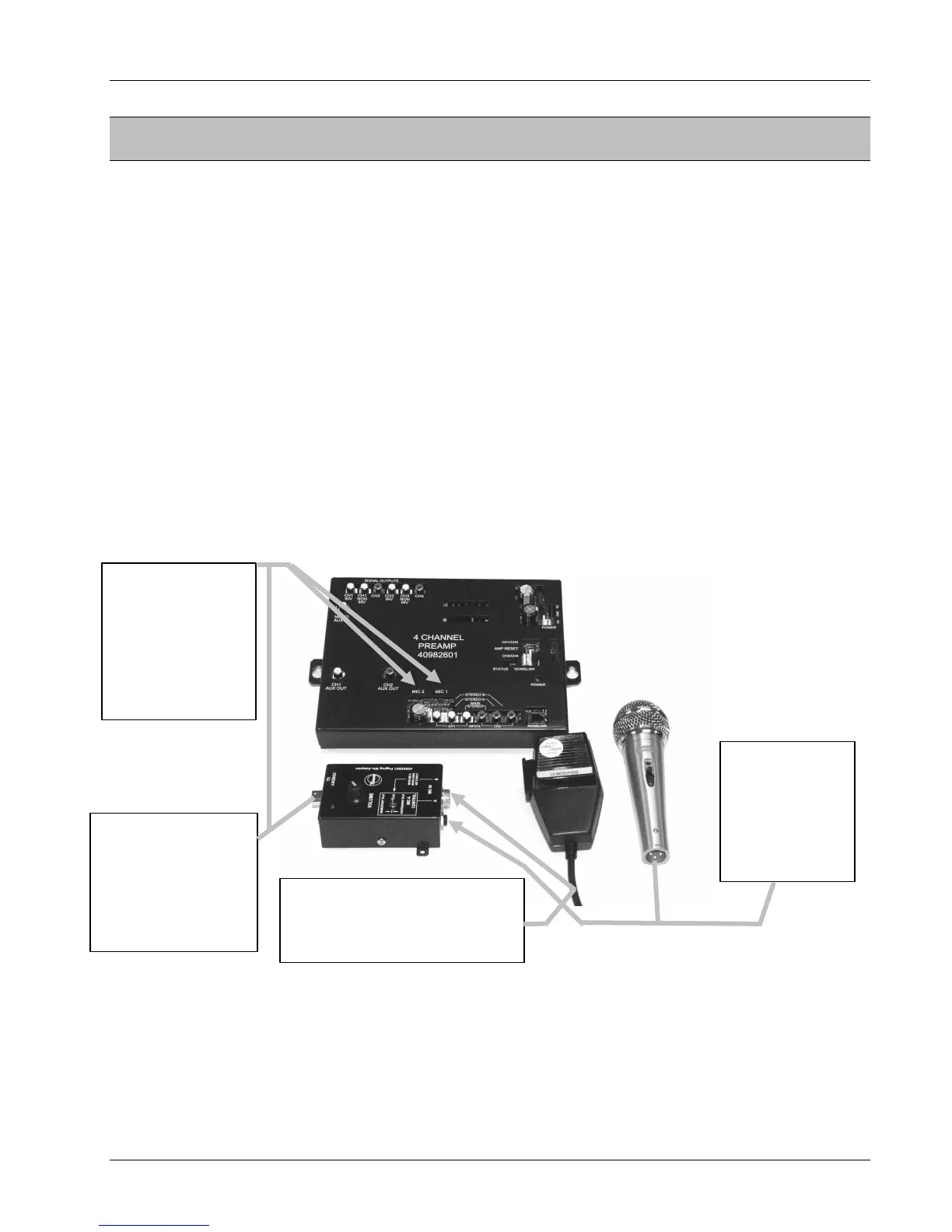
Up to two microphones can be plugged into the 4-Channel Pre-amplifier and used for paging. Microphones’
can be Rowe custom design, CB or “Rowe CB”, low-level balanced, low level unbalanced, or Rowe wireless.
NOTE 1: A 26679501 Paging System is needed to use low-level balanced and unbalanced
microphones.
NOTE 2: MIC 1 input has the standard voice activated and switch activated circuitry. MIC 2 input
has only the switch activated circuitry.
Rowe custom design microphones are no longer available but existing ones have a momentary PUSH to
TALK switch, a volume control, and plug directly into the 4-Channel Pre-amplifier connectors MIC 1 or MIC 2
via a Rowe 50-foot microphone cable.
The following Paging System Kits are available: The 26679501 Paging System with Hand-Held Microphone
contains: a Rowe CB type microphone that does not have a volume control, a Paging Microphone Adapter
that has a volume control, a Rowe 50-foot microphone cable that connects between the Paging Adapter and
the 4-Channel Pre-amplifier, and installation and operating instructions.
The 30995201 Paging System with Hand-Held Wireless Microphone allows wireless paging and its receiver
plugs into the 4-Channel Pre-amplifier connectors MIC 1 or MIC 2. The wireless receiver has an output level
adjustment that’s accessed through a hole in the cover. Use a small flat bladed screwdriver to adjust it.
Paging Mic Adaptor
Figure 4–1 – Microphone Connections
Adding Microphone(s)
The jukebox factory settings have all microphones unmuted and routed to the four channel signal outputs and
AUXILIARY OUT. For assistance contact AMI Technical Service.
Connect Rowe
Microphones that
have a volume
control, or the
wireless receiver
connector, into
MIC 1 or MIC 2
connectors.
Connect low-
level balanced
or unbalanced
microphones
into A INPUT of
Paging Mic
Adaptor.
Connect cable
between the
Paging Mic Adaptor
“TO JUKEBOX”
connector and the
MIC 1 or MIC 2
connector.
Connect a Rowe CB or other
CB Microphone into “B INPUT”
Connector of Paging Mic
Adaptor.


 To Next Page