NiteHAWK Internet Jukebox Routine Service
22022613 Rev B 6-3
Air Filter
Filtered cooling air is provided for the components inside the NiteHAWK via a fan mounted on the
bottom of the jukebox. The speed of this fan is controlled by the Computer Core – if the
temperature is moderate, the fan runs at a low speed, but as the temperature inside the box rises,
the fan is driven faster.
The air filter will need to be washed periodically. The frequency will depend on the conditions at the
site, so it is best to check the filter condition at least once a month. The filter is located on the
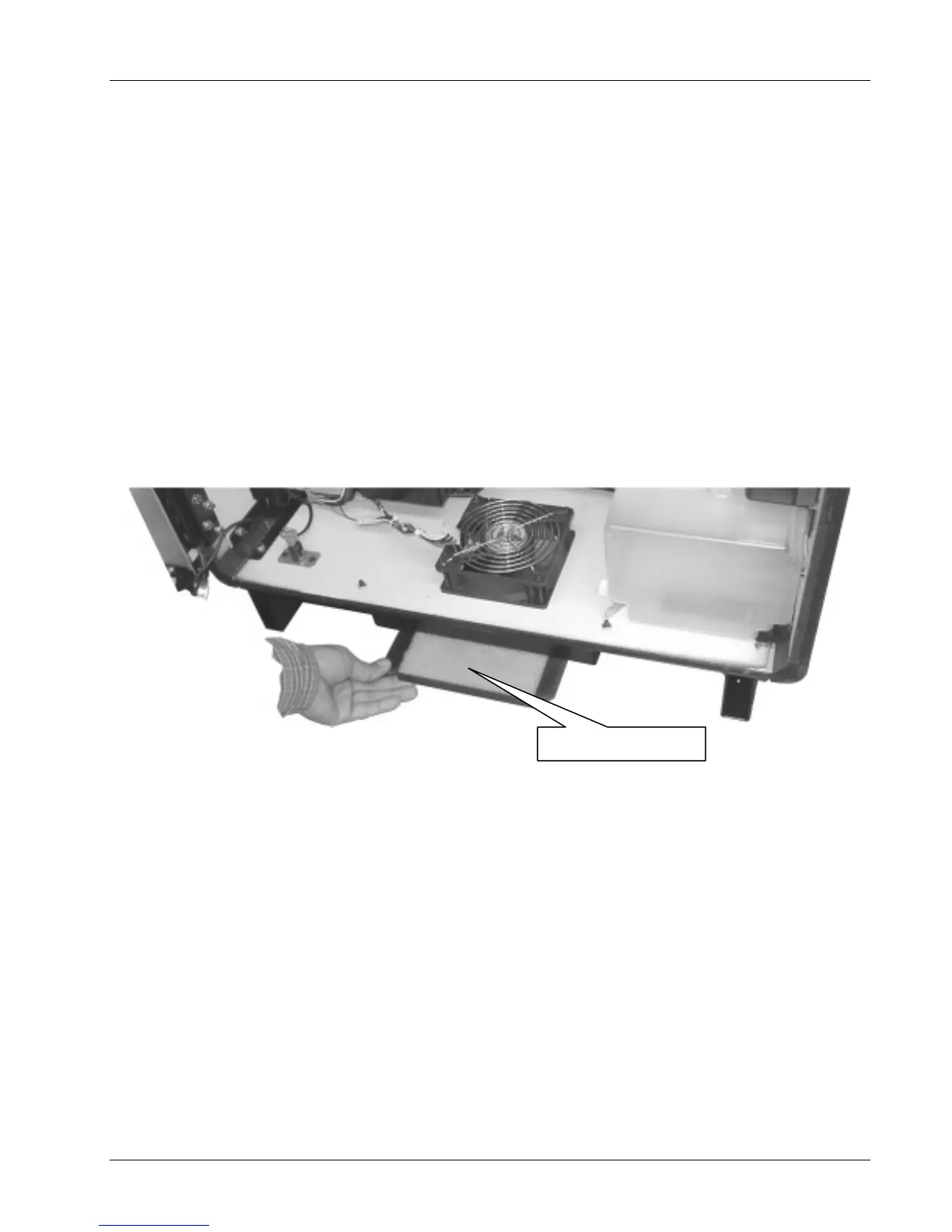
bottom of the NiteHAWK as shown In Figure 6–3.
Remove and clean the filter as necessary. To do this, remove the frame by sliding it forward as
shown in Figure 6–3. Remove the filter pad from the frame. Use warm water and a mild detergent
to clean the filter. Rinse thoroughly and allow it to dry. One side of the filter has been glazed to
make it easier to slide in and out of the frame. The glazed side should face down. Slide frame and
pad back until frame stops against filter mounting bracket back wall.
Figure 6–4 – Filter Removal
Glazed Side Down


 To Next Page