LED Lighting & Bill Acceptor NiteHAWK Internet Jukebox
5-4 22022613 Rev B
Bill Acceptor Settings
The NiteHAWK uses either a Coinco® Vantage™ or a MEI® AE2611 Bill Acceptor. In order to
function properly in the NiteHAWK, these Bill Acceptors must be configured as follows:
Coinco Vantage Setup
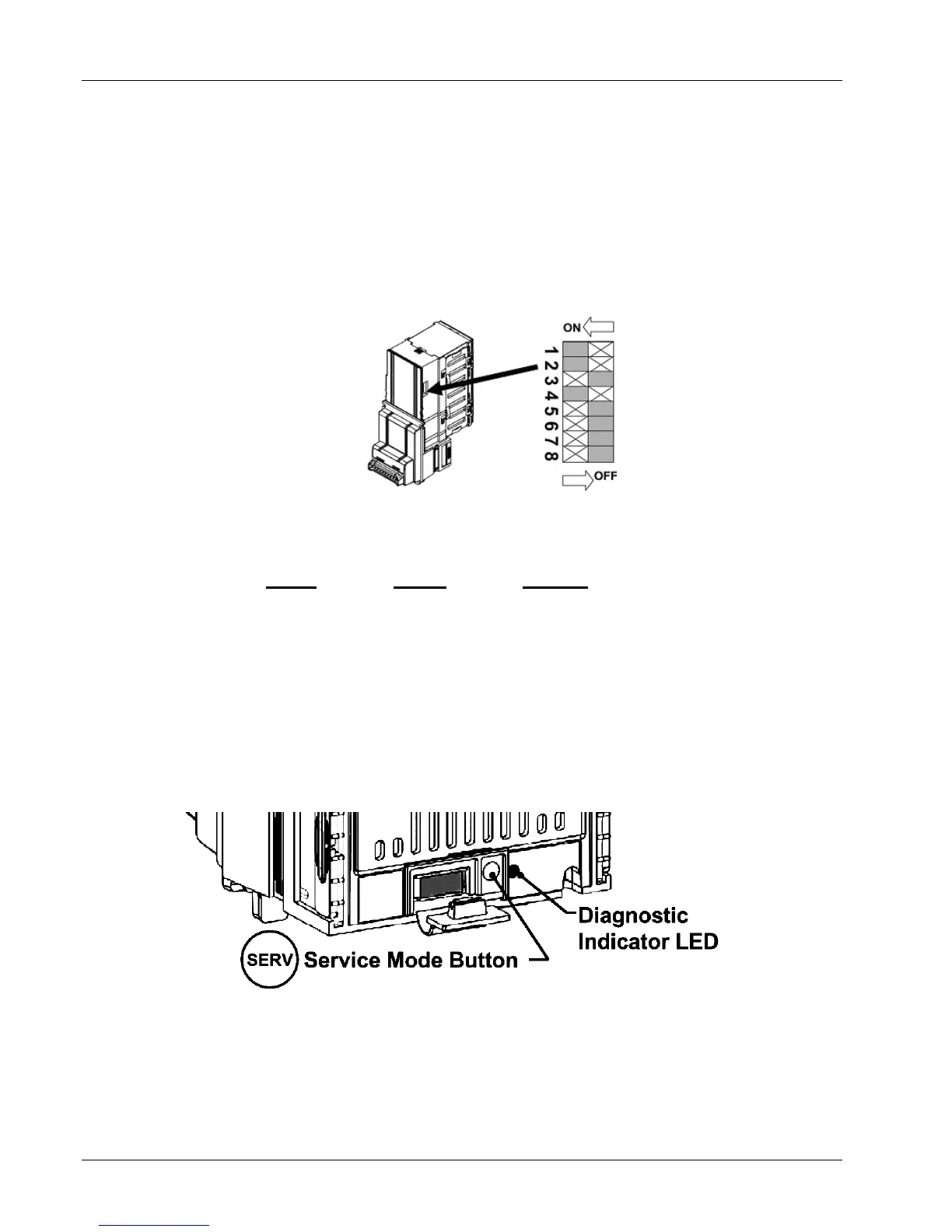
Figure 5–3 shows the location and orientation of the DIP Switches.
Figure 5–3 – Coinco Vantage DIP Switches
Factory Dip Switch Settings are:
Switch Setting Remarks
1&2 ON Fast Pulses
3 OFF 1 Pulse per Dollar
4 ON Always Enabled
5 OFF Pulse Mode
6,7,& 8 OFF For future use by Coinco
In addition, the Vantage has several other Configuration Settings which are made via an electronic
menu system. Operation and settings options are described as follows:
1. To enter the Configuration More, locate the Service Mode Button and Diagnostic Indicator LED
as shown in Figure 5–4
.
Figure 5–4 – Service Mode Button and Diagnostic Indicator LED
2. Press and hold the Service Mode Button until the Diagnostic LED is blinking a 2-flash pattern
.
3. Depress the button on the bottom of the Bill Acceptor to release the Lower Housing from the
assembly as shown in Figure 5–5. Slide the Lower Housing out of the frame.


 To Next Page