Patient monitor User’s manual
Chapter 17-3
sensors. Dry-abrade the skin gently using the skin prep product or with a dry
wash cloth or gauze, to remove the non-conductive skin layer.
Alcohol is not recommended as a skin cleanser; it leaves a film layer
that may cause high sensor impedance. If alcohol is used, ensure 30
The performance of the CSM is only guaranteed by the manufacturer
when the CSM Procedure Pack is used.
If skin rash or other unusual symptoms develop, remove sensors from
Change sensors every 24 hours to check skin integrity.
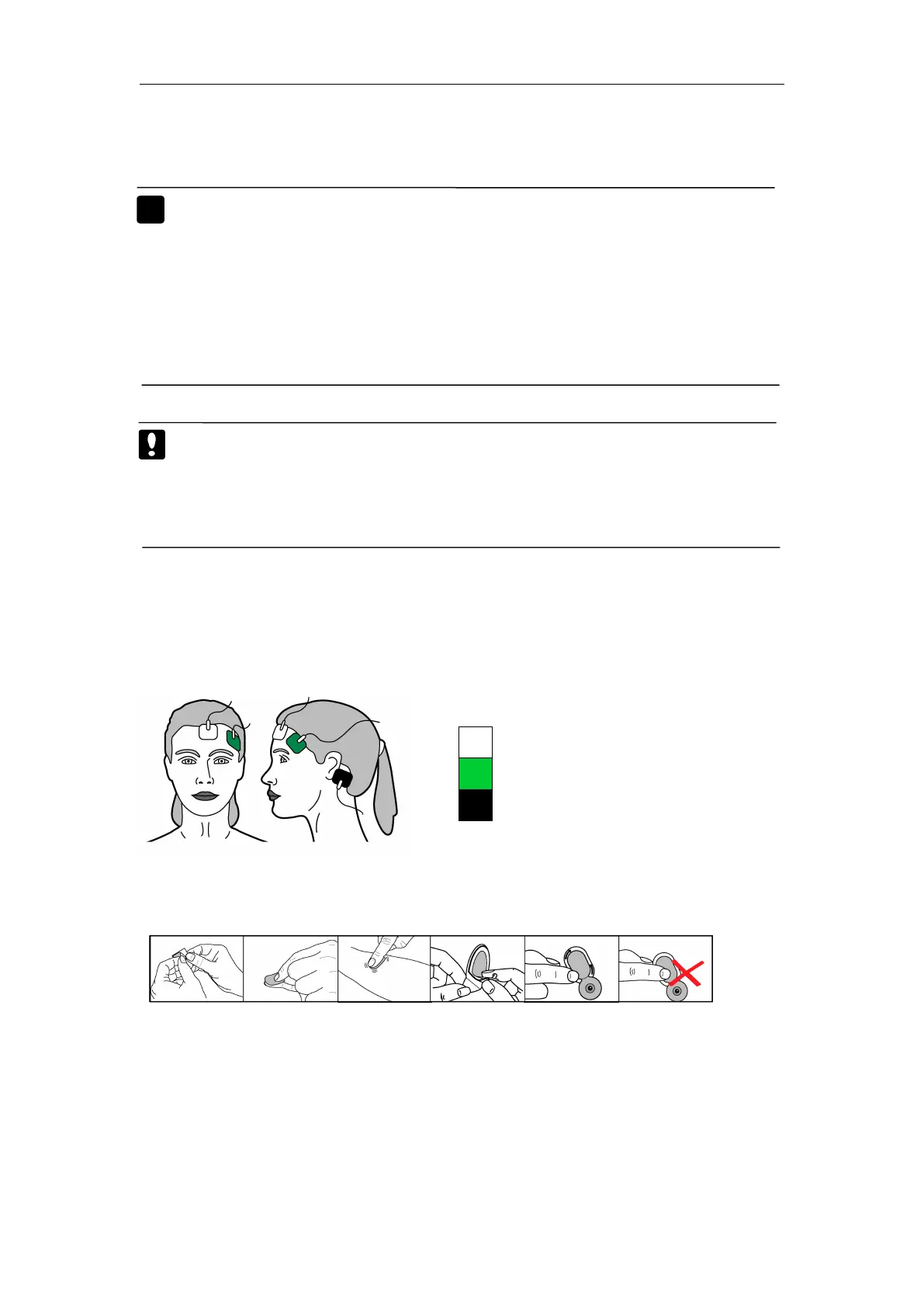
17.3.2 Placing the Sensors
Position the three sensors from your CSM Procedure Pack according to
the figure below:
The figure above shows a left-sided setup; right-sided is also acceptable.
Place sensors at the side furthest from the surgical area.
The advanced signal processing of the monitor ensures that a deviation in
the positioning of the sensors up to 2 cm (0.78 in) has no significant influence
on the index. However, it is recommended to place the sensors on an area of
the skull where only a few muscle fibres are present in order to achieve the
best quality signal.



 To Next Page