23
SETTING
- Access the selected menu
- Confirm changes and go back to previous menu
- Go back to previous menu
- Quit without confirming the changes
Pressed in sequence:
- Scroll the pages of a menu
- Change a value (increase)
Move the cursor during a change (press a
few times)
PROGRAMMING KEYSPROGRAMMING KEYS
12.3 Setup management
The VISIO BLC settings can be loaded or saved on USB* pendrive so as to reconfigure the device if necessary, solve problems or configure
another VISIO BLC without repeating all operations manually.
Once installation is completed, and you have checked VISIO BLC correct operation, we recommend storing the whole
configuration onto USB pendrive. To be able to use the following functions it is necessary to insert a USB pendrive in the
relevant port at the bottom of BLC VISIO.
*USB pendrive not included in the kit; the USB must be formatted in FAT32 mode.
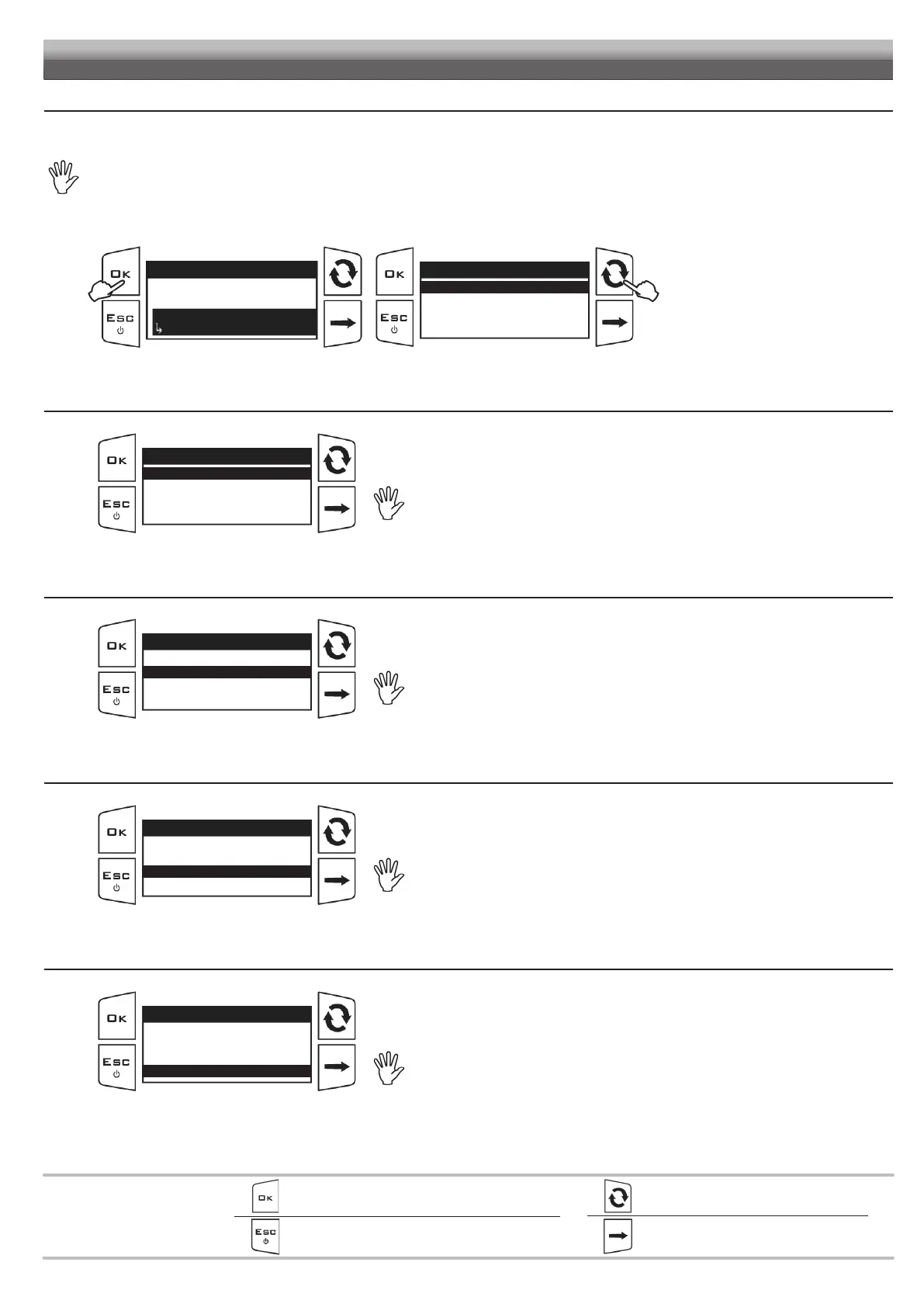
Fig. 57
Setup menu
BLC settings
Options
Setup management
...
1
Setup management
Save VISIO setup
Load VISIO setup
Save IBX setup
Load IBX setup
2
1
Access the Setup menu > Setup
management
.
2 Select the desired control.
Use of the keys at the bottom of the page.
12.3.1 Save VISIO setup - SETUP.BIN
Fig. 58
Setup management
Save VISIO setup
Load VISIO setup
Save IBX setup
Load IBX setup
It allows saving VISIO BLC (SETUP.BIN) configuration file on the USB pen drive: it will be
possible to load it again any time the same settings need to be retrieved.
If a SETUP.BIN file is already present in the USB pendrive root directory, the file will
be overwritten.
12.3.2 Load VISIO setup - SETUP.BIN
Fig. 59
Setup management
Save VISIO setup
Load VISIO setup
Save IBX setup
Load IBX setup
It allows selecting a configuration file saved in the USB pendrive and to set VISIO BLC again.
WARNING
By loading the SETUP.BIN file contained in the USB pendrive onto the VISIO BLC,
all current settings will be lost. The SETUP.BIN file can be loaded only if it is saved
in the USB pendrive root directory.
12.3.3 Save IBX setup - CFGLEVEL.DAT
Fig. 60
Setup management
Save VISIO setup
Load VISIO setup
Save IBX setup
Load IBX setup
It allows saving the IBX100 (CFGLEVEL.DAT) configuration file on the USB pendrive: it will be
possible to load it again any time the same settings need to be retrieved.
If a CFGLEVEL.DAT file is already present in the USB pendrive root directory, the
file will be overwritten.
12.3.4 Load IBX setup - CFGLEVEL.DAT
Fig. 61
Setup management
Save VISIO setup
Load VISIO setup
Save IBX setup
Load IBX setup
It allows selecting a setup file saved in the USB pendrive and to set the IBX100 unit (through the
BLC VISIO) again.
WARNING:
By loading the CFGLEVEL.DAT file from the USB pendrive to the IBX100 unit, all
current settings will be lost. The CFGLEVEL.DAT file can be loaded only if it is
saved in the USB pendrive root directory.


 To Next Page