15
SETTING
- Access the selected menu
- Confirm changes and go back to previous menu
- Go back to previous menu
- Quit without confirming the changes
Pressed in sequence:
- Scroll the pages of a menu
- Change a value (increase)
Move the cursor during a change (press a
few times)
PROGRAMMING KEYSPROGRAMMING KEYS
12.1.1 Basic settings - WIZARD
Fig. 26
BLC settings
Basic settings
...
Boom settings
Parameters adjust.
1
Basic settings
Start procedure...
Status: OK!
Number of sensors
External sens. [X]
2
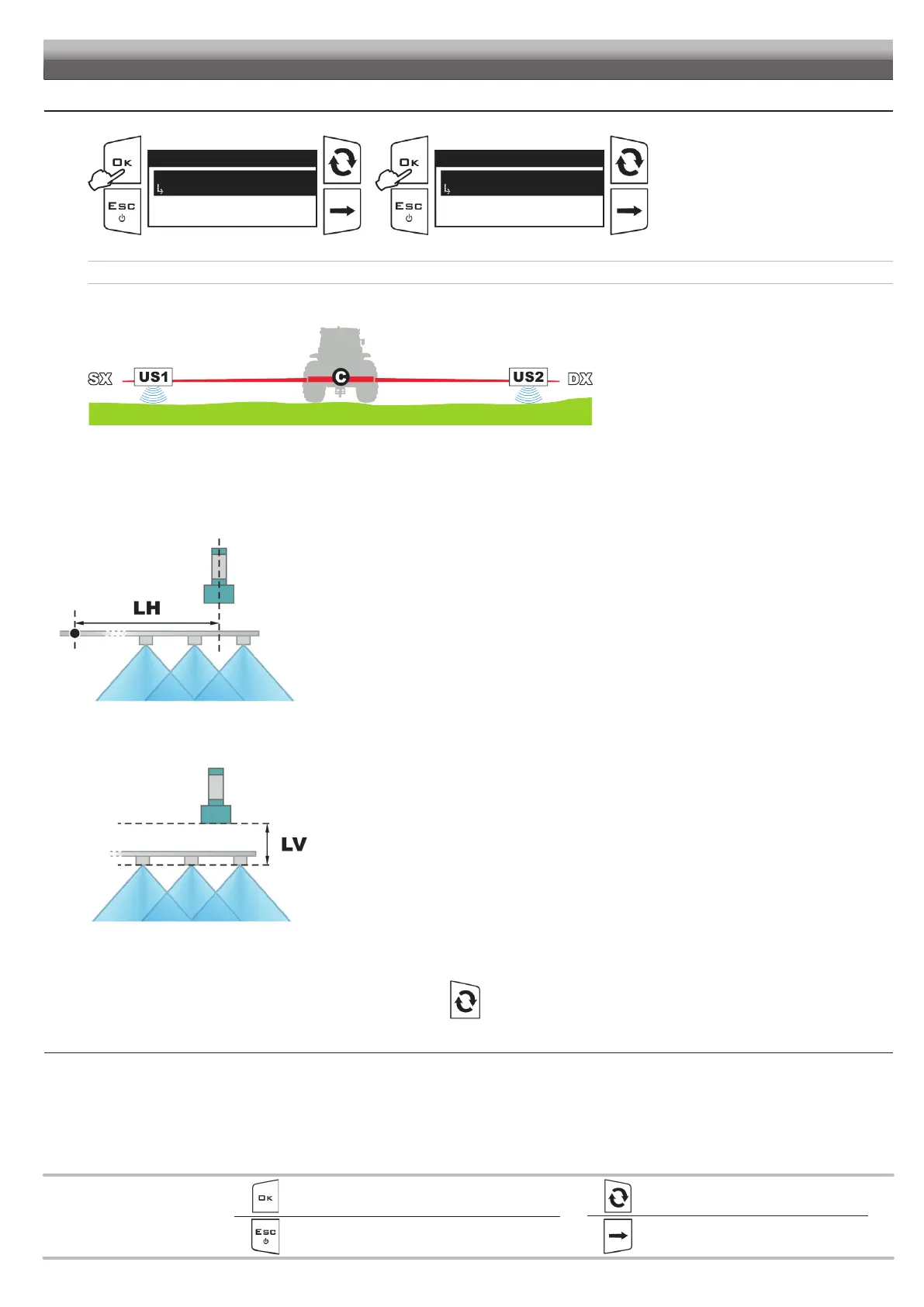
Access the BLC settings menu.
1 Press to access the Basic settings
menu.
2 Press OK to start the wizard.
VISIO will guide you during the
configuration: follow the steps and select
the desired options. OK = Next step.
You can view the set values by scrolling the items of the Basic settings menu. Use of the keys at the bottom of the page.
SYSTEM WITH 2 SENSORS
Fig. 27
• Number of sensors: 2 (US1 + US2). Number of ultrasonic sensors used by the BLC control.
• External sens. [X]: value relating to US1 + US2 (pair of external sensors).
BOOM BOOM
CENTERCENTER
ULTRASONIC ULTRASONIC
SENSORSENSOR
Fig. 28
Horizontal distance LH1 between the longitudinal axis of EXTERNAL sensors and boom center (Fig. 28).
Enter the value in the corresponding menu only once:
it is identical for the same pair of sensors.
• External sens. [Y]: value relating to US1 + US2 (pair of external sensors).
SENSOR SENSITIVE SENSOR SENSITIVE
SURFACESURFACE
NOZZLE OUTLETNOZZLE OUTLET
Fig. 29
Vertical distance LV1 between the sensitive surface of EXTERNAL sensors and nozzle outlet (Fig. 29).
The sensitive surface must be positioned ALWAYS HIGHER than the outlet (LV > 0 mm).
Enter the value in the corresponding menu only once:
it is identical for the same pair of sensors.
• HL Button: select the device that will give the headland control HL.
External (external switch) or Keyboard (Visio keyboard, key ).
CONTINUES > > >


 To Next Page