CYC5000 User Guide www.arrow.com
Page | 62 March 2023
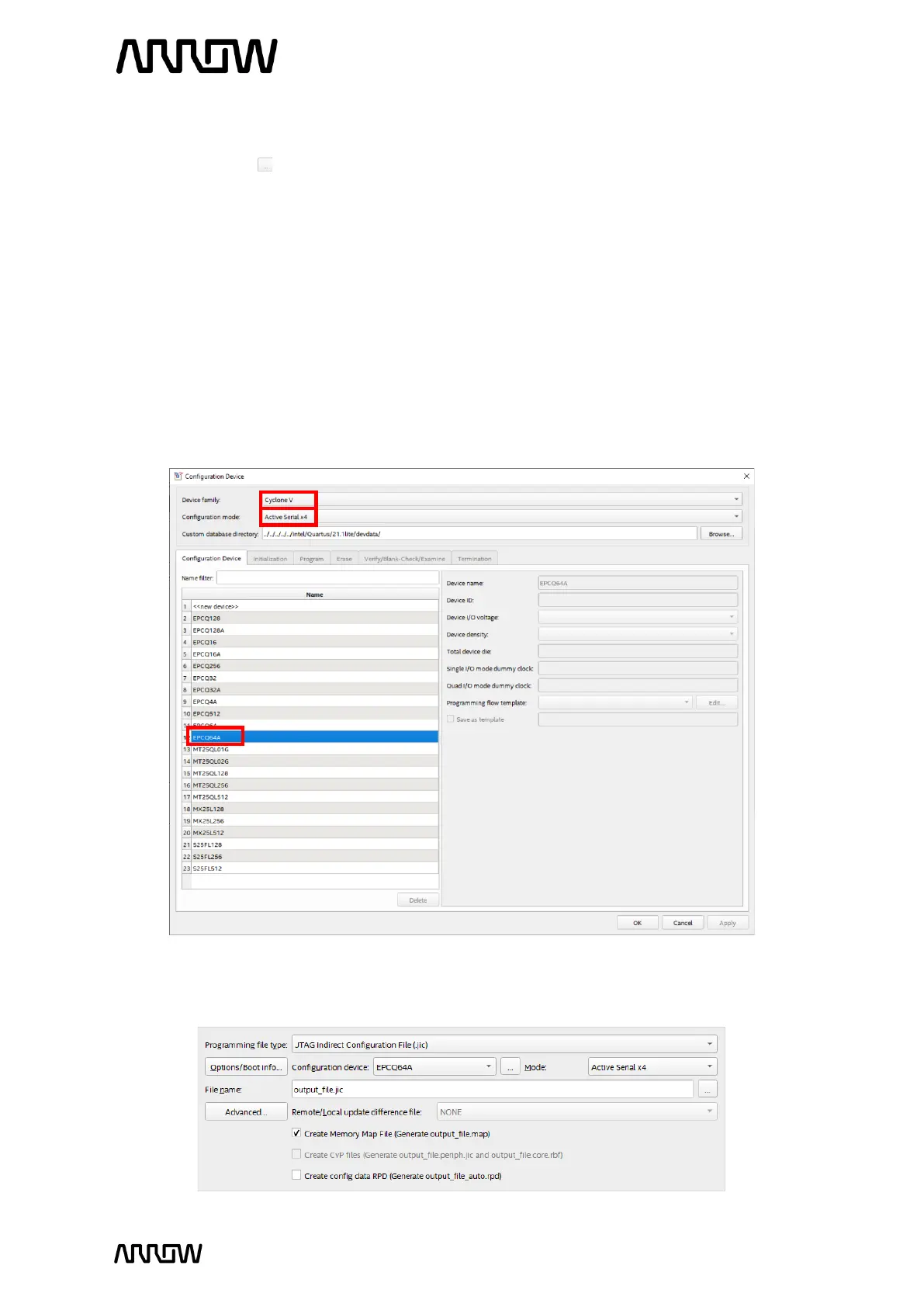
6.2.1.2 Set the programming file type to JTAG Indirect Configuration File (.jic).
6.2.1.3 Click on the button for configuration device.
6.2.1.4 Select Cyclone V for the Device family, Active Serial x4 for Configuration mode, and
choose EPCQ64A from the Configuration device tab.
Although the CYC5000 board has a Winbond QSPI flash memory, the use and control of
this memory are completely identical to Intel EPCQ-A. Accordingly, instead of adding a
new Configuration device to Quartus, simply selecting EPCQ64A is sufficient.
The Active Serial (AS) configuration scheme is supported in the 1-bit data width while AS
x4 supports a 4-bit of data width. The Cyclone V FPGA and the QSPI flash memory on the
CYC5000 board support both configuration schemes, but AS x4 allows for much faster
configuration, which can significantly reduce the start-up time.
6.2.1.5 Click “OK”. Now the output programming file settings should look like this:



 To Next Page