11
⑯
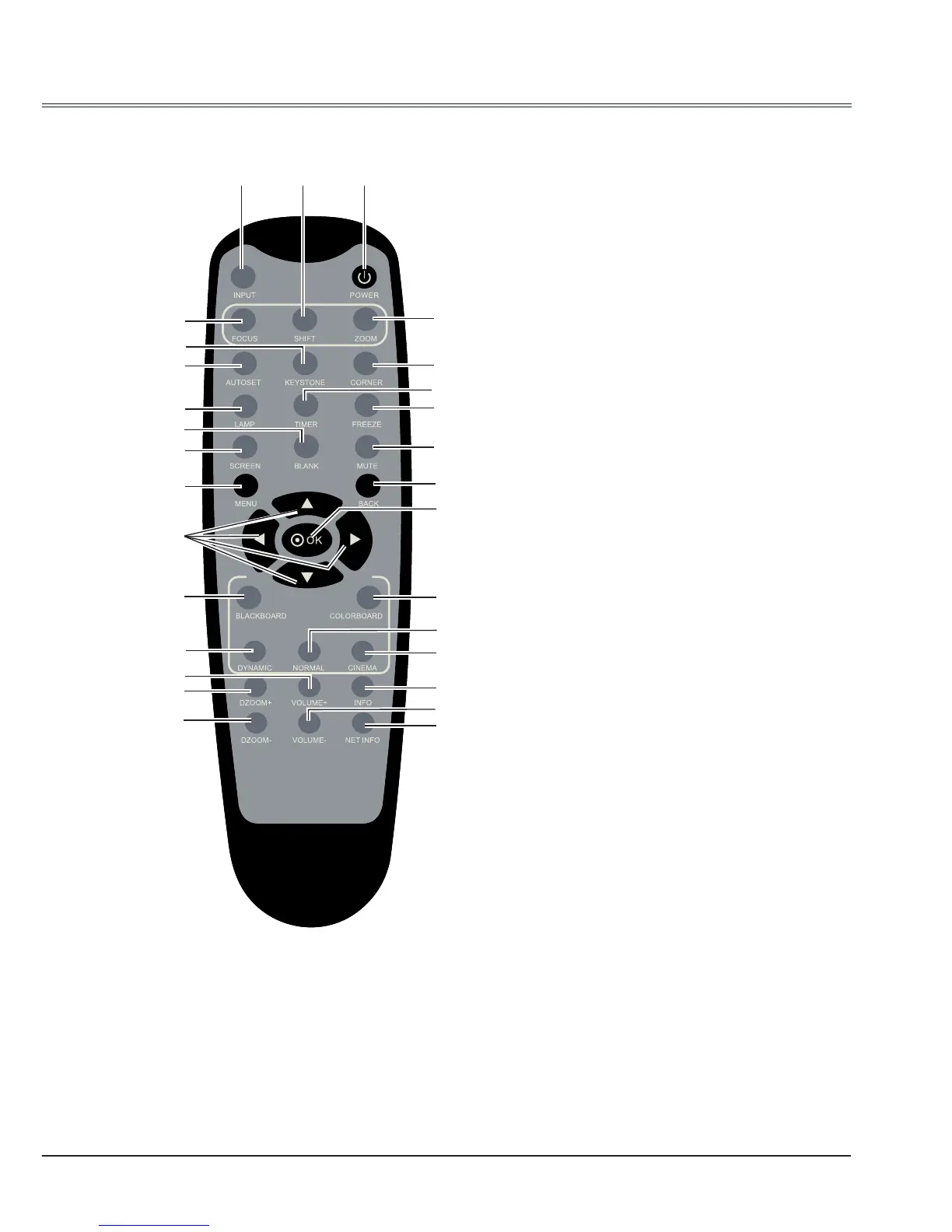
MENU button
Open or close screen menu.
⑰
SELECT button
Sselect an item in the menu.
⑱
Pointer
button
- Select item or adjust data in screen menu.
- Select the image display area in digital
zoom mode.
⑲
COLORBOARD button
Select the color of project board.
⑳
BLACKBOARD button
Select Blackboard(Green) as blackground.
㉑
NORMAL button
Select normal image mode.
㉒
DYNAMIC button
Select dynamic image mode.
㉓
CINEMA button
Select cinema image mode.
㉔
VOUME + button
Increase the volume level.
㉕
INFO. buttom
Display the projector information.
㉖
DZOOM + button
Select the digital zoom + mode.
㉗
VOUME - button
Decrease the volume level.
㉘
DZOOM- button
Select the digital zoom - mode.
㉙
NET INFO button
Display the network information, such as
MAC address, IP address, SSID/ESSID etc..
Part names and functions
Remote Control
⑱
⑲
㉑
㉗
㉓
㉕
㉙
①③ ②
④
⑧
⑩
⑭
⑯
⑥
⑫
⑦
⑬
⑮
⑪
⑤
⑰
⑳
㉒
㉖
⑨
㉘
㉔



 To Next Page