8
Part names and functions
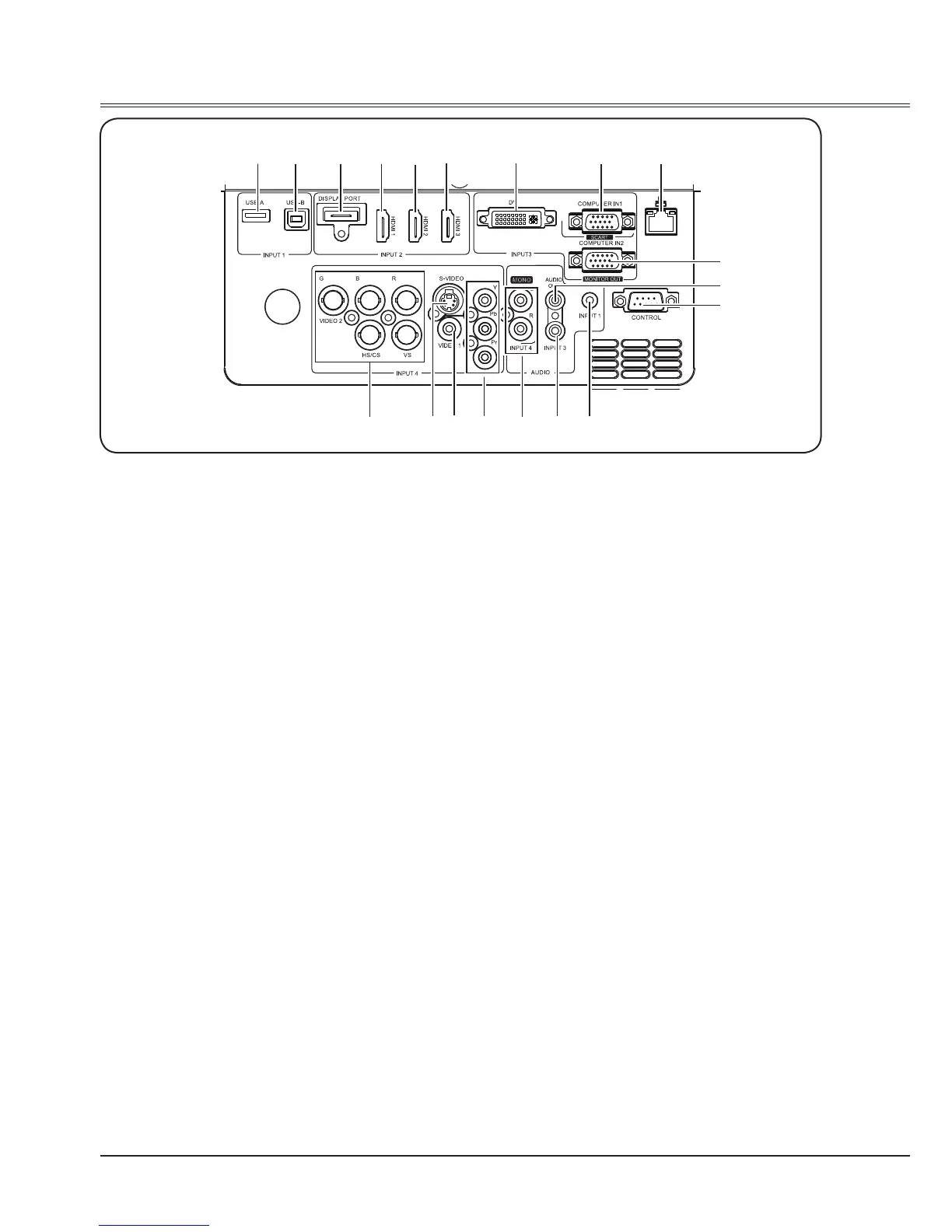
Terminals
①
②
③ ④ ⑤ ⑥ ⑦ ⑧
⑨
⑩
⑪
⑰⑱
⑲
⑯ ⑮
⑭ ⑬
⑫
①
USB-A port
Connect the A type USB device (USB ash
disk) to this port.
②
USB-B port
Connect B type USB device between
projector and computer with B type USB
cable to project the images in computer.
③
DISPLAY PORT
Connect DP output signal to this port.
④
HDMI 1
Connect digital output signal from HDMI to
this terminal.
⑤
HDMI 2
Connect digital output signal from HDMI to
this terminal.
⑥
HDMI 3*
Connect digital output signal from HDMI to
this terminal.
⑦
DVI
Connect the DVI digital output to this port.
⑧
COMPUTER IN1/SCART
connect a computer or SCART output to this
terminal.
⑨
LAN terminal
Connect the wired LAN cable to this port.
⑩
COMPUTER IN2/MONITOR OUT
- Connect computer output to this terminal.
- Output the analog signal form
⑧
or
⑲
to
other monitor.
⑪
AUDIO OUT
Output audio from INPUT 1/3/4. The internal
speaker of the projector doesn't work while
connecting audio cable to this jack.
⑫
CONTROL
When using RS232 to control the projector,
please connect the serial control line to this
terminal.
⑬
INPUT1 audio input jack
Output the audio from
①
.
⑭
INPUT3 audio input jack
Output the audio from
⑦
,
⑧
or
⑩
.
⑮
INPUT4 audio input /MENO jack
-Output the audio from
⑯
,
⑰
,
⑱
or
⑲.
-For a mono audio signal (a single audio
jack), connect it to L(MONO) jack.
⑯
Y/Pb/Pr
- Connect component video signal to this
jack.
⑰
VIDEO 1
Connect video signal to this jack.
⑱
S-VIDEO
Connect S-Video signal to this jack.
⑲
BNC/VIDEO 2
- Connect RGBHV signal to R,G,B,HS and VS jacks.
- Connet composite video signal to G jack.
* Some model has no this terminal.



 To Next Page