14
Installation
Lens installation
Follow the instructions below to install the lens upon replacing or using the provided lens. For the
specication of projector lens, contact your dealer.
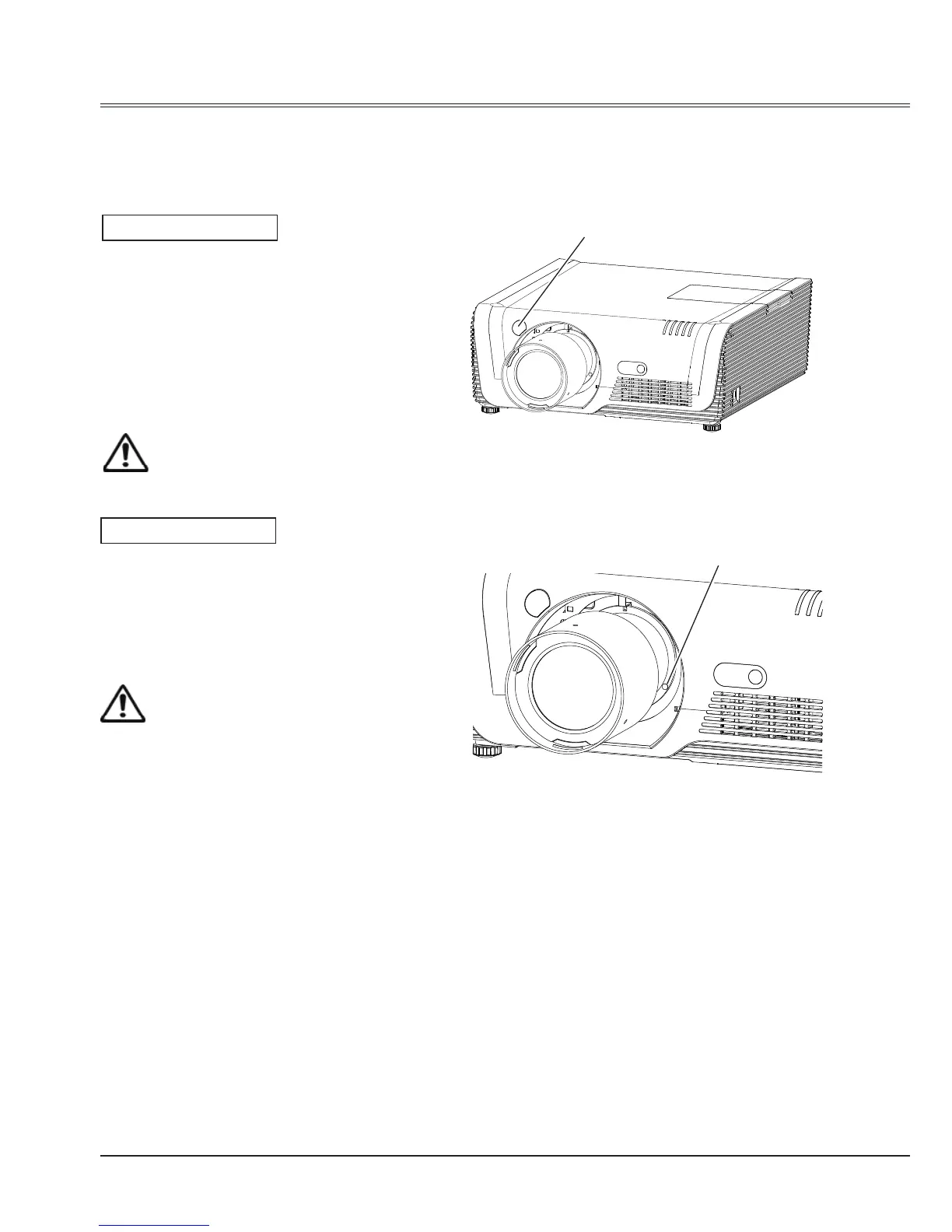
Removing the lens
Installing the lens
1 Shift the lens to the center with the lens shift
function.
2 Turn off the projector, and unplug the AC
power cord.
3 Press and hold the lens release button
on the top counterclockwise until the lens
cannot be rotated. Draw it out slowly from
the projector.
1 Remove the lens decorator.
2 Align the red point on the lens with that on
the projector to install the lens.
3 Rotate the lens clockwise slowly until it
clicks.Make sure that the lens is the
projector.
Caution
Do not drop the lens when handling.
Caution
While installing the lens, do not hold the
release button.
Lens release button
Red point
Notes on lens installation
● Do not touch or remove any part except lens and its relative part. This may cause a malfunction,
electric shock, re or other hazards.
● Make sure the mode of the lens is compatible with your projector before installing or replacing
the lens.
● For information about the lens and its installation, contact the local dealer.



 To Next Page