9
Part names and functions
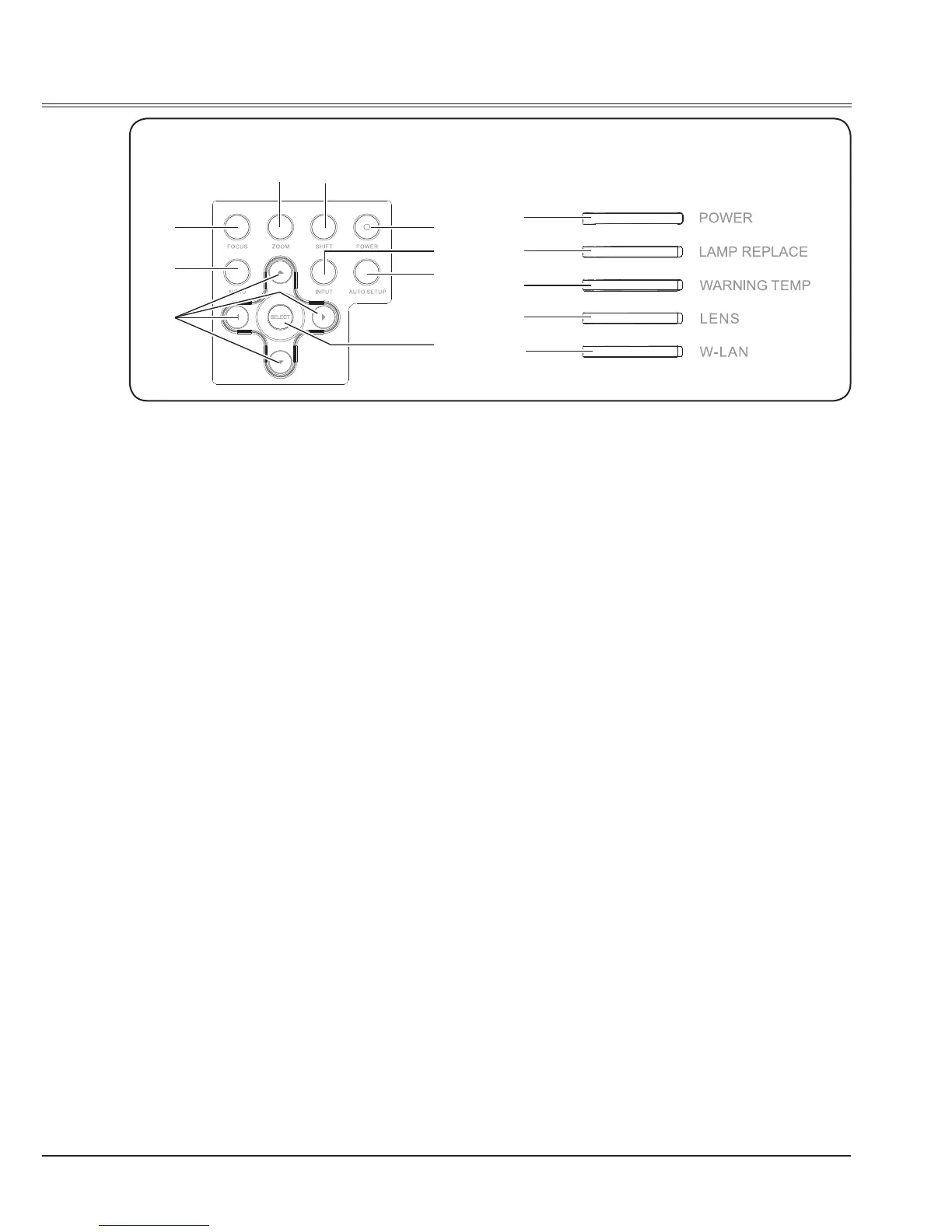
Side control Indicators
①
②
④
⑥
⑦
⑨
⑩
⑪
⑫
⑬
⑭
③
⑤
⑧
①
FOCUS button
To adjust the focus.
②
MENU button
To open or close the screen menu.
③
Point ▲▼◄► buttons
- Select an item or adjust the value in the
On-Screen Menu.
- Pan the image in the D. Zoom +/- mode.
④
SELECT button
- Execute the selected item.
- Expand or compress the image in the
Digital Zoom Mode.
⑤
AUTO SETUP button
To perform various settings congured
automatically, including the input source
search, auto PC adjust and auto focus
function.
⑥
INPUT button
To select an input source.
⑦
POWER button
To turn on/off the projector.
⑧
SHIFT button
To enter the lens shift mode.
⑨
ZOOM button
To zoom in/out images.
⑩
POWER indicator
- Lights red when the projector is in stand-
by mode.
- Lights green during operations.
- Flashes green in the Power management
mode.
- Flashes red during fans cooling.
⑪
LAMP REPLACE indicator
It turns orange when the life of the
projection lamp draws to an end.
⑫
WARNING TEMP indicator
It ashes red when the internal projector
temperature is too high.
⑬
LENS indicator
Lights blue when the projector lens is
moving or zooming.
⑭
W-LAN indicator
Flashes green while W-LAN is available.



 To Next Page