10
Part names and functions
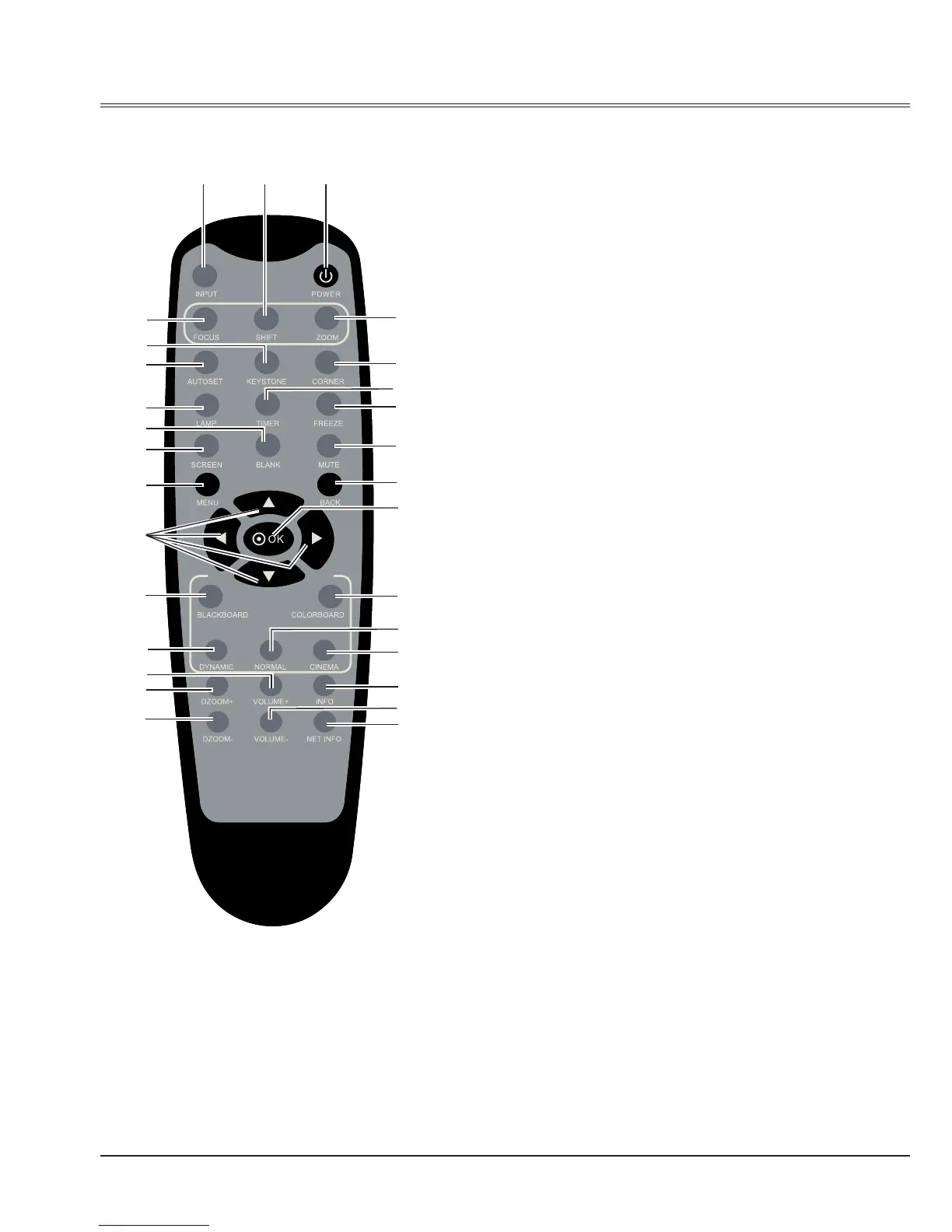
Remote Control
①
POWER
Turn on or turn off the projector.
②
SHIFT
To enter the lens shift mode.
③
INPUT
Select input source.
④
FOCUS
Adjust the focus.
⑤
ZOOM
Adjust the image size.
⑥
KEYSTONE
Correct the keystone distortion.
⑦
CORNER
Adjust four corners of the image.
⑧
AUTOSET
Enter auto setup mode.
⑨
TIMER button
Enable the timer function.
⑩
LAMP button
Select the lamp mode.
⑪
FREEZE button
Freeze the project image.
⑫
BLANK button
Temporarily close the image on the screen.
⑬
MUTE
Turn off the volume.
⑭
SCREEN button
Select the screen size.
⑮
BACK button
Return to previous menu.
⑱
⑲
㉑
㉗
㉓
㉕
㉙
①③ ②
④
⑧
⑩
⑭
⑯
⑥
⑫
⑦
⑬
⑮
⑪
⑤
⑰
⑳
㉒
㉖
⑨
㉘
㉔



 To Next Page