page 6 – 2
D-16 / Feb 2003
CONTROL SECTION
Control Section
Overview
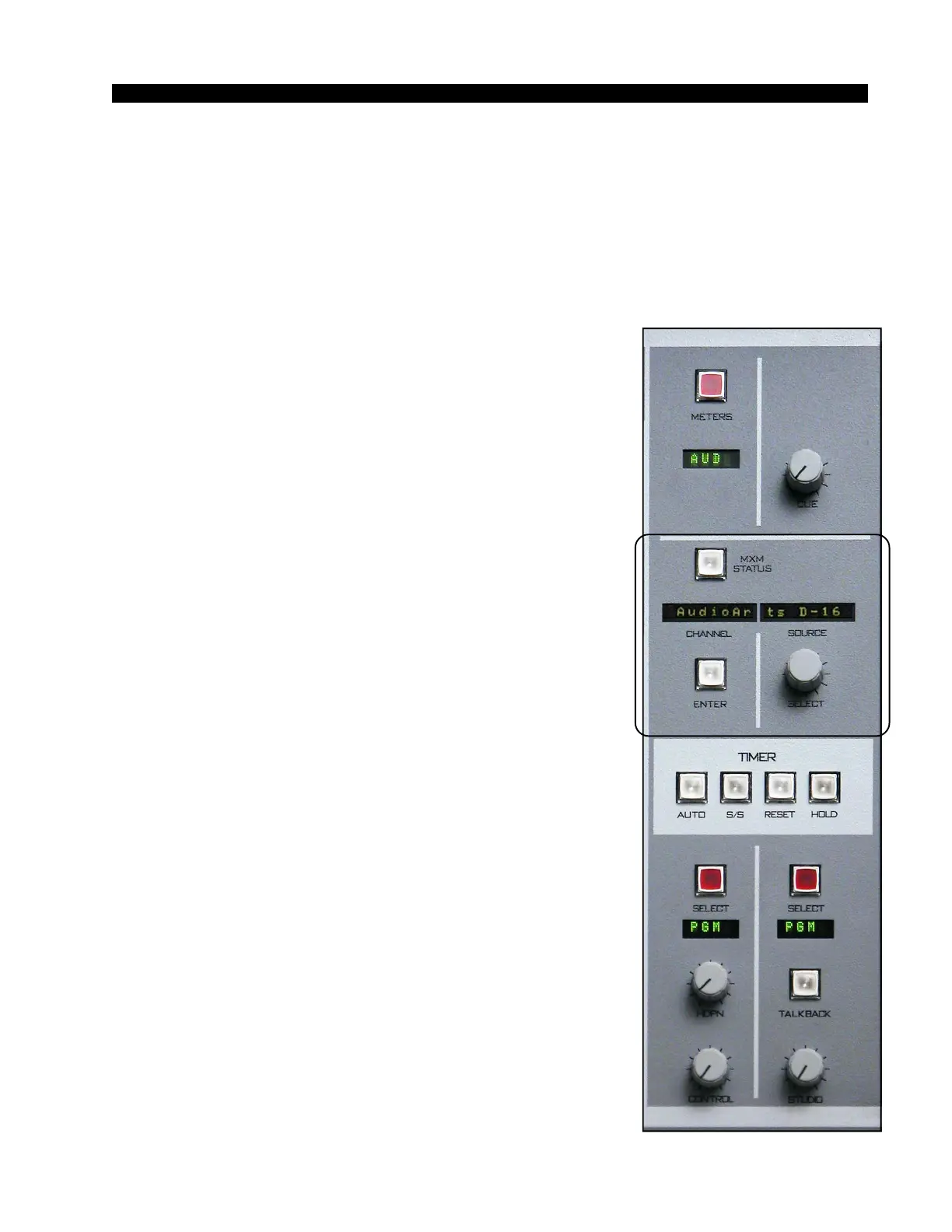
The CONTROL SECTION consists of a CHANNEL
DISPLAY, a SOURCE DISPLAY, a SELECT KNOB, an
ENTER BUTTON, and an MXM STATUS BUTTON.
CHANNEL DISPLAY - shows which fader is being
accessed. During a mix-minus status check the display shows
“MIXMINUS”.
SOURCE DISPLAY - shows the name of the source
currently selected for or being selected for the fader. During a
mix-minus status check the display shows firmware revision
information.
When not used for other purposes, the combined CHAN-
NEL and SOURCE DISPLAYS show “AudioArts D-16”.
SELECT KNOB - used to sequence a source-to-fader
assignment through its possible choices.
ENTER BUTTON - used to accept a selection during the
process of source-to-fader assignment. Pressing the ENTER
BUTTON is not a meaningful action unless the button is
flashing.
MXM STATUS BUTTON - is used to show the current
mix-minus status of the inputs assigned to each fader.



 To Next Page