- 53 -
9 6
5 1
7.2.4 Serial Interface
FB-600E printer serial interface can be compatible with RS-232C, and supports RTS/CTS and
X-ON/X-OFF handshaking. Its interface connectors are DB-9 type connector and DB-25 type
connector.
7.2.4.1 Serial Interface (DB-9)
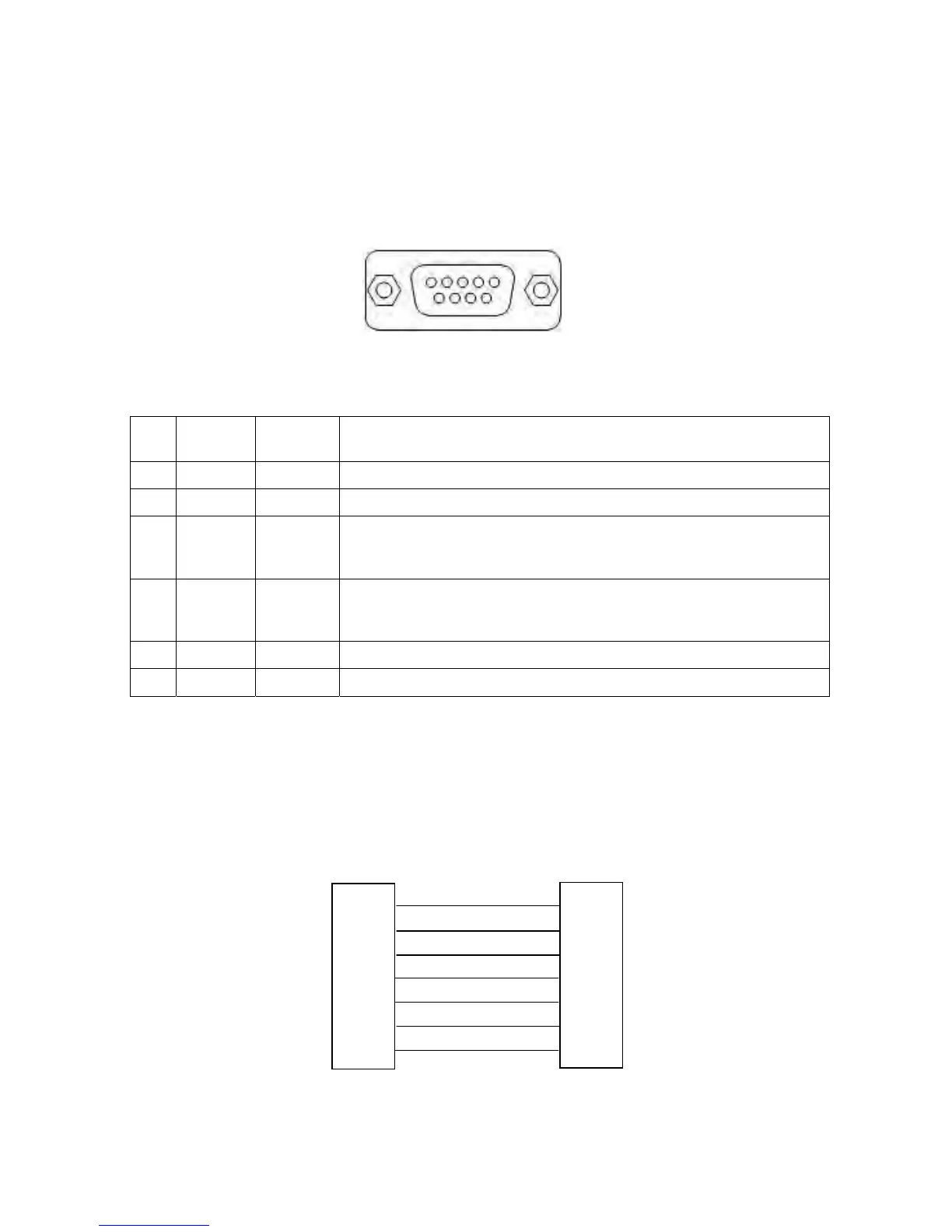
DB-9 serial interface connector’s pin number is shown as Figur
e 7-5:
Connector Pin Assignments:
PIN SIGNAL
NAME
SIGNAL
HEAD
EXPLANATION
2 RXD HOST The printer receives data from HOST.
3 TXD PRINTER The printer send X-ON/X-OFF and data to the HOST.
7 RTS PRINTER When the signal is MARK, it denotes the printer is BUSY and can not
receive data. When the signal is SPACE, it denotes the printer is
READY and can receive data.
8 CTS HOST When the signal is MARK, it denotes the printer is BUSY and can not
receive data. When the signal is SPACE, it denotes the printer is
READY and can receive data.
5 GND — Ground
4 DTR PRINTER Data Terminal Ready
Note: Signal logic lever is EIA lever.
Connect with the serial interface, the baud rate and data frame has been set to 9600 bps, 8 data bits,
no check and 1 bit stop bit.
Refer to Figure 7-6 when connect to the computer.
Serial interface connect relations are as follow:
Figure 7-5 DB-9 Serial interface connector pin number
Table 7-5 Connector Pin Assignments
Figure 7-6 The connection of printer and HOST
DSR
DTR
RTS
CTS
GND
TXD
RXD
6
4
DTR
DSR
CTS
RTS
GND
RXD
TXD
7
8
5
3
2
4
6
8
7
5
2
3
HOST 9 PIN connecto


 To Next Page