116
COMPACT VOICE ALARM SYSTEM
SERVICE MANUAL
12.8 Scenario Conguration
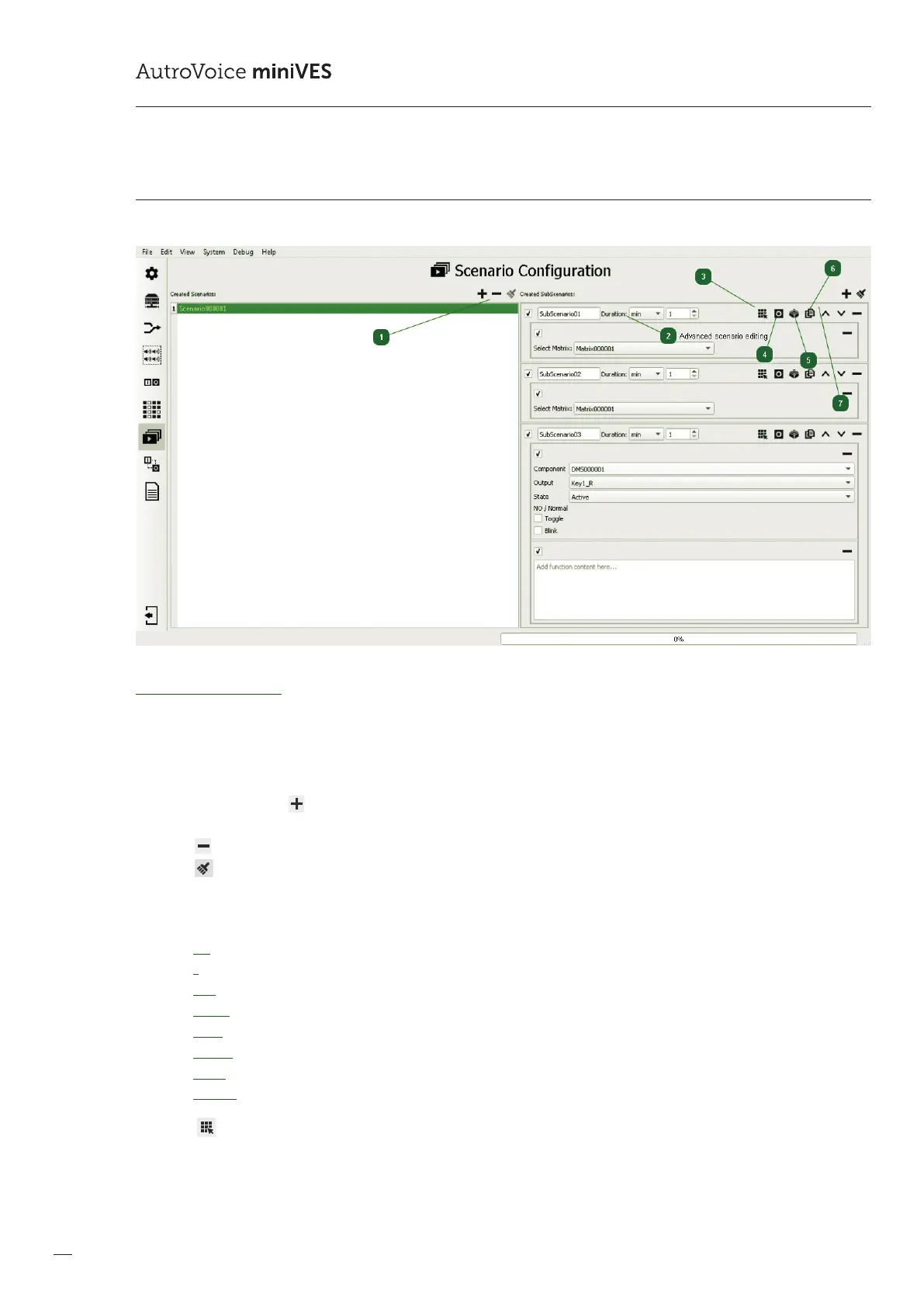
Scenario Conguration – this enables to create an event sequence that is time-limited in any way and executed one by one
(SubScenario after SubScenario). Scenarios can consist of matrixes, logical (relay) outputs and individually created
functions in the LUA language.
1
Scenario editing tab enables to create new scenarios, changing their names and deleting selected ones.
By means of the icon , a new scenario is created, whose generic name can be changed by double-clicking the left mouse
button on the scenario name.
Icon results in deleting the marked scenario completely.
Icon deletes all previously created scenarios.
2
Advanced scenario editing
Each subscenario has a predened duration (Duration). Available options include as follows:
ms – millisecond (1000ms = 1 second)
s – second
min – minutes
hours
days
weeks
years
innite (no end dened)
3
Icon adds a matrix or a number of matrices to a subscenario. It must be remembered that after the Duration time
has expired, counting from activation of a given scenario, the created matrices are deactivated.



 To Next Page
 Loading...