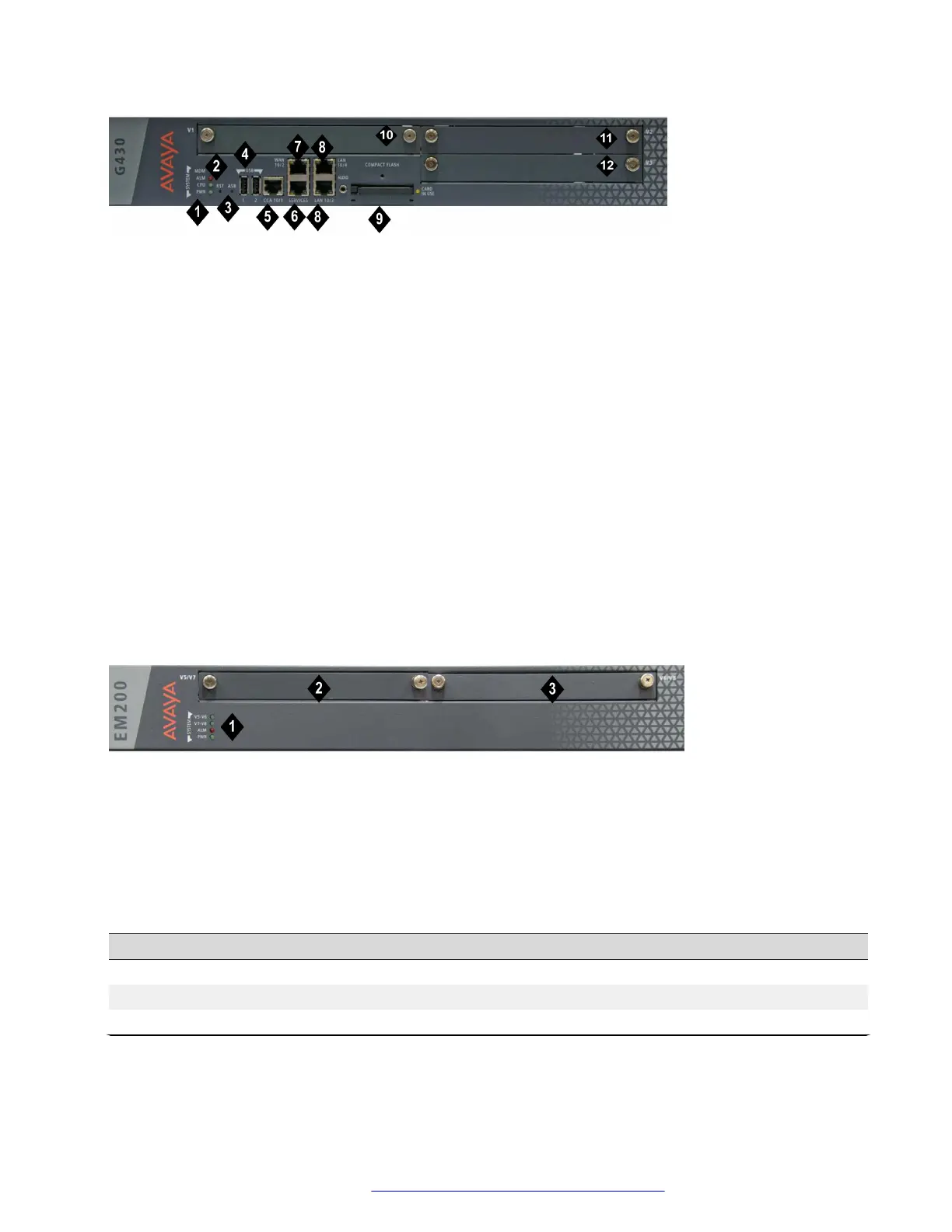
Figure 3: The G430 Branch Gateway front panel ports and slots
Table 1: Figure notes:
1. System LEDs
2. RST button
3. ASB button
4. USB 2.0 ports
5. CCA (Contact Closure) port
6. 10/100M Services port
7. 10/100M ETH WAN port
8. 10/100M ETH LAN ports
9. Compact Flash slot
10. V1 — slot for media module or S8300 Server
11. V2 — slot for media module
12. V3 — slot for media module
Figure 4: The EM200 front panel slots
Table 2: Figure notes:
1. System LEDs
1. V5/V7 — slot for media module
2. V6/V8 — slot for media module
Table 3: Permitted slots for Branch Gateway and EM200 media modules
Media module
Permitted slots Description
MM710 V1-V3, V5-V8 1 T1/E1 ISDN PRI trunk port
MM710B V1-V3, V5-V8 1 T1/E1 ISDN PRI trunk port
MM711 V1-V3, V5-V8 8 universal analog ports
Table continues…
Installing the Branch Gateway and EM200
February 2017 Installation and Upgrades for the Avaya Branch Gateway G430 30
Comments on this document? infodev@avaya.com


 To Next Page