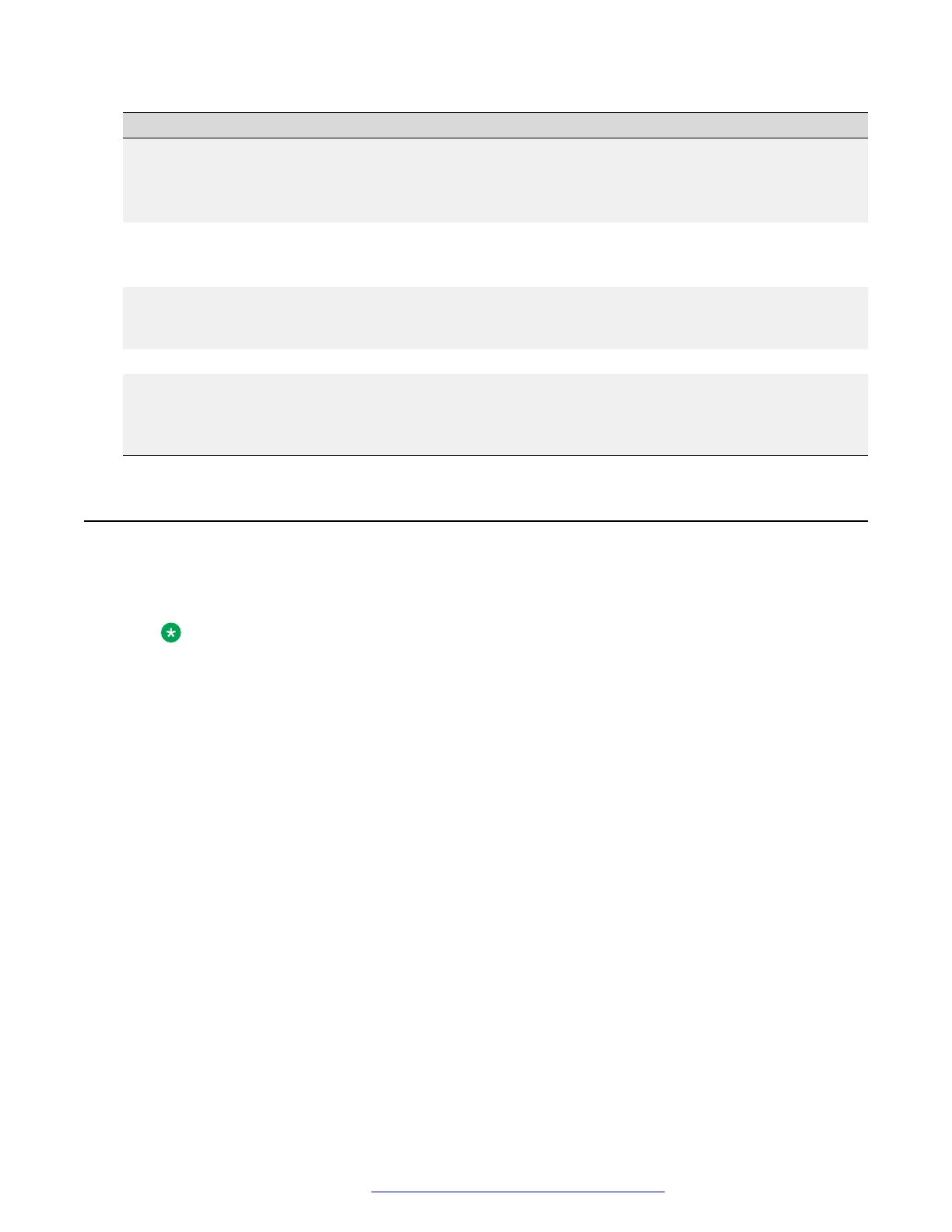
Problem Possible cause Action
“Not enough memory in RAM” The remote file is larger than the
available RAM.
Free more space in the RAM
using the erase phone-
script or erase phone-
image command.
“Not enough memory in NVRAM” The remote file is larger than the
available NVRAM.
Free space in the NVRAM
using the erase phone-
script command.
“File already Exists in other Bank” You tried to download the same file
to more than one bank.
None. You cannot load two
files with the same file name to
more than one bank.
“TFTP - General failure” File name or path incorrect Check the file name and path.
“Can't start upload operation.
Wrong operation parameters or
other operation already in
progress, please try again”
You are trying to upload a file from
an empty bank.
Upload from a different bank.
Download a file to the bank.
Upgrading considerations
• Configuration files, such as upgrade script and setting files, are copied to the phone
configuration banks in NVRAM, while phone images are stored in RAM
Note:
Image files are cleared if you reset the gateway.
• Phone image banks are stored in the same TFTP directory. Therefore, you cannot copy the
same file name to more then one bank. Copying a file to a bank containing a file with the
same file name causes the old file to be overwritten by the new one.
• File names for IP phone image files and script files are limited to 32 characters
Upgrading IP phone configuration and firmware files
July 2018 Deploying and Upgrading Avaya G430 Branch Gateway 98
Comments on this document? infodev@avaya.com



 To Next Page