Terminal server installation
Issue 9.1 June 2006 399
Terminal server installation
This section provides information on connecting adjunct equipment to a G700 or G350 Media
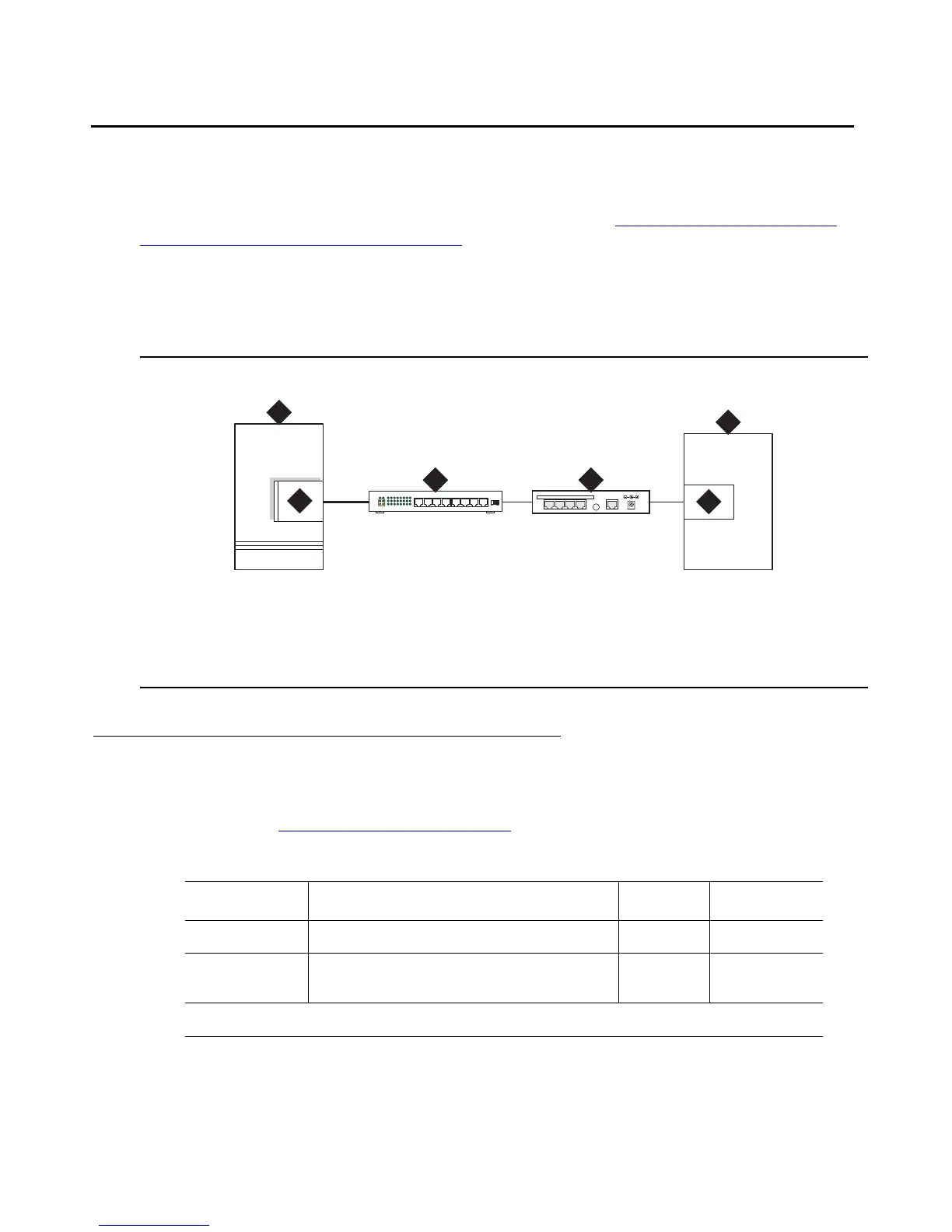
Gateway with an S8300 Media Server using a terminal server (Figure 36: Switch-to-adjunct
LAN connectivity through a terminal server). Avaya supports the IOLAN+ 104 terminal server.
Any device that does not support a direct TCP/IP connection, but that does support an RS232
interface, can connect through a terminal server. System printers and some CDR devices use
RS232 connections and can connect through a terminal server.
You can connect up to four adjuncts through one terminal server.
Figure 36: Switch-to-adjunct LAN connectivity through a terminal server
Installing and administering the terminal server
Make sure you have all the equipment on site before the installation. You must have the
hardware listed in Table 27: Required equipment
.
Figure notes:
1. switch
2. IP connection on an S8300/G700 or G350 configuration
3. 10/100Base-T Hub (optional)
4. terminal server
5. serial port
6. CDR adjunct
LAN
1
2
5
6
3
DATA CONNECTIONS ONLY - NOT FORTELECOM USE
1234 10BASE-T 5VDC
4
Table 27: Required equipment
Comcode Description Qty Supplier
700015084 IOLAN+ 104 communications server 1 Avaya
NA RJ45-to-DB25 connector for IOLAN+
(supplied with 700015084)
4Avaya
1 of 2



 To Next Page