DADman Software 24
Output Level Meter
Displays the monitor signal level.
Level Display
Displays the gain adjustment to the monitor signal in dB.
Output Label
Click to change the label (name) for the channel.
Connections Section
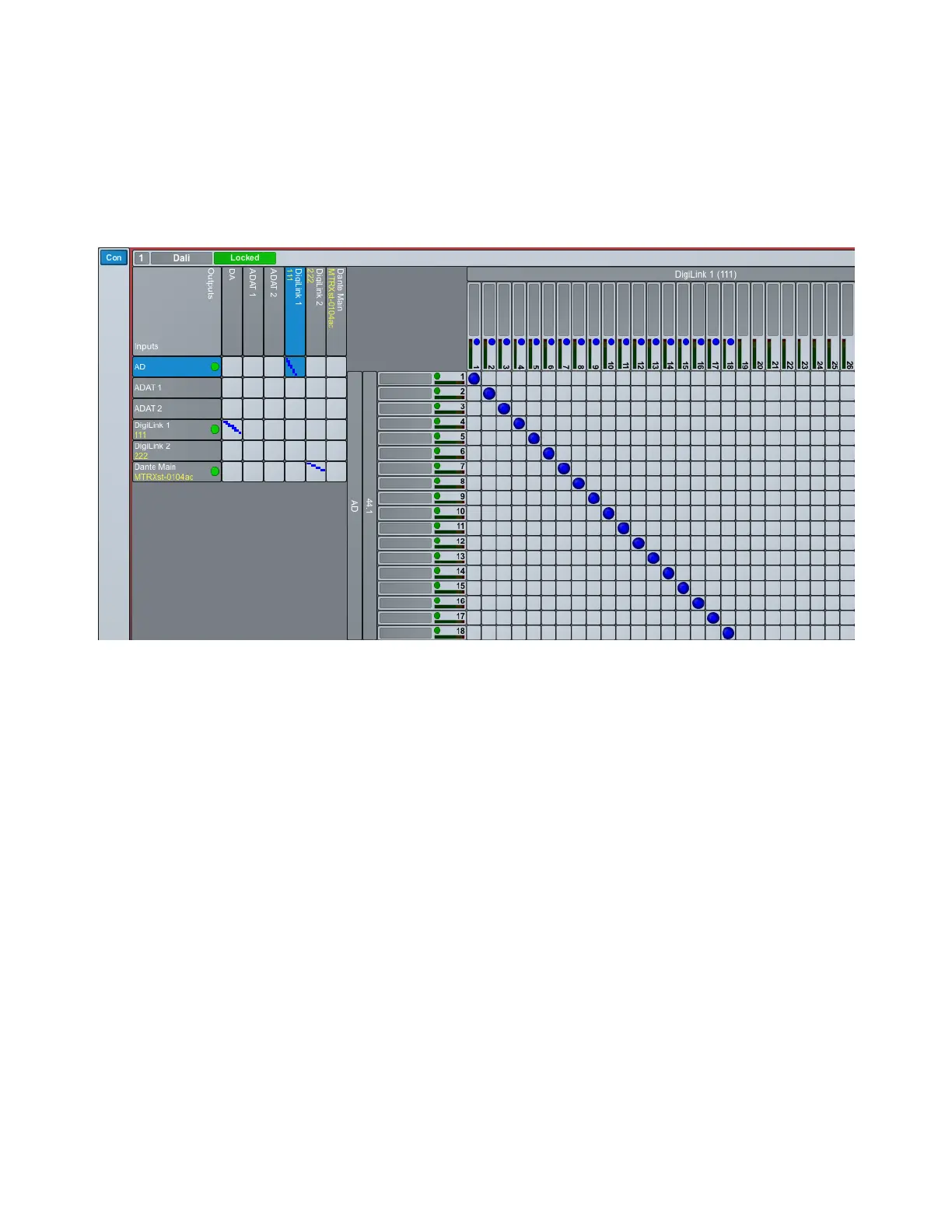
The Connections section shows the DADman matrix for each unit in on the network. The left side of the panel for each unit and
horizontal lines are inputs for the unit. The top side and vertical lines are the outputs.
To connect inputs and outputs, do any of the following:
Click in the junction of the mono input and output channels that you what to connect. It highlights blue.
Shift-click to connect two consecutive channels.
Command-click (Mac) or Control-click (Windows) to select noncontiguous channels.
To disconnect an input and output:
Click any crosspoint connection (blue) to disconnect it.
The Connections section includes of an overview matrix to the left and a detailed matrix, to the right, which appears when you se-
lect a cross point between two interfaces in the overview matrix.
There is more helpful information in the matrix view. In the top row of the output signal names, a blue square is visible if the output
is already connected. The square is light blue if the output is connected to an input not shown in the detailed matrix. The square is
dark blue if the output is connected to an input shown in the detailed matrix. It is always possible to override this connection by just
connecting to another input.
Connections section: AD inputs mapped to DigiLink 1 outputs



 To Next Page