Chapter 3: Pro Tools | Sync X Back Panel 7
Chapter 3: Pro Tools | Sync X Back Panel
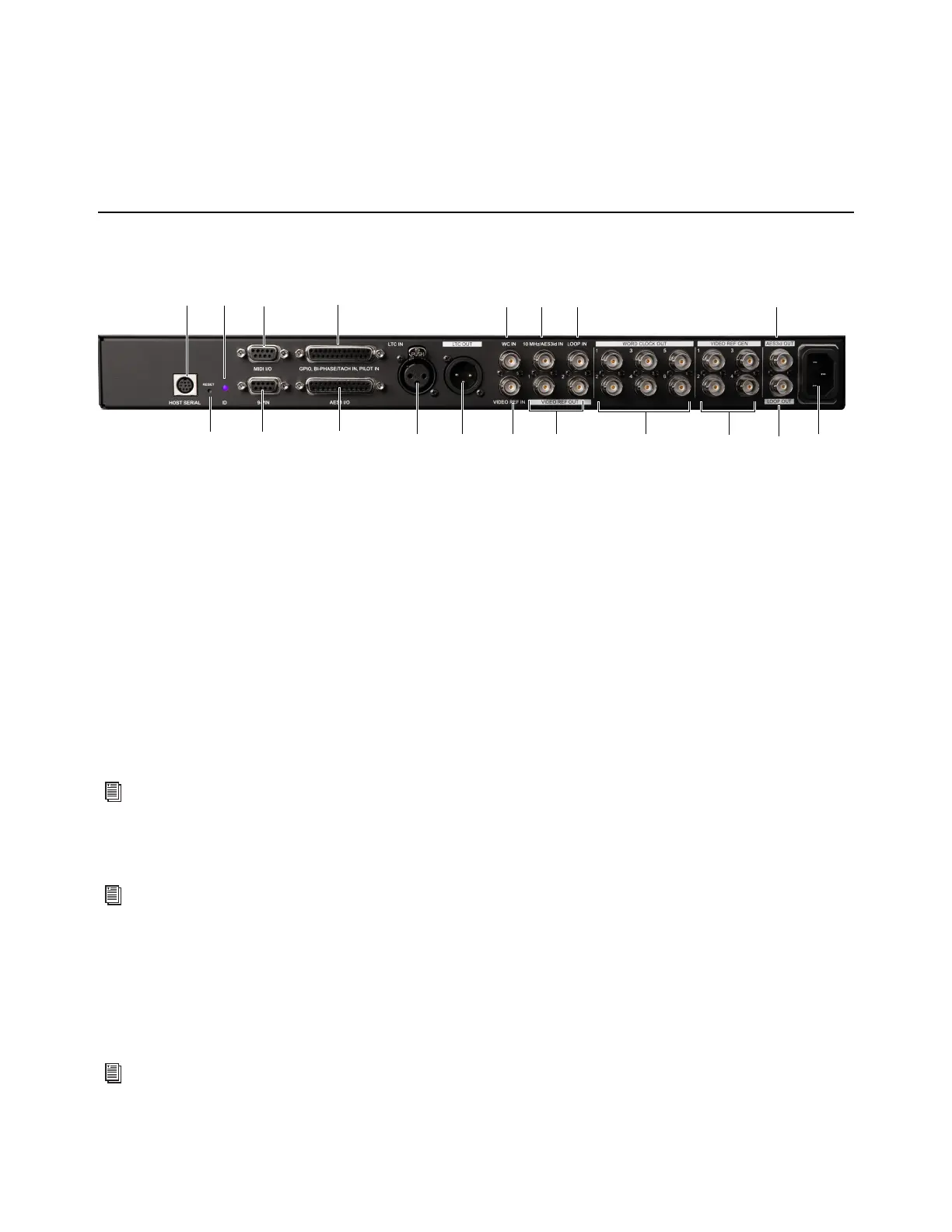
Pro Tools | Sync X Back Panel Connectors
1 HOST SERIAL: The Host Serial port is a bidirectional (in/out) port to connect Sync X to the Serial Port on HD Native or on the
primary HDX card in your system.
2 RESET button (see Factory Reset).
3 ID LED: Flashes when the ID button is engaged on the front panel. This lets you easily identify the unit when it is installed in a
rack.
4 MIDI I/O: The MIDI I/O port is a 9-pin connection for the included MIDI I/O breakout cable. Sync X outputs MTC (MIDI Time
Code), only. No other MIDI data appears at this output. MTC output is regenerated while Sync X is locked to any supported po-
sitional reference and clock reference, or internally generated in Generate mode, in which case MTC output follows generator
run/stop. This port is intended to supply MTC from Sync X to external sequencers or other MIDI devices. Sync X does not re-
spond to incoming MTC at this time.
5 9-PIN: For Machine Control-enabled systems, this port connects directly to external 9-pin transports. Use a Colin Broad 422
USB serial adapter to connect to a USB port computer.
6 GPIO, BI-PHASE/TACH IN, PILOT IN: This DB-25 port is an accessory port for Bi-Phase, Tach, and Pilot signals (specific ca-
bles are required for different applications). This connector is also used for GPI input, output (including Fader Start), and thru
signals.
7 AES3 I/O: This DB-25 port provides AES3 clock reference input and outputs. The AES3 audio signal is silent (all bits OFF) and
its sample rate exactly matches the Sync X sample clock.
8 LTC IN: This XLR port receives a LTC (Linear Time Code) source, balanced or unbalanced analog, for positional and/or clock
reference. This port is often used to receive LTC from an audio track on an external deck or the address track of a VTR.
9 LTC OUT: This XLR port outputs LTC (Linear Time Code), in balanced or unbalanced analog audio format. LTC output level
is adjustable using the Synchronization page of the Peripherals dialog in Pro Tools.
Pro Tools | Sync X back panel
For more information, see the Machine Control chapter of the Pro Tools Reference Guide.
For wiring information and other specifications for this port, see Wiring Diagrams and Pin Assignments.
For wiring details, see Wiring Diagrams and Pin Assignments.
7
5
4
1
6
8 13
10
2
9
3
11 12 18
1714 15 16 19












 To Next Page