Chapter 4: Installing Pro Tools | Sync X
12
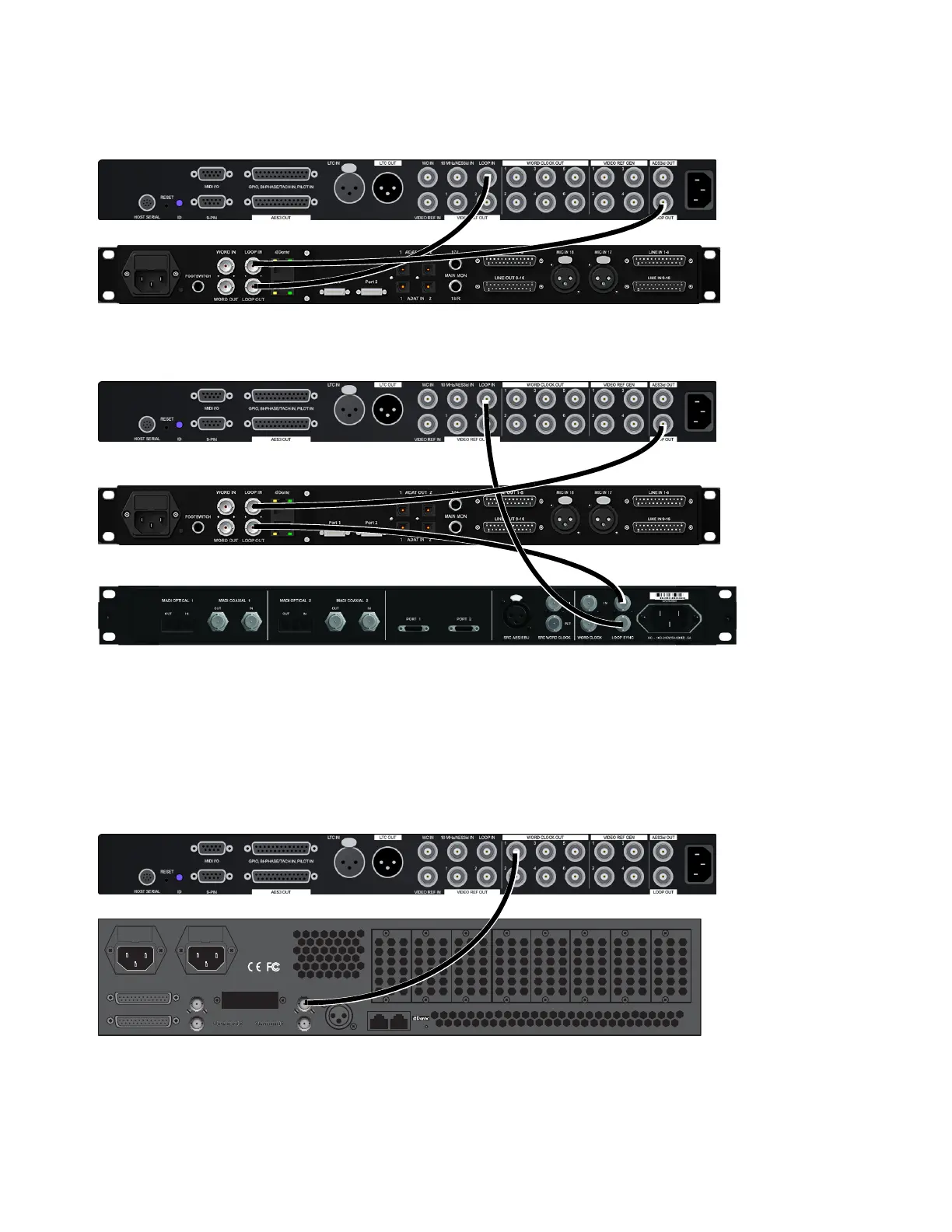
To connect Loop Sync between Pro Tools | Sync X and Pro Tools audio interfaces:
1 Using a shielded BNC cable, connect the LOOP OUT port of Sync X to the Loop Sync In of your Pro Tools audio interface.
2 Connect the LOOP IN port of Sync X to the Loop Sync Out of your Pro Tools audio interface.
3 When using more than one Pro Tools audio interface, make Sync X the first and last unit in the Loop Sync chain.
Connecting Word Clock for Pro Tools | MTRX
Since Pro Tools | MTRX does not support Loop Sync, use Word Clock for clock reference between Sync X and MTRX.
To connect Word Clock between Pro Tools | Sync X and Pro Tools | MTRX:.
1 Using a shielded BNC cable, connect any WORD CLOCK OUT port of Sync X (there are 6 separate Word Clock Out connections)
to the Word Clock In of your Pro Tools | MTRX.
2 In DADman software, set Word Clock as the Sync source for Pro Tools | MTRX.
Making Loop Sync connections, Sync X and MTRX Studio shown
Making Loop Sync connections, Sync X, MTRX Studio, and HD MADI are shown
Making Word Clock connections, Sync X and Pro Tools | MTRX
AES/EBU I/O 5-8
AES/EBU I/O 1-4 MADI
in
out
in
out
100-240VAC, 50/60 Hz
Max 90 VA
Fuse T1AH/250VAC
WC/VBB
PHD I/O
Primary 1 Pr 2/Exp
AES11 in
Net 1 Net 2
Optical I/O
8
75 1
1
2684












 To Next Page