EasyManua.ls Logo

Avision @V6600 - LCD Does Not Display; Scanning Is Not Performed

Avision @V6600
86 pages
Print Icon
To Next Page IconTo Next Page
To Previous Page IconTo Previous Page
Loading...
Service Manual
5-7
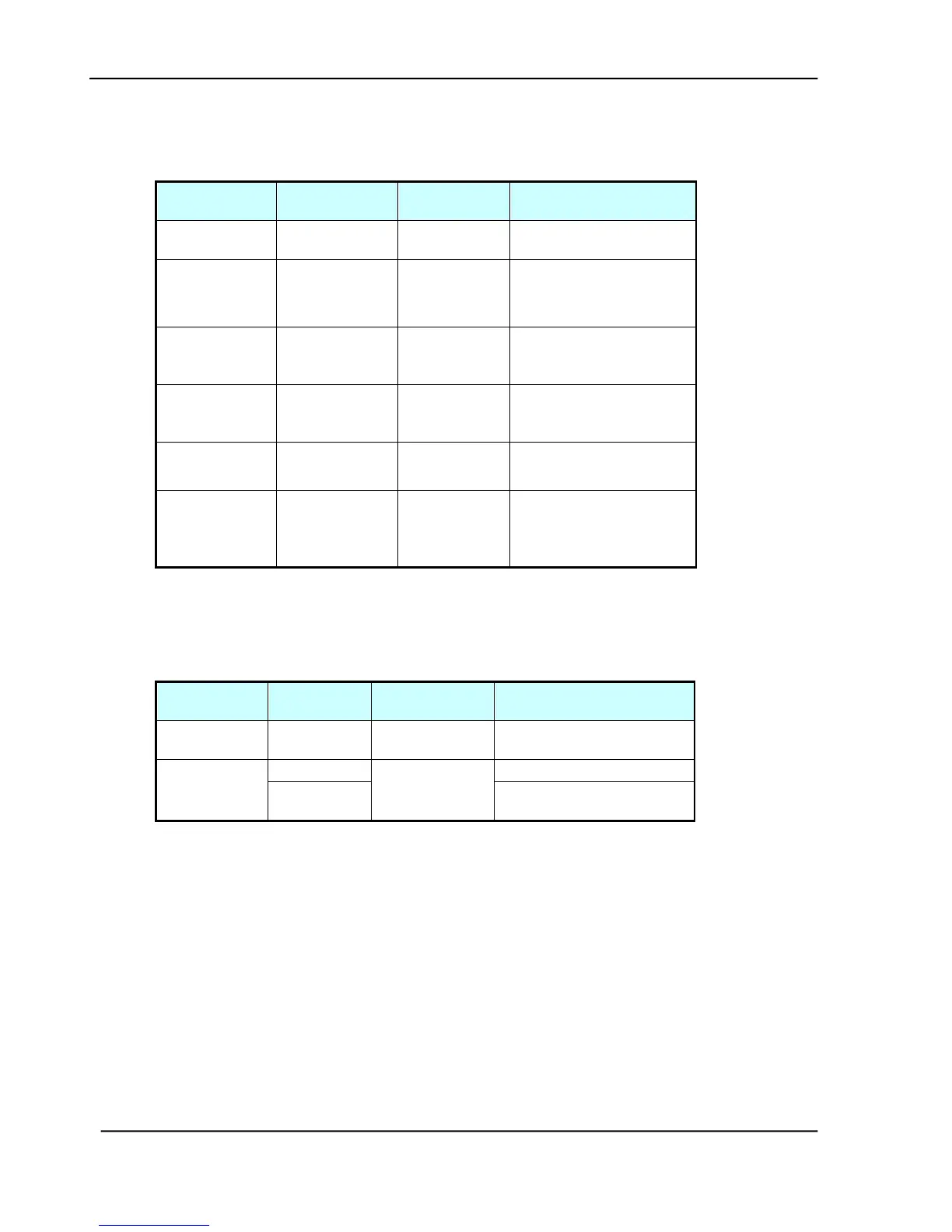
5.2.1 LCD does not display
Cause
Relevant
Unit
Check
Method
Maintenance
Method
Unplugged
from outlet
None
Visual check
Insert the AC plug into
the outlet
DC power
unplugged
from unit
None
Visual check
Insert the DC power
adapter cable into the
unit
AC voltage
failure
None
AC outlet
voltage
check
None
Power adapter
output voltage
failure
Power unit
Output
voltage
(+24v) check
Replace the power
unit
PCB failure
Main control
PCB
Tester check
(+24V, GND)
Remove the cause or
replace the PCB
LCD module
main board
connection
failure
LCD module
main board
Visual check
Plug the connector and
secure it firmly
Table 5.1
5.2.2 SCANNING IS NOT PERFORMED
Cause
Relevant
Unit
Check
Method
Maintenance Method
Scanner USB
cable failure
Scanner
USB cable
Visual check
Attach the scanner USB
cable
Scanner link
failure
Main PCB
Visual check
Replace the PCB
Optical
Chassis
Replace the Optical
Chassis
Table 5.2

Table of Contents

Related product manuals